Bureau of Innovation
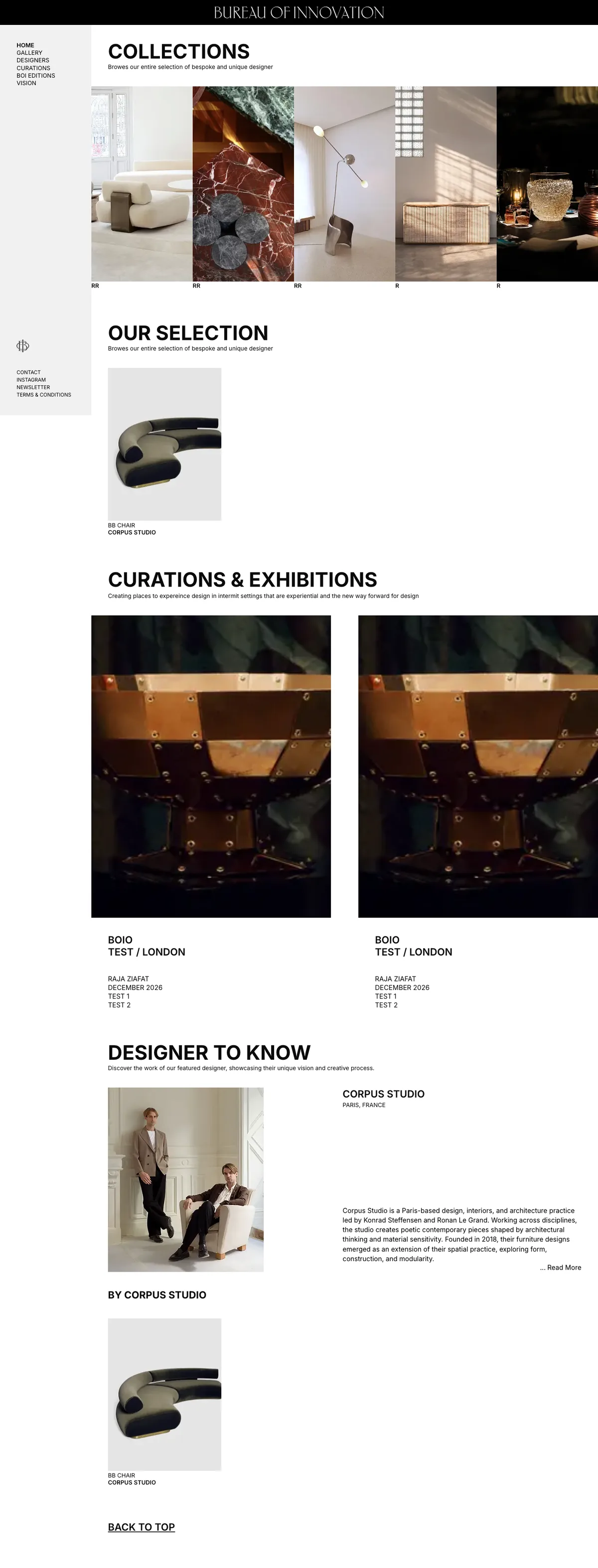
A digital gallery for bespoke designer furniture, lighting, and art objects. Editorial collections, designer features, rotating curations and exhibitions, and BOI's own limited editions, built to feel like a gallery rather than a store.
Collections by category
Gallery-grade experience
High-fidelity image delivery
The project and the problem.
A digital gallery for bespoke designer furniture, lighting, and art objects. Editorial collections, designer features, rotating curations and exhibitions, and BOI's own limited editions, built to feel like a gallery rather than a store.
Bureau of Innovation represents bespoke designers. Furniture, lighting, storage, art objects. And the work is the entire point. They needed a digital home that felt like walking into a gallery, not scrolling a catalog. Most e-commerce templates flatten beautiful, large-format photography into a product grid and bury the curatorial voice. BOI needed editorial layouts, designer spotlights, rotating curations and exhibitions, and a way to publish their own limited editions. All while serving heavy, high-resolution imagery without making visitors wait.
- Present curated furniture with gallery-grade presentation
- Make discovery feel considered rather than transactional
- Keep image-heavy pages fast on every device
The approach and process.
We designed the experience in Figma first, in strict black and white, then built it on Next.js with an AWS S3-backed image pipeline so the photography could stay large and sharp without dragging the page down. Everything is content-managed, so the team can publish a new designer, collection, or exhibition without an engineer in the room.
- 01
Reading the Room
2 weeksBefore any design, we worked out what kind of place this had to feel like. A gallery, not a shop. That one decision drove everything: the threshold splash, the restraint, the refusal to slap a "Buy Now" button under a piece that costs more than a car. We mapped the content the gallery actually had. Designers, collections, curations, editions. Into a model the site could grow into.
Content model. Designer, collection, curation, edition · Information architecture for the left-rail navigation · Reference board of galleries, not e-commerce sites · A roadmap framed around the program, not features
- 02
Black, White, and a Lot of Space
3 weeksThe design phase was mostly subtraction. A serif wordmark, a quiet left rail, and photography given room to dominate. We tested the layouts against the worst case and the best case. A tiny art object and a wall-filling sofa. To make sure the grid held either way.
Figma design system, strict black and white · Collection, designer, and exhibition templates · Type and spacing scale tuned for editorial reading · Motion notes. Slow, deliberate, never bouncy
- 03
Next.js + the Image Problem
3 weeksThe hard engineering problem in a gallery site is always the images. They're enormous and they're the point. We built on Next.js and wired an AWS S3 pipeline so large-format photography stays sharp but never blocks the page, with responsive variants and lazy loading doing the quiet work.
Next.js app with server-rendered collection and designer pages · AWS S3 storage with optimized, responsive image delivery · Lazy loading with placeholders for image-heavy grids · Base UI built from the design system
- 04
Collections, Designers, Curations
3 weeksWe built the surfaces that make it a gallery: collections by category, designer features, and the curations-and-exhibitions program. Each is content-managed, so staging a new show or adding a designer is the team's job, not a deploy.
Collections by category (Seating, Tables, Lighting, Storage, Art Objects) · Designer feature pages with bios and works · Curations & Exhibitions surface with dated shows · BOI Editions destination
- 05
The Threshold and the Polish
2 weeksWe added the splash entry last, once the rest earned it. A quiet threshold that sets the tone before the first scroll. Then a performance and accessibility pass, because a gallery that loads slowly stops feeling expensive.
Threshold splash entry · Performance pass on image-heavy pages · Accessibility review (contrast, keyboard, alt text) · Newsletter + Instagram integration
The reasoning and the value.
Most furniture sites are catalogs that happen to be online. We built Bureau of Innovation as a gallery that happens to be a website, where the photography is the architecture and the navigation gets out of its way.
Bureau of Innovation is deployed and live, presenting curated collections, featured designers like Corpus Studio, and a rotating curations-and-exhibitions surface inside a single editorial platform. With the team adding designers, pieces, and shows themselves as the gallery grows.
Editorial design system
A restrained black-and-white visual language designed in Figma. Generous whitespace, a fixed left-rail wordmark and navigation, and layouts that frame the work like a gallery wall.
Collections by category
Seating, Tables, Lighting, Storage, and Art Objects. Each a browsable collection with large-format imagery and room to breathe.
Designer features
"Designer to Know" spotlights, like Paris-based Corpus Studio, pairing studio bios with their pieces so the people behind the work stay visible.
Curations & Exhibitions
A surface for time-based, gallery-style shows so curations and exhibitions can be staged, dated, and rotated without a redesign.
BOI Editions
A dedicated home for the gallery's own published, limited editions. First-class content, not a footnote in a generic store.
AWS S3 image pipeline
Large, high-resolution photography served from S3 with optimized delivery, so the work stays sharp and the pages stay fast.
What changed.
A side-by-side of what the client had before we engaged, and what we shipped.
- Galleries like this usually live on Instagram, where a museum-grade piece scrolls past between a reel and an ad
- Lookbooks went out as PDFs that nobody opened twice and search engines never saw
- When there was a site, it was a generic store template that treated a sculptural chair like a SKU
- High-resolution photography got crushed by platform compression. The grain of the marble gone before anyone saw it
- Designers were credited in a caption, if at all, never given a page of their own
- Exhibitions and curations had no home online. They happened, then disappeared
- Limited editions sat in the same grid as everything else, indistinguishable from stock
- A gallery-grade site where the work is framed, not listed. Whitespace doing the job a frame does on a wall
- Server-rendered pages so a collector searching for a designer or a piece can actually find BOI on Google
- Editorial layouts built for the photography first; the catalog logic lives underneath, out of sight
- Large-format imagery preserved at high fidelity and served fast from S3
- Every featured designer gets a real spotlight. Bio, practice, and their pieces in one place
- A Curations & Exhibitions surface where shows can be staged, dated, and rotated like a real program
- BOI Editions as its own destination, so the gallery's published work reads as the statement it is
Technology stack.
The tools behind the build, and the reasoning behind each choice.
Server-rendered collection and designer pages so the gallery's work is discoverable on Google, not locked behind client-side rendering.
Designer, collection, curation, and edition content are all typed against their templates. A malformed entry doesn't compile, let alone publish.
The design lives or dies on consistent spacing. Utility classes made the generous, editorial whitespace easy to enforce on every page.
The photography is the product. S3 holds the large originals and serves optimized, responsive variants so pages stay sharp and fast.
Each image ships in the smallest variant that still looks gallery-grade, lazy-loaded so a long collection page doesn't stall.
Designers, collections, curations, and editions are all editable by the team. Staging a new exhibition is content work, not an engineering ticket.
Each content type. Designer, collection, edition, exhibition. Is first-class, so nothing important has to masquerade as a generic "product".
Designed in strict black and white before a line of UI. The restraint was the hard part, and it was settled in the file, not in code.