Expo SDK 58 Upgrade: What Breaks, What It Costs, and How to Plan It
Expo SDK 58 shipped on October 15 with React Native 0.88 and the iOS 27 scene lifecycle. Here is what actually breaks, how to size the work, and the order we would do it in.
 Shumail RafiqueSenior Full Stack Developer
An Expo SDK 58 upgrade is the next job on the list for most React Native teams. Expo released SDK 58 on October 15, 2026, with React Native 0.88, support for the iOS 27 SDK, and a new scene-based app lifecycle on iOS. This guide explains what changed, what tends to break, how to size the work before anyone starts, and the order we would do it in.
It is written for founders, CTOs, and product leads who own an Expo app and need a clear answer to two questions: how big is this, and when should we do it?
What changed in Expo SDK 58
The Expo SDK 58 changelog is long. For planning, these are the changes that matter:
- React Native 0.86 to 0.88. You get two React Native releases at once, including the 0.87 changes.
- The iOS 27 SDK and the UIKit scene lifecycle.
npx expo prebuildnow generatesSceneDelegate.swiftand a scene manifest inInfo.plist, and the scene delegate creates the app window instead of the app delegate. - Strict TypeScript by default. Deep imports from
react-native/Libraries/*are now type errors. - Expo Router changes. Data loaders, server rendering, middleware, and native tabs are stable, the navigation core was reworked, and server output is the default when
web.outputis unset. - R8 on by default in Android release builds.
- A new Expo Go that supports only SDK 58.
There is good news in the release too. Expo reports that prebuilt native libraries cut a clean four-ABI Android debug build from about 80 seconds to about 39 seconds in its test, and Expo UI lists now virtualize and recycle rows.
Why you should not leave it for long
Expo's own upgrade guide describes the scene-based lifecycle as required by the iOS 27 SDK, which adds support for new form factors such as the iPhone Duo. Apple raises the minimum SDK for App Store uploads on a regular cycle, so an app that cannot build against the iOS 27 SDK will eventually stop being able to ship updates. We walked through the same pattern on the React Native side in our React Native New Architecture migration guide.
Two smaller pressures add up:
- 1.Expo Go. The new Expo Go only runs SDK 58 projects. If designers, testers, or clients review builds through Expo Go on their phones, they will hit a wall once it updates.
- 2.Tooling. SDK 58 needs Node.js 22.13 or newer on the 22 line, 24.3 or newer on the 24 line, or Node 26. Odd-numbered releases such as 23 and 25 are not supported. CI images pinned to an older Node will fail first.
On Android, the yearly target API level rule creates a similar deadline, which we covered in our Google Play target API level guide.
Size the job before you start
Nobody can give an honest estimate for this upgrade without looking at the project. Three things decide the size:
- How far behind you are. Expo's upgrade documentation recommends moving one SDK version at a time. An app on SDK 57 is a short job. An app on SDK 54 is three upgrades in a row.
- Whether you use Continuous Native Generation. If your
iosandandroidfolders are generated by prebuild and not committed, most native changes arrive for free. If you commit and edit them by hand, you apply the native diff yourself. - Custom native code. Overridden AppDelegate methods, config plugins that patch native files, and in-house native modules are where the time goes.
A quick audit takes under an hour:
# Which SDK and Node version are we on?
npx expo config --type public | grep sdkVersion
node --version

# Do we commit native folders, or generate them?
git ls-files ios android | head

# Anything that touches the app delegate?
grep -rn "AppDelegate" ios plugins app.config.* 2>/dev/null
If the last two commands return nothing, you are probably looking at a short upgrade. If they return a lot, budget for native work and testing on top.
The upgrade, step by step
This is the order we follow, and it matches what Expo publishes. Do it on a branch, with your current version tagged so you can roll back.
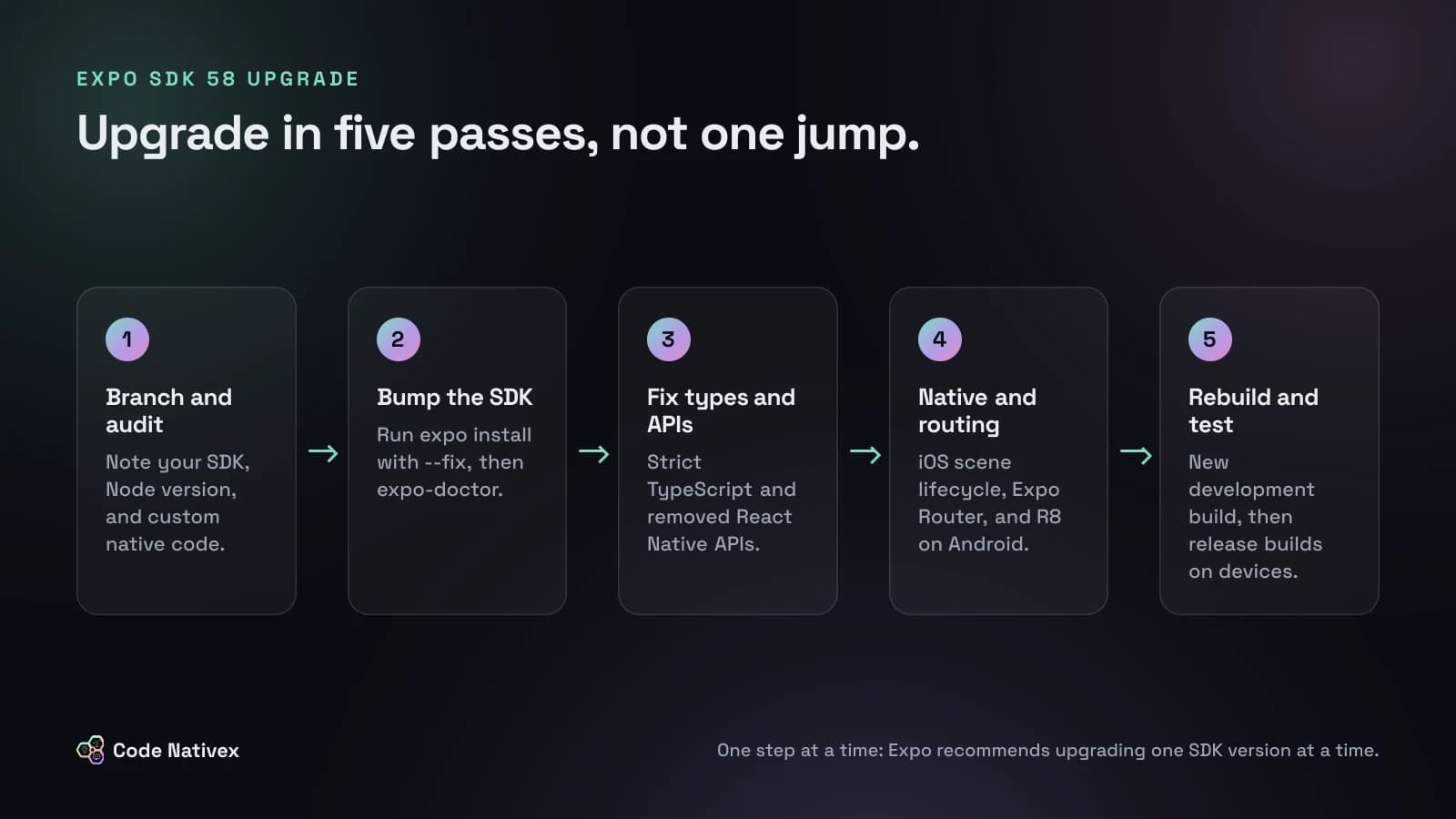
- 1.Bump the SDK. Run
npx expo install expo@^58.0.0 --fix, which upgradesexpoand aligns your other Expo packages, thennpx expo-doctor@latestto catch common problems. - 2.Type check. Run your TypeScript build before anything else. Strict TypeScript surfaces deep imports and refs that need instance types such as
ViewInstance. These errors are cheap to fix and point straight at code that would break later. - 3.Replace removed APIs. React Native removed
InteractionManager(userequestIdleCallback), theanimatedprop onModal, and thebackgroundColor,translucent, andnetworkActivityIndicatorVisibleprops onStatusBar.ImageBackgroundis deprecated in favor of aViewwith an absolutely positionedImage. - 4.Handle native and routing changes. These are the next two sections.
- 5.Rebuild. Create a new development build, update any pinned iOS image in
eas.jsontosdk-58orlatest, and then test release builds on real devices.
The changes most likely to bite
iOS: the scene lifecycle
If you never touched native iOS code, prebuild handles this. If you enabled ios.enableSceneSupport in expo-build-properties on SDK 57, remove it, because SDK 58 includes scene support. If you override app delegate methods, maintain ios by hand, or run a bare React Native app, follow Expo's scene life cycle migration guide. Watch anything that ran at launch in didFinishLaunchingWithOptions and assumed a window existed.
Expo also notes that iOS 27 makes iPhone apps resizable, so requireFullScreen no longer opts out and ScreenOrientation.lockAsync may have no effect. If your layout assumed a locked portrait screen, test it at other sizes.
Expo Router
Change imports from expo-router/unstable-native-tabs to expo-router/native-tabs. If web.output is unset, the default is now "server"; set it to "static" to keep SDK 57 behavior. Some expo-router/react-navigation exports were moved or removed, so custom navigators need the Router migration guide.
Android: R8 in release builds
R8 now shrinks and obfuscates release builds by default. Most apps get smaller and keep working, but code that relies on reflection can fail only in release builds, which is exactly where nobody looks during development. Test a release build before you ship, add ProGuard keep rules where needed, or opt out with android.enableMinifyInReleaseBuilds set to false while you investigate.
Smaller ones worth a search
- Expo CLI now sets
NODE_ENVitself, soNODE_ENV=test npx expo startloads.env.development. File.write()inexpo-file-systemis now async. UseFile.writeSync()for the old behavior.expo-notificationsshows foreground notifications by default unless your handler says otherwise.expo-sqliteremoved libSQL support.
Should you upgrade now or wait?
Our default advice: start the upgrade on a branch now, and ship it once your release builds pass on real devices. Waiting a few weeks for library maintainers to publish SDK 58 versions is reasonable if expo-doctor flags packages without support. Waiting for months is not, because each skipped SDK adds another round of breaking changes to the next upgrade.
Upgrade sooner if your team tests on Expo Go, if you have an iOS release planned, or if you are already one SDK behind. Wait a little if you depend on a third-party native library that has not shipped SDK 58 support, or if you are mid-launch and cannot afford a regression this week.
How we approach upgrades like this
When we build cross-platform mobile apps, the backend, the web product, and the app share one stack, so an SDK upgrade is one planned piece of work rather than a surprise. Our process is weekly increments with a build the client can test themselves, which is exactly what an upgrade like this needs: one reviewed pass at a time, and a build in the client's hands before it reaches the stores. The same discipline applies to Apple's review rules, which we covered in our post on App Store guidelines for AI apps.
Conclusion
For a managed Expo app on SDK 57, this upgrade is two commands, a TypeScript pass, and careful testing of release builds. For an app with custom native code or several SDKs of debt, it is a small project, and an audit up front tells you which one you have. Either way, start on a branch now, so the iOS 27 SDK and the new Expo Go do not set the schedule for you.
If you would like a second pair of eyes on your upgrade, or a team to handle it, tell us about your app and we will send a fixed-scope proposal.
Frequently asked questions
- How do I upgrade to Expo SDK 58?
- Run npx expo install expo@^58.0.0 --fix to upgrade expo and align your other dependencies, then run npx expo-doctor@latest. After that, work through the SDK 58 changelog: strict TypeScript, removed React Native APIs, the iOS scene lifecycle, Expo Router changes, and R8 in Android release builds.
- Which React Native version does Expo SDK 58 use?
- Expo SDK 58 upgrades React Native from 0.86 to 0.88, so it also includes every change from React Native 0.87, such as the Strict TypeScript API becoming the default.
- Do I need to change my AppDelegate for Expo SDK 58?
- Only if you customized it. Prebuild now generates SceneDelegate.swift, and the scene delegate creates the window. If you override AppDelegate methods, maintain the ios folder by hand, or run a bare React Native app, follow Expo's scene life cycle migration guide.
- Can I skip from an older SDK straight to SDK 58?
- Expo recommends upgrading one SDK version at a time. Each step has its own breaking changes, and fixing them in order is easier to debug than fixing several releases of changes at once.
- Does Expo Go still work with SDK 57?
- The new Expo Go supports only SDK 58. Expo said it would reach the App Store and Google Play in the weeks after the release, so plan to upgrade or move your team to development builds.
Written by
Shumail Rafique
Senior full stack developer at Code Nativex, building scalable web applications with modern technologies.
Meet the team