App Store Guidelines for AI Apps: What Apple's October 2026 Update Means for Your Product
Apple's October 16 guideline update names AI content creation apps directly and adds a new rule against hidden features. Here is what an AI feature in an iOS app now needs before it goes to review.
 Raja ZiafatCEO & Founder
The App Store guidelines for AI apps changed on October 16, 2026. Apple's updated App Review Guidelines now name AI content creation apps under the user-generated content rule, add a new rule against hidden features, and warn that failing to fix moderation problems can count as a Code of Conduct violation. If your iOS app generates text, images, or audio with a model, this guide explains what changed, what reviewers expect to see, and how to build the safeguards without slowing the product down.
It is written for founders, CTOs, and product leads who are adding AI to a mobile app, or who just had a build rejected and want to know why.
What Apple changed on October 16
Apple published two developer news posts that day: Updated App Review Guidelines are now available and a second post on strengthening the rules against nonconsensual intimate imagery and bait-and-switch apps. Three changes matter most for AI features:
- Guideline 1.2 now names AI. The rule covers apps that let users "create, generate, upload, share, or otherwise contribute content", and it says this includes social media, user-generated content platforms, and AI content creation apps. Nonconsensual intimate imagery, including AI-generated imagery, is called out by name.
- Enforcement goes beyond the build. Developers who fail to put appropriate safeguards in place, or fail to fix violations after notice, may be considered in violation of the Developer Code of Conduct. That puts your developer account at risk, not just one release.
- New Guideline 2.5.19. Apps must not include hidden, dormant, or undocumented features, and the functionality should be clear to users and to App Review.
None of this bans AI. It makes Apple's expectations explicit, and it closes the gap that some apps used: pass review as a harmless utility, then switch on generation features later.
Does your AI feature count as user-generated content?
This is the first question to answer, because it decides how much you need to build.
You are clearly covered if users can generate content and then post, share, or send it to other users inside your app. An AI avatar maker with a public feed, a chat app with an AI image tool, or a community app with AI-written posts all fall here.
You are probably covered if users generate content that stays private but can be exported. The guideline says "generate", not only "share", and a screenshot is one tap away. Assume an output filter and a report button are expected.
You are least exposed when the AI improves an existing feature without producing free-form content: ranking search results, extracting fields from a receipt, or suggesting a category. Even then, the data-sharing rule below still applies.
The four safeguards Guideline 1.2 requires
The App Review Guidelines list four things an app in scope must include. Here is what each means for a model-backed feature.
1. A method for filtering objectionable material
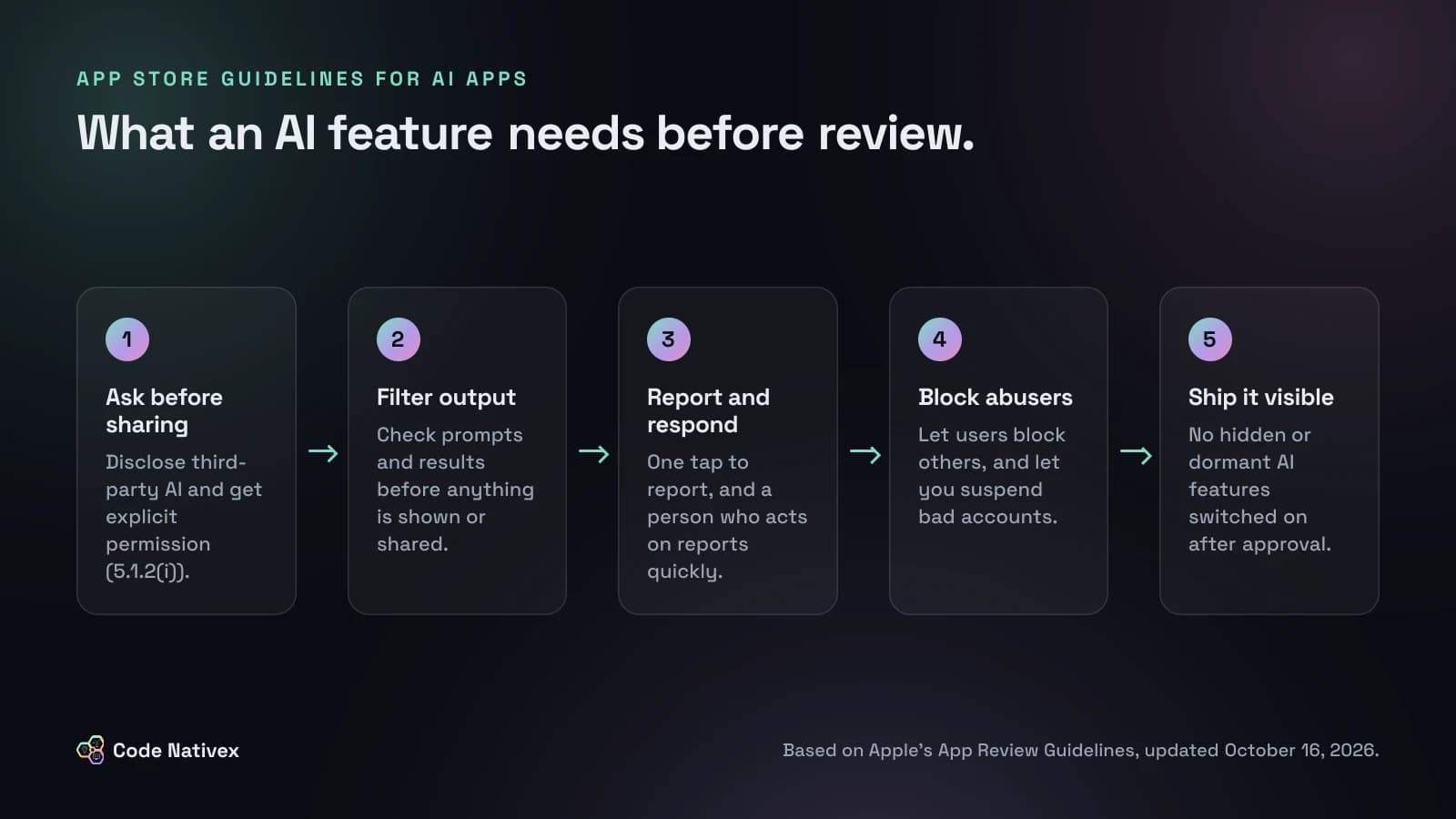
Filter both directions: the prompt before it reaches the model, and the output before it reaches the screen. Most model providers offer a moderation endpoint or built-in safety settings, but do not rely on the provider alone. Add your own rules for the risks specific to your product, such as uploads of real people's faces in an image app.
2. A way to report offensive content, with timely responses
Every generated item needs a visible report action. Behind it you need a queue, a person who reads it, and a way to remove content and act on the account. The guideline asks for "timely responses", so decide who owns the queue before launch.
3. The ability to block abusive users
If users interact with each other, they must be able to block each other. You also need an admin-side way to suspend accounts that abuse the generator.
4. Published contact information
Put a support email or contact page in the app and on your App Store listing. It is the easiest of the four and still a common reason for rejection.
A moderation gate in code
The core pattern is simple: nothing the model returns is shown until it passes a check, and anything blocked is logged so you can tune the rules. A minimal server-side version in TypeScript looks like this:
type Verdict = { allowed: boolean; reason?: string };

export async function generateSafely(
  userId: string,
  prompt: string,
  deps: {
    moderate: (text: string) => Promise<Verdict>;
    generate: (prompt: string) => Promise<string>;
    log: (event: Record<string, unknown>) => Promise<void>;
  },
): Promise<{ text: string } | { blocked: string }> {
  const input = await deps.moderate(prompt);
  if (!input.allowed) {
    await deps.log({ userId, stage: "input", reason: input.reason });
    return { blocked: "This request can't be completed." };
  }

  const text = await deps.generate(prompt);
  const output = await deps.moderate(text);
  if (!output.allowed) {
    await deps.log({ userId, stage: "output", reason: output.reason });
    return { blocked: "We couldn't show this result." };
  }
  return { text };
}
Keep this on your server, not in the app binary. You can tighten rules without shipping an update, and you can swap the model behind generate when your provider retires it, which we covered in our guide to LLM model deprecation.
Hidden features and remote flags after Guideline 2.5.19
Feature flags are normal engineering practice, and 2.5.19 does not ban them. What it bans is a feature that reviewers could not see and users were not told about. The line we draw for clients:
- Fine: a feature that is in the reviewed build, described in your App Review notes, and rolled out to users gradually with a flag.
- Not fine: a generation feature that is compiled in but dormant, then switched on remotely after approval, or a feature hidden behind obfuscation.
If a new AI capability is coming, ship it in a build that goes through review, and say what it does in the review notes. Give reviewers a demo account where the feature works, because a reviewer who cannot reach the feature cannot approve it.
Disclose third-party AI and ask first
Guideline 5.1.2(i) predates this update, and it is the rule teams forget most. It says you must clearly disclose where personal data will be shared with third parties, including third-party AI, and get explicit permission before doing so.
In practice that means a short, plain consent screen before the first AI request that includes personal data, naming the provider category and what is sent. Your privacy policy and App Store privacy labels have to match. If you can strip names, emails, and IDs before the prompt leaves your server, do it: it reduces what you need to disclose and what you risk if the provider has an incident. It also cuts tokens, one of several tactics in our post on how to reduce LLM API costs.
Android has its own rules. Google Play's AI-Generated Content policy covers apps where a chatbot is central, image generators, and apps that create voice or video of real people, and it requires that they do not produce offensive or deceptive content. One moderation service on your backend can serve both stores.
How we build AI features that hold up to review
Our rule on AI products is that the model never has the last word on what a customer sees. On Carvise, an AI advisory platform for car repair quotes, the AI does a first pass in about two minutes, and a certified expert validates or corrects every result before it reaches the driver. Nothing is auto-published. That is a web product, not an iOS app, but the principle carries straight over to App Review: a check between the model and the user, a record of what was blocked, and a person accountable for what ships.
When we scope a mobile app with AI in it, the safeguards above go into the first sprint alongside the feature, not into a fix after a rejection. If you want to see how we plan that work, our mobile app development service walks through the process, and our AI agent development page covers the backend side. If your app is also overdue for platform updates, read our React Native New Architecture migration plan first, because an app that cannot build with the current SDK cannot ship any of this.
Conclusion
The App Store guidelines for AI apps are now specific: filter what goes in and comes out, let people report and block, publish a way to reach you, ask before sending personal data to a model provider, and never hide features from review. None of it is hard to build if you plan it from the start. It is expensive when it arrives as a rejection the week you meant to launch.
If you are adding AI to an iOS or Android app and want a second opinion on the plan, tell us about your project.
Frequently asked questions
- Does Apple reject apps that use AI?
- No. Apple does not ban AI features. It rejects apps that let users generate or share content without safeguards, apps that send personal data to third-party AI without consent, and thin apps that add little beyond a chat box. A well-scoped AI feature with moderation and clear disclosure can pass review.
- Does Guideline 1.2 apply if my AI output is private to each user?
- The guideline covers apps that let users create, generate, upload, or share content, and it names AI content creation apps explicitly. Even when output is private by default, users can screenshot or export it, so plan for an output filter and a way to report bad results. If your output can be posted or shared inside the app, treat it as full user-generated content.
- Can I use a feature flag to turn on AI after App Review?
- Not for anything reviewers did not see. Guideline 2.5.19 forbids hidden, dormant, or undocumented features. Flags for gradual rollout of a feature that was in the reviewed build and described in your review notes are a different matter, but enabling a new AI capability remotely after approval is exactly what the rule targets.
- Do I need user consent to send data to OpenAI or another model provider?
- Yes, when personal data is involved. Guideline 5.1.2(i) says you must clearly disclose where personal data will be shared with third parties, including third-party AI, and obtain explicit permission before doing so. Your privacy policy and privacy labels should match what the app actually sends.
- Does Google Play have similar rules for AI apps?
- Google Play has its own AI-Generated Content policy. It covers apps where a chatbot is a central feature, apps that generate images, and apps that create voice or video of real people, and it requires that those apps do not generate offensive or deceptive content. Plan one moderation layer that serves both stores.
Written by
Raja Ziafat
Founder and CEO of Code Nativex. Raja scopes every project with clients directly and leads the engineering behind the web, SaaS, and AI products the team ships.
Connect on LinkedIn