AWS Emulator vs LocalStack: Should Your Team Switch for Local AWS Testing?
AWS now ships its own free local emulator, built and maintained by AI agents. Here is how it compares with LocalStack, where it falls short, and how to try it without breaking your test suite.
On November 11, AWS released AWS Emulator, a free local copy of its cloud APIs that you run on your own machine or in CI. For years, the default answer to testing AWS code locally was LocalStack, and this year LocalStack started requiring an account to run. So AWS Emulator vs LocalStack is now a real decision for any team with AWS calls in its test suite. This guide covers what AWS launched, how the two compare, what the emulator cannot test, and a low-risk way to try it.
What AWS launched
According to the AWS News Blog announcement, AWS Emulator is generally available and serves an AWS API endpoint over local HTTPS. The AWS CLI, the AWS SDKs, and coding agents call it with the same APIs they use in the cloud, so your application code does not change. You point it at the emulator with environment variables.
The key facts:
- No account and no fee. You do not need an AWS account to download or run it, and there is no additional service fee.
- Broad API coverage. It supports the APIs of AWS services that have a model in AWS's public API models repository, with the same request shapes and errors.
- Where it runs. On Linux, you install an RPM or Debian package. On macOS and Windows, you build a Docker image from AWS's Dockerfile. There is also an embedded mode for tests written with the AWS SDK for Rust.
- Open source. The code is on GitHub under the CC0 1.0 public domain dedication.
- Built by agents. AWS says autonomous AI agents wrote the emulator and keep it updated, comparing it against real AWS and fixing differences many times a day.
Unimplemented operations return HTTP 501 with the error code NotImplemented, so a test that hits a gap fails at once instead of passing silently.
What changed at LocalStack
LocalStack is a Docker-based AWS emulator that many teams have used for years. Its pricing and packaging update ended support for the Community edition on March 23, 2026. Since then there is a single image, and running it requires a user account and an auth token. CI pipelines that pulled localstack/localstack:latest without a token had to be updated.
LocalStack kept a permanent free tier, but it does not permit commercial use. Open-source projects can apply for free access to the paid packages. For a startup or agency, that means local AWS testing with LocalStack now involves a paid plan, while AWS Emulator is free for any use.
AWS Emulator vs LocalStack at a glance
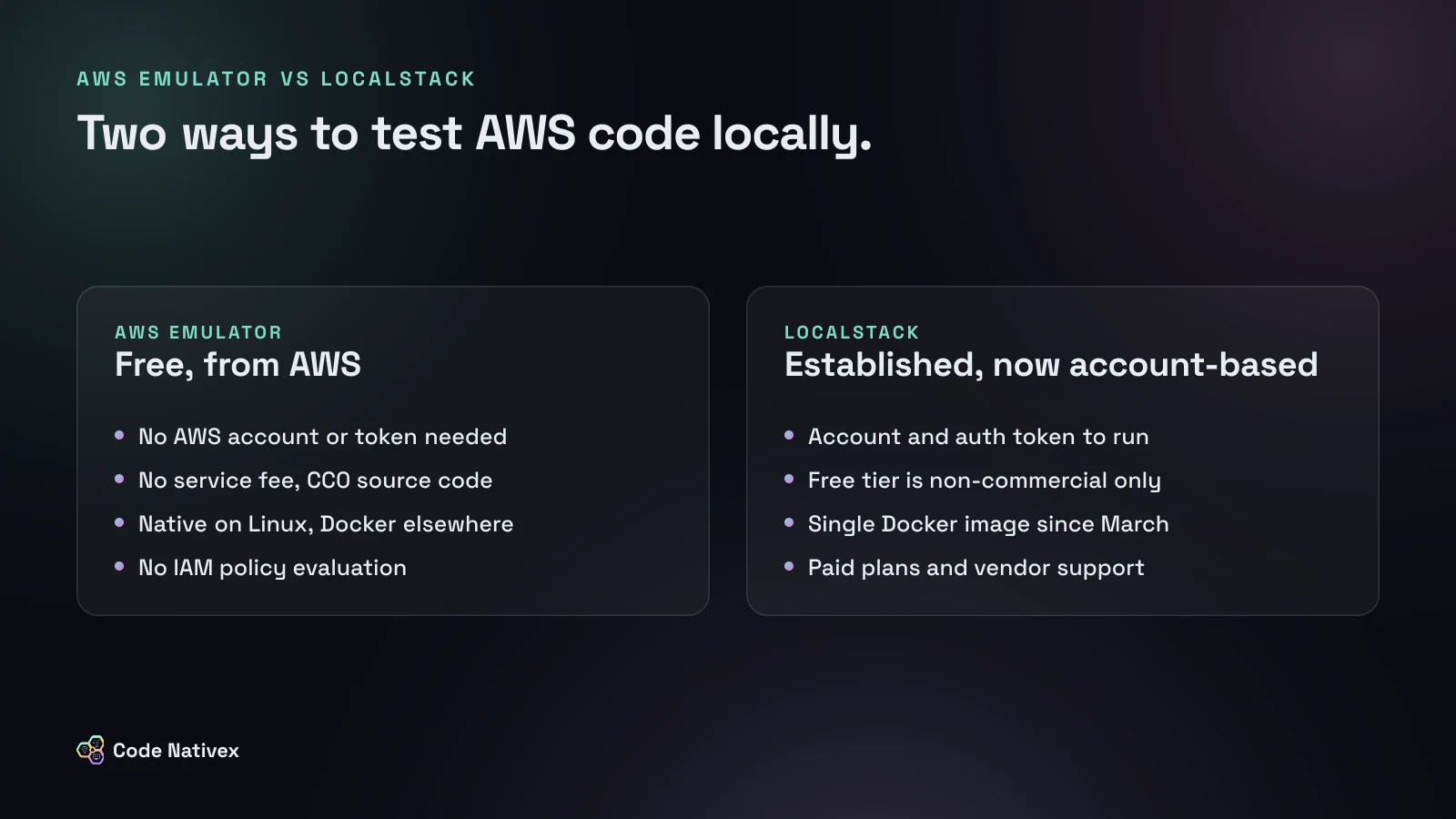
AWS Emulator is the better fit when you want no accounts, tokens, or licenses in CI, your tests mostly create and read resources in services like S3, DynamoDB, and SQS, and you are comfortable checking fidelity scores yourself.
LocalStack is the better fit when your team already depends on its tooling and paid features, you need a vendor contract and support, or your tests rely on behavior that AWS Emulator does not match yet for your services.
There is no reason to switch in a rush. A test suite that passes today on LocalStack is worth more than a free tool you have not checked.
What AWS Emulator cannot test
The AWS Emulator documentation lists its limitations plainly. Read them before you move anything:
- IAM policies. It does not evaluate IAM or resource-based policies the way AWS does. A request that AWS would deny might succeed locally, so AWS says not to use it to test security.
- One account, one Region. It accepts any Region or account ID but does not keep resources separate by either. To test several Regions, run one emulator per Region on its own port.
- Fidelity varies. It matches AWS most closely for control plane APIs, the calls that create, describe, update, and delete resources. Data plane behavior and support for CloudFormation, Terraform, and the AWS CDK vary by service.
- Checked in one Region. AWS verifies its behavior in US West (Oregon), plus US East (N. Virginia) for global services. Regional differences in service availability do not show up.
- Memory only. All resources live in memory and are deleted when it stops. It is built for test runs, not long-running use or load testing.
The IAM point matters most. Many real production incidents are permission problems: a role missing s3:PutObject, a bucket policy that blocks a new service. No local emulator replaces a test run against a real AWS account for those.
How to try it without breaking your tests
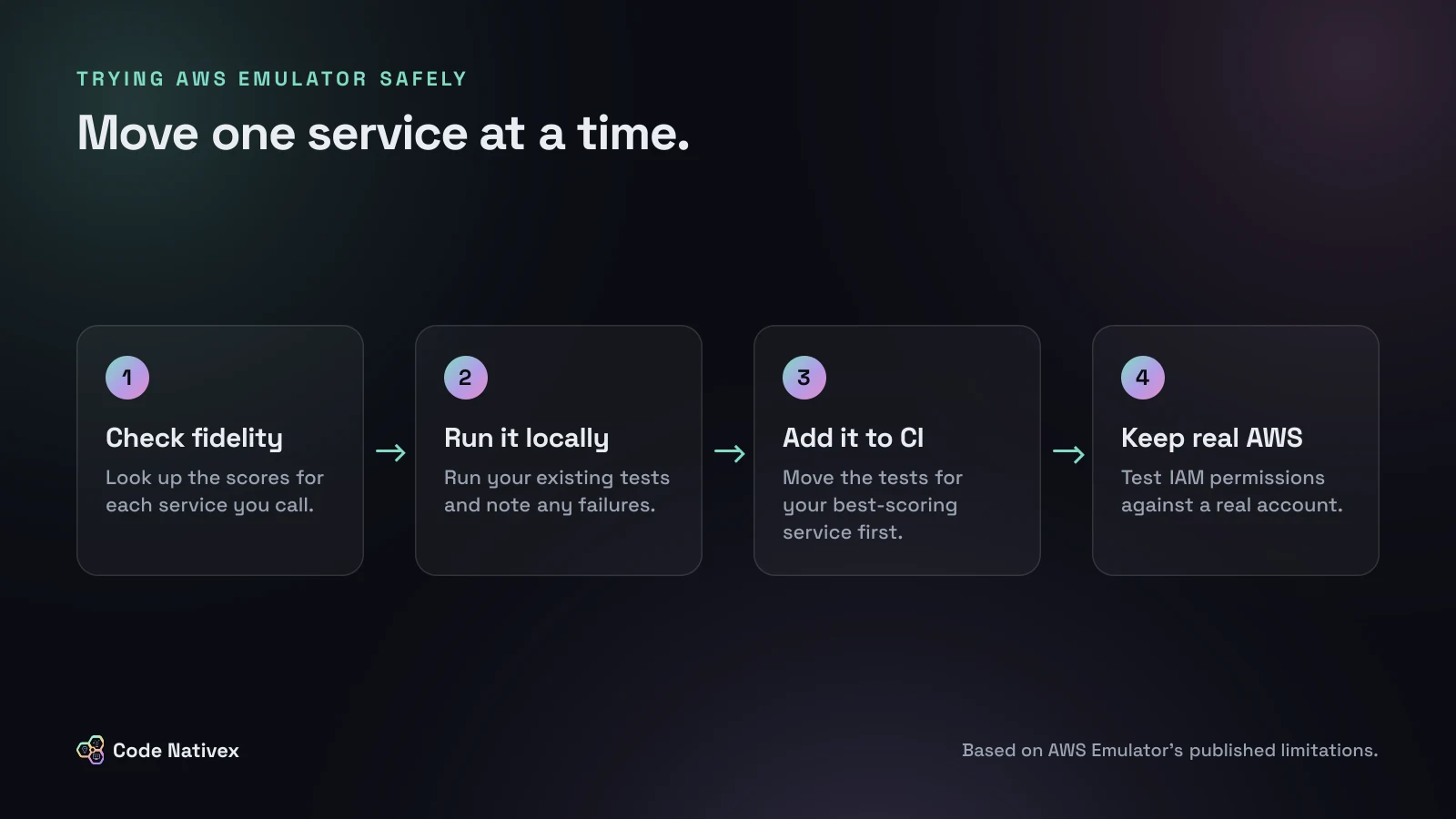
- 1.Check fidelity first. AWS publishes a fidelity score for each service with every release on GitHub, such as 40 of 50 tests passed. Look up the services your code calls. AWS also ships an
aws-emulatorskill that lets a coding agent such as Kiro, Cursor, or Claude Code check whether your project is expected to work. - 2.Run it locally. Start the emulator and run your existing integration tests against it. Note every failure and whether it is a 501 gap or a real difference.
- 3.Add it to CI for one service. Pick the service with the best score, often S3 or DynamoDB, and move only those tests first.
- 4.Keep a real AWS stage. Run a smaller set of tests against a real AWS account before release, to cover IAM policies and anything the emulator cannot match.
Here is a test script based on the setup in AWS's announcement. It starts the emulator, waits for its health check, points the CLI and SDKs at it, and runs your tests:
#!/usr/bin/env bash
set -euo pipefail

aws-emulator &                       # serves https://127.0.0.1:9297
EMU_PID=$!
trap 'kill $EMU_PID' EXIT
EMU=~/.aws/emulator/9297
until curl -sf --cacert "$EMU/ca.pem" https://127.0.0.1:9297/__admin/health; do sleep 1; done

unset AWS_ACCESS_KEY_ID AWS_SECRET_ACCESS_KEY AWS_SESSION_TOKEN AWS_PROFILE
export AWS_ENDPOINT_URL=https://127.0.0.1:9297
export AWS_SHARED_CREDENTIALS_FILE="$EMU/emulator_credentials"
export AWS_CONFIG_FILE="$EMU/config"
export AWS_EC2_METADATA_DISABLED=true
export AWS_DISABLE_HOST_PREFIX_INJECTION=true
export AWS_REGION=us-east-1 AWS_DEFAULT_REGION=us-east-1
export NODE_EXTRA_CA_CERTS="$EMU/ca.pem"   # Node.js: trust the local certificate

npm test
Unsetting your real credentials is deliberate. The emulator rejects requests not signed with its own keys, and keeping production keys out of test jobs is good practice anyway. Our guide on how to rotate secrets after a breach explains why fewer long-lived keys in CI means less to clean up when something leaks.
Questions to ask before you switch
- Which services do we call? List them from your code, not from memory, and check each fidelity score.
- Do we test infrastructure or application code? If your tests deploy Terraform or CDK stacks locally, check support for those tools service by service.
- Who owns the gaps? Someone needs to read release notes and file issues on GitHub when the emulator differs from AWS.
- Is AI-written code acceptable to us? AWS says agents wrote and maintain the emulator, with fidelity tests and security review in its release pipeline. It runs only on your machine and in CI, but some teams will want to review that process first.
Moving tests is also a good moment to check the rest of your local stack. If your app runs on Node.js, make sure your runtime is patched against the Node2Shell vulnerability, and if you are weighing where your database should live, our guide on how to choose a managed Postgres provider covers the trade-offs.
How we approach cloud testing for clients
When we build products on AWS, we treat local emulators as a fast first check, not as proof that something works in production. Integration tests run against an emulator on every push, and a smaller set runs against a real cloud account before release, so permission and configuration problems show up before users see them. Our SaaS development service covers the build, the CI pipeline, and the cloud setup together.
The bottom line
AWS Emulator gives teams a free, account-free way to test AWS code locally and in CI, just as LocalStack moved behind an account and a commercial license. It is a strong option for testing application code against common services, but it does not check IAM policies and its fidelity varies by service. Check the scores for the services you use, move one service at a time, and keep a real AWS stage for permissions.
Planning a SaaS product on AWS, or want a second pair of eyes on your test pipeline? Tell us about it and we will send a fixed-scope proposal.
Frequently asked questions
- Is AWS Emulator free?
- Yes. AWS says AWS Emulator has no additional service fee and you do not need an AWS account to download or run it. You only pay for AWS resources you deploy in the cloud. The source code is under the CC0 1.0 public domain dedication, except third-party code in its vendor directory, which is under Apache 2.0.
- Is AWS Emulator a replacement for LocalStack?
- For many teams that use LocalStack to test calls to S3, DynamoDB, SQS, and similar services, it can be. It does not evaluate IAM policies and its fidelity varies by service, so check the published fidelity scores for the services you use before you switch.
- Does AWS Emulator work on macOS and Windows?
- Yes, through Docker. The emulator runs natively only on Linux, where you install it from an RPM or Debian package. On macOS and Windows, you build a Docker image from the Dockerfile in the AWS documentation and run it in a container.
- Can I test IAM permissions with AWS Emulator?
- No. AWS says the emulator does not evaluate IAM policies and resource-based policies the way AWS does, so a request that AWS would deny might succeed locally. Test permissions against a real AWS account.
- Does AWS Emulator keep data between runs?
- No. It keeps all resources in memory and deletes them when it stops. That makes it a good fit for test runs, where each run starts from a clean state, but not for long-running use.