PostgreSQL 19 Upgrade: What to Patch Today and When to Move Production
PostgreSQL 19 is due on November 19, and a 52-vulnerability security release landed on November 12. Here is what to patch today, what breaks in 19, and when to move production.
 Tayyeb FeroziSenior Full Stack Developer
A PostgreSQL 19 upgrade is now on the calendar for most teams running Postgres in production. The PostgreSQL project shipped release candidate 2 on November 12, 2026, alongside a security release for every supported version, and plans general availability for November 19. This guide covers what to patch today, the breaking changes in 19 that will actually bite a SaaS or web app, and a realistic date to move production without gambling on a fresh major release.
What shipped on November 12, and why it matters now
The official November 12 announcement covers PostgreSQL 18.7, 17.12, 16.16, 15.20, and 14.25, plus 19 RC 2. It fixes 52 security vulnerabilities and over 140 bugs. Many of those vulnerabilities are rated CVSS 8.8 and allow arbitrary code execution by a user who can already connect, so a multi-tenant app with any SQL surface (reporting tools, analytics users, extensions) should treat this as urgent.
It is also the final release of PostgreSQL 14. If you are still on 14, you are now running an unsupported database. We covered that deadline in our PostgreSQL 14 end of life guide.
The good news: this part is easy. A minor update needs no dump, no restore, and no pg_upgrade. You stop the server, install new binaries, and start it again. On a managed host it is usually a maintenance-window click.
The post-update steps most teams will miss
The announcement lists several fixes for index and backup corruption that need action after you update. These are the ones that apply to typical product databases:
- GIN indexes: if you suspect a GIN index is affected (common for
jsonband full-text search), rebuild it withREINDEX INDEX. - pg_trgm: reindex any GiST index using the
gist_trgm_opsoperator class. Fuzzy search on names and emails often uses this. - bpchar columns: reindex B-tree indexes on columns declared as
bpcharwithout a length. Columns declared aschar(n)are not affected. - Incremental backups: take a new full backup and base future incremental backups on it.
- Partitioned tables: find
NOT NULL NO INHERITconstraints that may have let NULLs into partitions.
The announcement gives the exact query for that last check:
SELECT conrelid::regclass, conname
FROM pg_constraint
WHERE contype = 'n' AND connoinherit
  AND conrelid IN (SELECT oid FROM pg_class WHERE relkind = 'p');
Use REINDEX INDEX CONCURRENTLY in production so writes keep flowing while the index rebuilds.
What PostgreSQL 19 adds that a product team will notice
The PostgreSQL 19 release notes are long, but a few items matter to teams shipping SaaS products:
- REPACK (CONCURRENTLY): reclaims disk space and reorganizes a table without blocking reads and writes. Today that usually means installing the pg_repack extension or taking a lock with
VACUUM FULL. - Parallel autovacuum and smarter prioritization: autovacuum can process a table's indexes in parallel, and a new scoring system decides which tables get vacuumed first. Large, busy tables should stop falling behind.
- Read-your-writes on replicas: a new
WAITcommand lets a read replica wait until it has caught up to a given point, so a user who just saved a form does not see stale data on the next page. - Logical replication without a restart: it can now be enabled while
wal_levelis set toreplica, and sequence values replicate too. That makes zero-downtime major upgrades through logical replication less fiddly. - Faster foreign-key checks and COPY: foreign-key constraint checks are quicker, and
COPY FROMfor text and CSV uses SIMD instructions, which helps bulk imports.
None of these force an upgrade on their own. They make 19 a good destination, not an emergency.
The breaking changes to check before you upgrade
This release has more compatibility changes than usual. Here are the ones we would check first on a typical Next.js and Postgres stack:
- 1.JIT is disabled by default. It used to switch on based on cost estimates the project now calls unreliable. Most OLTP apps will be fine or faster, but if you run heavy analytical queries, benchmark them and turn JIT back on where it helps.
- 2.max_locks_per_transaction changed meaning. The default went from 64 to 128 because lock allocation changed, so any custom value must be doubled to keep the same capacity. Apps with many partitions are the ones that hit this.
- 3.btree_gist inet and cidr indexes block pg_upgrade. Those operator classes could skip rows that should be returned, and pg_upgrade refuses clusters that use them. Rebuild them with the core GiST operator class first.
- 4.Auth changes. RADIUS support is removed, and successful MD5 password logins now log a warning. MD5 passwords were already deprecated in 18, so this is a good moment to move roles to SCRAM.
- 5.standard_conforming_strings is always on. Dumps made by an older pg_dump with this setting off will not load correctly. Use the version 19 pg_dump when you dump and restore.
- 6.Full-text search and pg_trgm behavior can change in databases using ICU or the builtin locale provider. Reindex those indexes and recompute stored
tsvectorvalues after pg_upgrade. - 7.Small result changes.
json_array()over zero rows now returns an empty array instead of NULL. Check any code that tests for NULL there.
One more from RC 2 itself: a change that allowed JSON_ARRAY() and JSON_OBJECT() in expression indexes, generated columns, and partition keys was reverted. If you created such objects while testing a beta, drop or redefine them before you upgrade.
When to move production to PostgreSQL 19
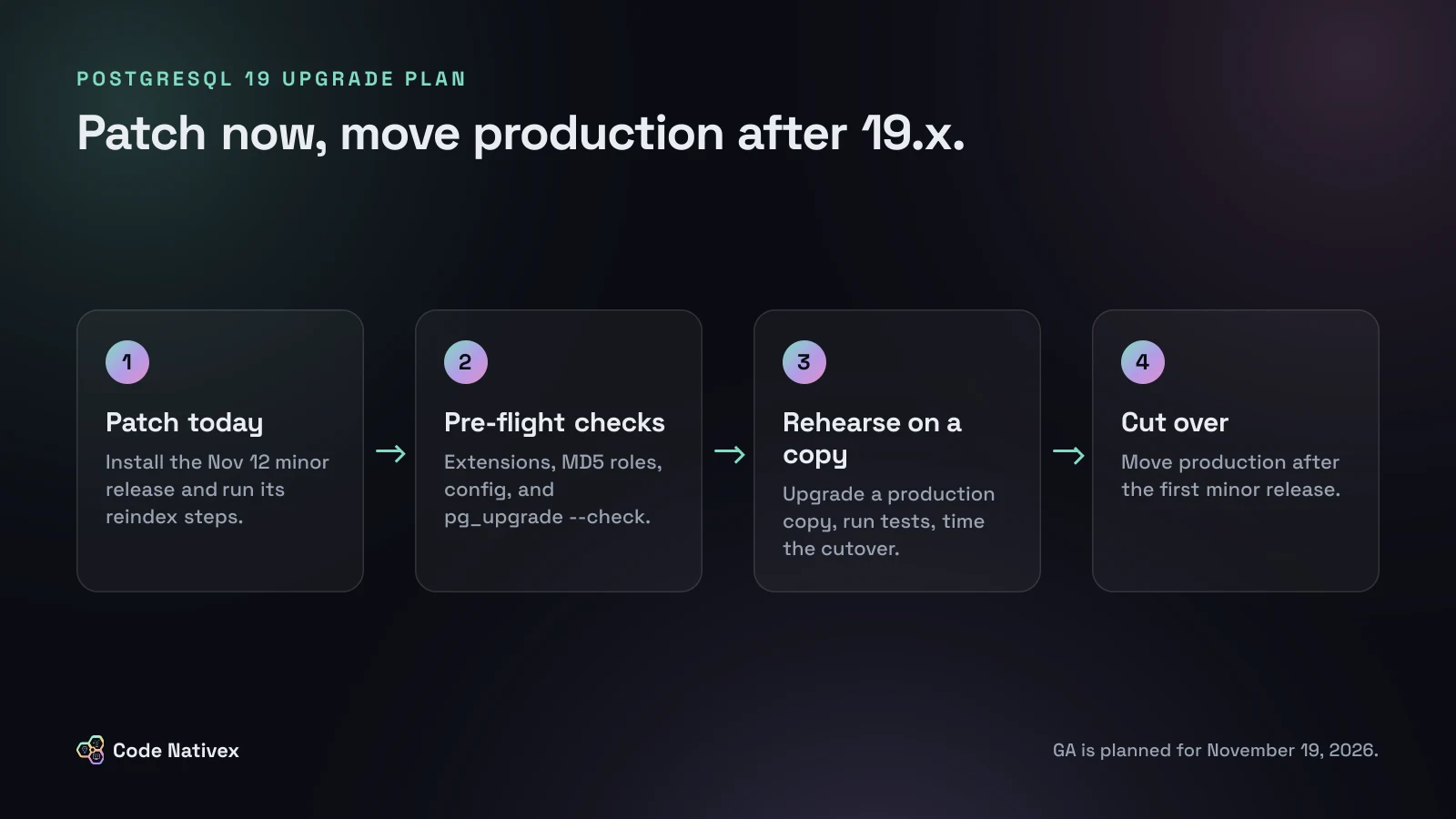
Our recommendation for most startups: patch your current version this week, test 19 in staging now, and move production after the first minor release. A .0 release has had the least real-world mileage, and the wrong-result fixes and reverted feature in RC 2 show the project is still finding edge cases. Waiting a few months costs you nothing, because 18 and 17 stay supported for years.
There are two cases where we would move sooner. If you are on 14 or 15 and planning a major upgrade anyway, rehearsing straight to 19 avoids doing two migrations in a year. If REPACK or read-your-writes on replicas solves a problem you are paying for today, the benefit may outweigh the risk.
Either way, your hosting provider sets the real timeline. Managed services add new major versions on their own schedule, so check your provider's release calendar before you promise a date. If you are still choosing a host, our guide on how to choose a managed Postgres provider covers what to compare.
A pre-flight checklist you can run this week
Run these on a copy of production, not the live database:
- 1.List extensions and versions with
SELECT extname, extversion FROM pg_extension;and confirm each one has a release for 19. Extensions cause more upgrade failures than Postgres itself. - 2.Find MD5 roles: a superuser can run
SELECT rolname FROM pg_authid WHERE rolpassword LIKE 'md5%';and reset those passwords so they are stored as SCRAM. - 3.Run `pg_upgrade --check` with the 19 binaries. It reports blockers such as the btree_gist indexes above without changing anything. The official upgrade documentation explains the options.
- 4.Diff your config: look for custom
max_locks_per_transaction,jit, andio_workerssettings.io_workershas been removed and replaced by four new settings. - 5.Run your test suite and your slowest real queries against the upgraded copy, comparing
EXPLAIN ANALYZEoutput with production. - 6.Time the cutover and write down the rollback plan before the maintenance window.
What a rehearsal catches that the release notes do not
Release notes describe Postgres. They cannot describe your data. When we rebuilt the America Working subscription platform, the first migration run took six hours and corrupted about 300 rows because of an encoding mismatch in one source file. We added a quarantine table, made the job idempotent, and re-ran it in 90 minutes with zero data loss. That was a data migration, not a version upgrade, but the lesson is the same: the first run is where you find the problems, so make sure the first run is never the real one.
That is why database work is part of how we build and maintain products on our SaaS development service: schema design, migrations you can safely re-run, and upgrades rehearsed on a copy before anyone touches production.
Conclusion
The PostgreSQL 19 upgrade is worth planning, but the urgent job this week is the November 12 security release. Patch every server, run the reindex steps that apply to you, and take a fresh full backup. Then test 19 in staging, run pg_upgrade --check, and pick a production date after the first minor release, unless a 19 feature solves a problem you have today.
If you want a second pair of hands on a Postgres upgrade or a wider infrastructure review, tell us about your project and we will scope it with you.
Frequently asked questions
- When is PostgreSQL 19 released?
- The PostgreSQL project plans general availability for November 19, 2026. Release candidate 2 shipped on November 12, and the project says the date holds unless an issue requires a delay or another release candidate.
- Should I upgrade to PostgreSQL 19 right away?
- Not in production on day one for most teams. Install the November 12 minor update on your current version now, test 19 in staging, and plan the production move after the first minor release once your extensions and hosting provider support it.
- Do I need pg_upgrade for the November 12 security release?
- No. Minor releases such as 18.7 or 17.12 only need new binaries and a restart. Some fixes do ask you to reindex certain GIN, pg_trgm GiST, or bpchar B-tree indexes afterwards.
- Can I upgrade straight from PostgreSQL 14 or 15 to 19?
- Yes. pg_upgrade, dump and restore, and logical replication can all skip versions. Read the migration notes for every version you skip, not just 19, and rehearse on a copy of production first.
- What breaks when upgrading to PostgreSQL 19?
- The main items are JIT being disabled by default, max_locks_per_transaction now needing double the old value for the same capacity, RADIUS auth being removed, standard_conforming_strings always on, and btree_gist inet or cidr indexes blocking pg_upgrade.
Written by
Tayyeb Ferozi
Senior full stack developer at Code Nativex, delivering full-cycle products from the database and backend to the user interface.
Meet the team