Background Jobs in Next.js: How to Choose Between after(), Workflows, Queues, and Daemons
Emails, exports, imports, and AI calls should not run inside a request. Here is how to choose the right home for background work in a Next.js app, including Vercel's new always-on Daemons.
 Tayyeb FeroziSenior Full Stack Developer
Sooner or later every product needs background jobs in Next.js: sending a welcome email, generating an export, importing a spreadsheet, or calling an AI model that takes thirty seconds to answer. None of that should happen while the user waits for a response. The tricky part is choosing where that work runs, because there are now several good options and they solve different problems. This guide compares them, including Vercel's new Daemons, and ends with the rules every background job should follow.
Why slow work does not belong in the request
A request handler should do the minimum, then respond. When it also sends emails or calls slow APIs, three things go wrong:
- Users wait. A form that takes ten seconds to submit feels broken, even if it works.
- Timeouts cut work off. Serverless functions have a maximum duration. Work that runs past it simply stops.
- Failures disappear. If an email provider is down for a minute, nothing tries again unless something is built to.
The fix is the same pattern everywhere: accept the request, record what needs doing, respond right away, and let something else do the work. Moving slow work to background jobs is also the second stage of our guide on how to scale a SaaS application, right after fixing slow queries.
The options at a glance
Vercel's guide to running background jobs in Next.js recommends starting with Workflows, and adds Queues and Cron Jobs for other kinds of work. Next.js itself provides after(), and Vercel added Daemons in October 2026. Each one has a clear job:
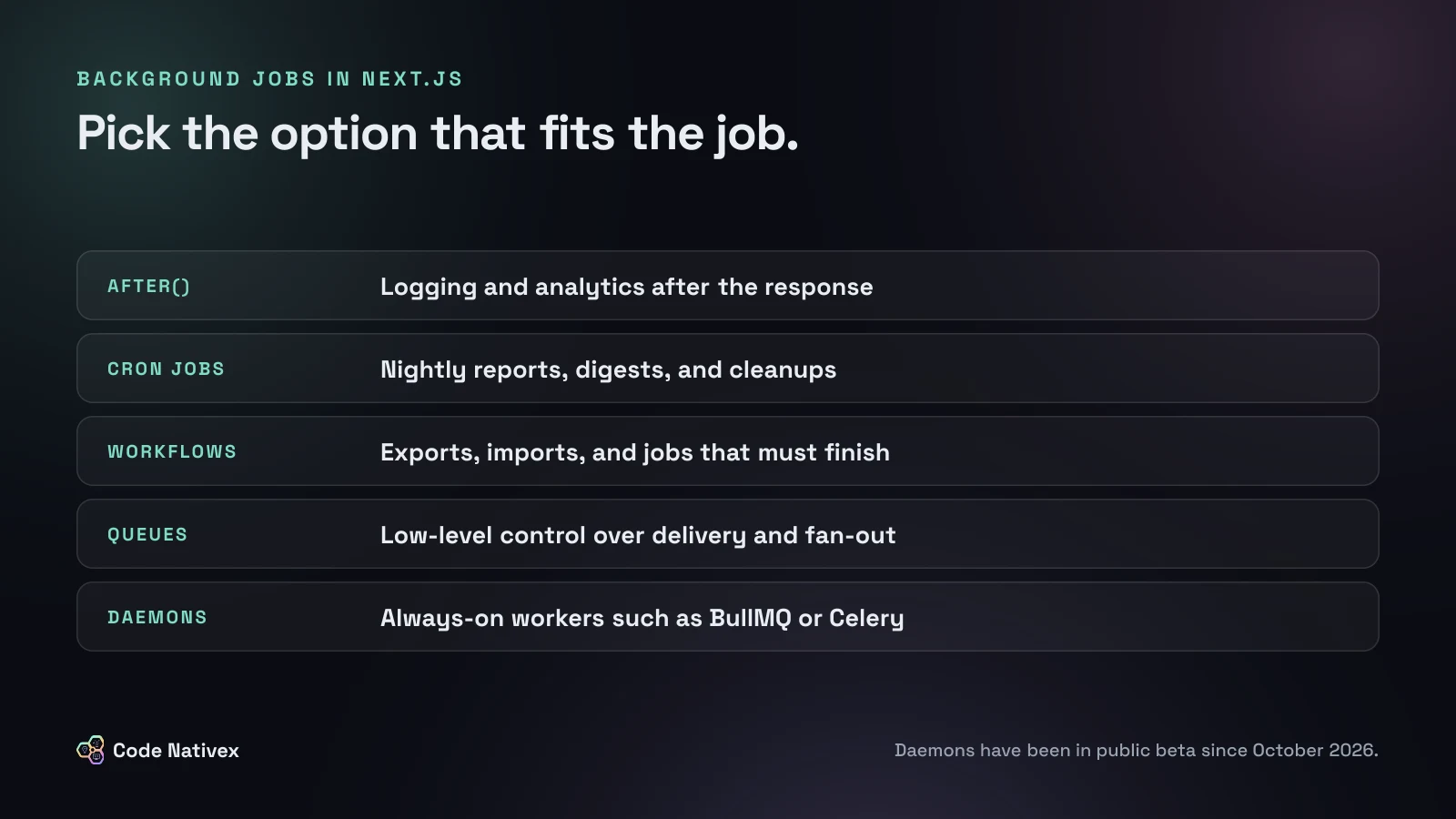
The five built-in options
after(): best-effort work after the response
The after() function schedules a callback to run once the response is finished. It is ideal for logging, analytics, and other side effects that should never slow the user down.
Two details matter. It runs within the route's maximum duration, so it is not for long tasks. And it is best effort: if it fails, nothing retries it. Never use it for anything a customer would notice going missing, such as a receipt email.
Cron Jobs: work on a schedule
Cron Jobs call one of your routes on a schedule set in vercel.json, which suits nightly reports, digest emails, and cleanups. They run only on production deployments, and the route is public, so protect it with a CRON_SECRET that Vercel sends as a bearer token. Keep the cron route thin: let it start a workflow rather than doing the work itself.
Workflows: durable jobs that must finish
For work that has to complete, such as an export, an import, or onboarding steps spread over days, Vercel recommends its Workflow SDK. You mark a function with "use workflow" and each unit of work with "use step". Each step retries on failure, and a workflow can pause with sleep for seconds or months without using compute.
Here is the pattern in practice: a route that starts a durable job, and uses after() only for analytics.
// app/api/exports/route.ts
import { after } from "next/server";
import { start } from "workflow/api";
import { exportReport } from "@/workflows/export-report";

export async function POST(req: Request) {
  const { accountId } = await req.json();

  // Durable: each step retries on failure and survives deploys.
  await start(exportReport, [accountId]);

  // Best effort: runs after the response and is never retried.
  after(() => track("export_requested", { accountId }));

  return Response.json({ status: "queued" }, { status: 202 });
}
Queues: low-level control over delivery
Vercel Queues deliver messages at least once, with automatic retries, and they are the foundation the Workflow SDK is built on. Vercel's own advice is to reach for Queues only when you need low-level control over event delivery and fan-out. For most product work, a workflow is simpler.
Daemons: always-on workers, new in October 2026
Vercel Daemons are the newest option, in public beta on all plans since Vercel's announcement in October 2026. A daemon is a long-running process built from a Dockerfile that pulls work from a queue, a workflow engine, or a database. Vercel keeps the configured number of instances running and restarts any that crash.
They fit teams that already run workers, such as BullMQ, Celery, or Sidekiq consumers, and want them on the same platform as the app. The beta has limits to plan around:
- Daemons run only on production deployments, not previews.
- You set instance counts by hand. There is no autoscaling or persistent storage yet.
- They receive no inbound traffic. They pull work rather than serving requests.
- On shutdown, Vercel sends
SIGTERMand waits 30 seconds by default before stopping the process. vercel devdoes not run them, so test workers locally with Docker.
On the Hobby plan, the quota counts active CPU time, so a worker that mostly waits for work uses less of it.
Third-party and self-hosted options
You do not have to use Vercel's tools. Managed services such as Inngest, Trigger.dev, and Upstash QStash offer durable jobs with dashboards and retries, and work on any host. Teams with heavy or very long jobs can also run a worker on a separate server or container platform next to the app. The trade-off is the same as anywhere: a managed service saves operations work, while self-hosting gives more control and more to maintain.
Rules for any background job
The tool matters less than these habits. Vercel's Daemons documentation states the most important one plainly: a worker can stop at any time, so jobs must be safe to retry.
- 1.Make every job idempotent. Running it twice must give the same result. Store a job ID and skip work that is already done.
- 2.Acknowledge work only after it is finished. If a worker stops halfway, the job should be picked up again.
- 3.Set timeouts on everything external. A hung API call should fail and retry, not block a worker forever.
- 4.Handle shutdown signals. Stop taking new work on
SIGTERMand finish what is in progress. - 5.Make failures visible. Log every attempt, alert on repeated failures, and keep failed jobs somewhere you can inspect and replay.
How to choose
Answer these in order and stop at the first yes:
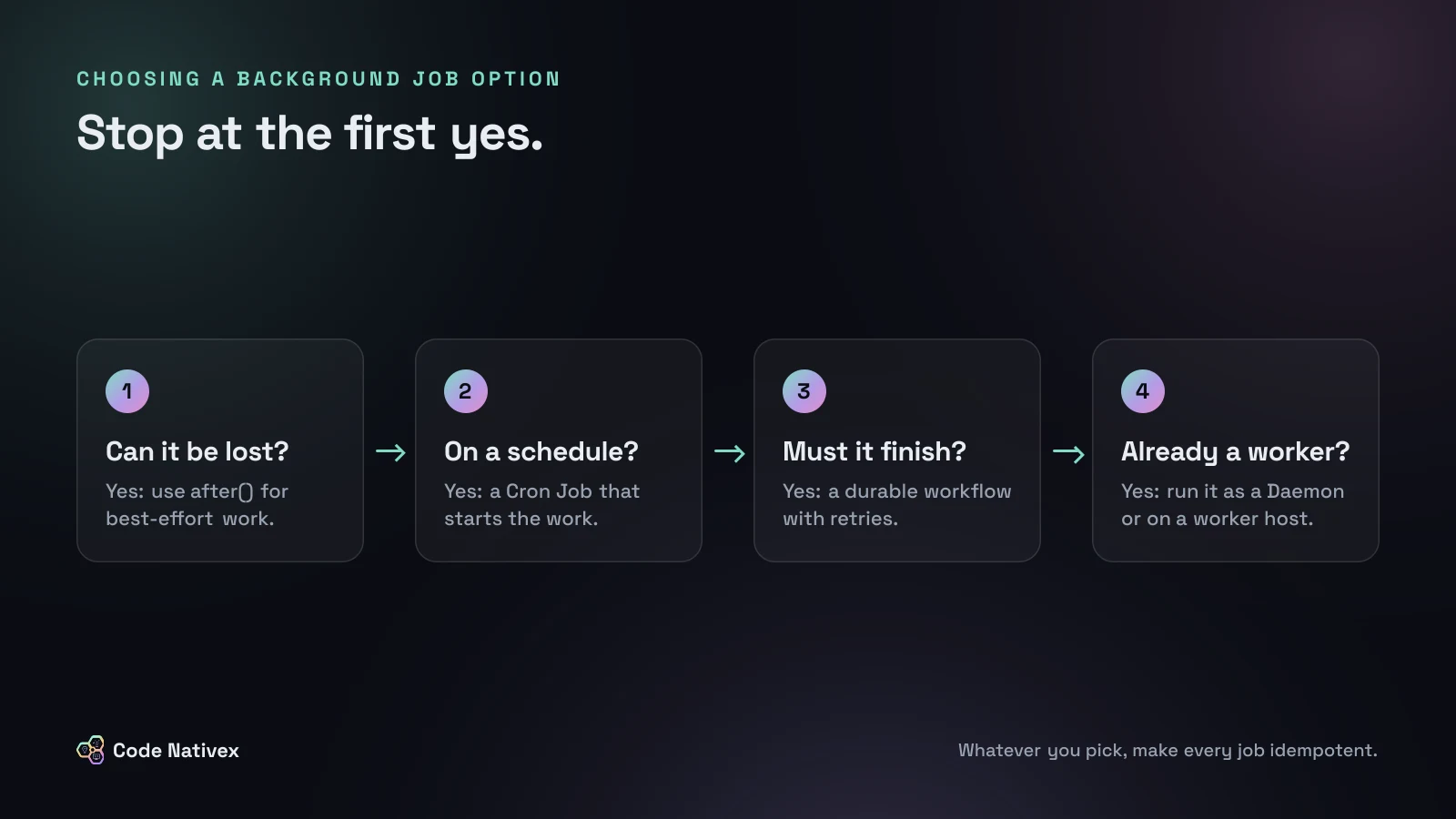
A typical SaaS product needs only three: after() for analytics, Cron Jobs for schedules, and a durable workflow for everything users care about.
How we handle background work on client builds
On the America Working subscription platform, welcome emails used to be sent by hand, usually a day late. We rebuilt them so onboarding, billing, retention, and product emails fire from product events through a single send pipeline, with no manual sends. That kind of work belongs in background jobs, never in the request that triggered it.
Our web app development service covers architecture decisions like this from the first sprint, on the stack described in our guide to the best tech stack for SaaS.
The bottom line
Background jobs in Next.js come down to one question per task: can this work be lost, or must it finish? Use after() for best-effort work, Cron Jobs for schedules, a durable workflow for anything a customer would notice, and Daemons or a dedicated worker when you already run a worker loop. Then make every job idempotent, because sooner or later it will run twice.
Planning a feature with heavy background work? Tell us about it and we will send a fixed-scope proposal.
Frequently asked questions
- How do I run background jobs in Next.js?
- Return the response first and hand the work to something built for it: after() for best-effort tasks, a durable workflow or queue for jobs that must finish, and a cron schedule for recurring work. Avoid long-running work inside the request itself.
- What is the after() function in Next.js?
- after() schedules a callback to run once the response is finished. It suits logging and analytics. It runs within the route's maximum duration and is not retried if it fails, so it is not a job queue.
- What are Vercel Daemons?
- Daemons are always-on background workers that run from a container image next to your app. They pull work from a queue, workflow engine, or database. They entered public beta in October 2026 and, during the beta, run only on production deployments.
- Do I need Redis for background jobs in Next.js?
- Not necessarily. Managed workflow and queue services handle storage and retries for you. You need Redis mainly if you choose a Redis-based library such as BullMQ and run its workers yourself.
- Why should background jobs be idempotent?
- Most job systems deliver work at least once, and workers can stop mid-task during a deploy. An idempotent job gives the same result if it runs twice, so a retry never sends two emails or charges twice.
Written by
Tayyeb Ferozi
Senior full stack developer at Code Nativex, delivering full-cycle products from the database and backend to the user interface.
Meet the team