How to Reduce Next.js Bundle Size: The 2026 Workflow With Bundle Analyzer and AI Agents
Next.js 16.4 gave the bundle analyzer snapshots, a critical-path view, and an AI agent skill that finds heavy imports for you. Here is the workflow we use to cut client JavaScript without breaking the app.
 Tayyeb FeroziSenior Full Stack Developer
If your Next.js app feels heavy on first load, the fastest way to reduce Next.js bundle size in 2026 is no longer guesswork with a treemap. On October 28, the Next.js team shipped new bundle analyzer tools and an AI agent skill that traces exactly which imports drag code into each page. This guide walks through the workflow we use: how to measure, the four causes we see most often, how to use the new agent skill without letting it break things, and how to tell whether JavaScript is even your real problem.
What changed in Next.js 16.4
The Next.js announcement adds two things on top of the Turbopack bundle analyzer that first arrived in Next.js 16.1.
- Better tools for humans. The analyzer now opens on a summary of your largest client routes, has a table view you can sort by size, saves snapshots of every run so you can diff them, and can highlight only the code on the critical render path.
- An agent skill.
next-bundle-optimizergives an AI coding agent access to Turbopack's module graph. It looks for large groups of connected modules, traces their import chains, and proposes a small set of import boundaries that would defer them.
Vercel says it used the skill on v0 and vercel.com and cut nearly two megabytes of compressed JavaScript across their pages. The individual finds are the useful part, because they are the same mistakes we see in client codebases: an experimental code editor loaded on almost every v0 page (150 KB), markdown and chart code shipped to the dashboard before the agent panel was opened (255 KB), and a URL helper imported from a shared utility file that also pulled in an entire query engine (125 KB on one page).
None of those are exotic. They are ordinary imports that grew over time, which is why measuring beats rules of thumb.
Step 1: Measure before you change anything
The analyzer requires Turbopack, which has been the default bundler since Next.js 16. If you are still on an older version, our guide to the Next.js 15 end of life and upgrading to 16 covers that first step.
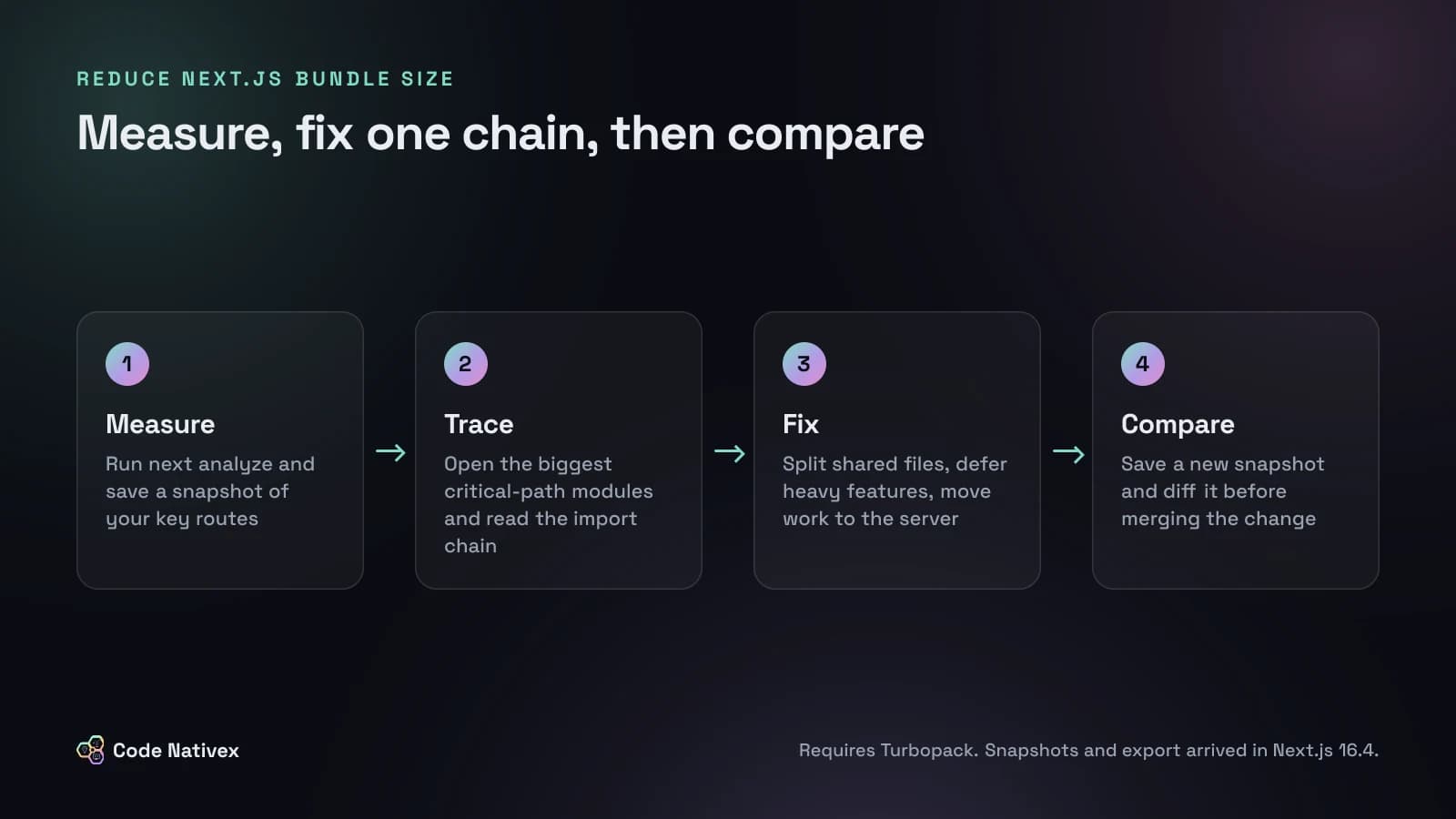
From the project root, the package bundling guide gives you three commands that matter:
# Open the interactive analyzer in your browser
npx next analyze

# Save a named snapshot so you can compare later (16.4+)
npx next analyze --output --snapshot before

# Export the module graph as JSON Lines for scripts or agents (16.4+)
npx next analyze export --snapshot before > bundle-graph.jsonl
Start on the route summary and pick the two or three routes that matter most to the business: usually the marketing homepage, the sign-up flow, and the main dashboard. A settings page that weighs 400 KB and gets opened twice a month is not where your time should go.
For each route, turn on the critical-path filter. Code that loads asynchronously after the first render is less urgent than code the browser must download and run before the page responds. Then sort by size and click the biggest modules to see their full import chain. The question to answer every time is simple: why is this module here?
The four causes we find most often
Vercel's finds and the Next.js docs point to the same short list of causes. Check these first.
1. A shared file that imports too much
A utils.ts or lib/index.ts that re-exports everything is convenient, and it is the most common source of bloat. A client component imports one tiny helper and receives everything else that file imports, as in Vercel's URL helper example. The fix is to split the file so client code imports only from small, focused modules.
2. A lazy import that is not actually lazy
This one catches experienced teams. As the Next.js team explains, a lazy import only defers a module if nothing else in the same bundle imports it statically.
// ReportsChart.tsx: deferred until rendered
import dynamic from "next/dynamic";
export const ReportsChart = dynamic(() => import("./HeavyChart"));

// DashboardHeader.tsx: this static import cancels the deferral above
import { formatAxis } from "./HeavyChart";
The header only wanted a formatting helper, but its static import puts the whole chart module back in the initial bundle. Move formatAxis into its own file and the chart becomes lazy again.
3. Client components doing server work
Syntax highlighting, markdown parsing, and date formatting libraries often run in a client component even though the result is static HTML. If the work needs no browser API and no user interaction, move it into a Server Component. The library then runs on the server and the browser receives only markup.
4. Heavy features loaded for everyone
Editors, charts, dialogs, and AI chat panels are frequently imported at the top of a layout so they are "ready". Load them when the user opens them instead, with next/dynamic or a plain import() inside the click handler. For icon and utility packages with hundreds of exports, add them to optimizePackageImports in next.config.ts if they are not already on Next.js's built-in list, and check for duplicate versions of the same large dependency.
Using the next-bundle-optimizer agent skill safely
If your team already works with a coding agent, the skill is worth installing:
npx skills add vercel/next.js --skill next-bundle-optimizerRun /next-bundle-optimizer in your agent to get a report. By default it only reports issues and suggested fixes. Running it with fix applies the changes, reruns the analysis, and compares snapshots.
Treat it like a sharp junior engineer on a performance audit:
- Start in report mode. Read the findings and decide which routes are worth touching.
- One change per pull request. Vercel's own process was to have the agent open a pull request per fix and verify each on a preview deployment before shipping. Copy that.
- Test the interaction, not just the build. Deferring a dialog or editor changes when it loads. Click through the flows that use it, on a slow connection, and make sure there is a sensible loading state.
- Keep the before and after snapshots in the pull request description so reviewers can see the size change.
The skill is good at the tedious part, tracing import chains across hundreds of modules. Deciding whether a 40 KB saving is worth a visible loading spinner is still a product decision.
Is JavaScript actually your bottleneck?
A smaller bundle is not automatically a faster product. Before investing a sprint, check which Core Web Vitals are failing. Google's thresholds for a good experience are a Largest Contentful Paint within 2.5 seconds and an Interaction to Next Paint of 200 milliseconds or less. Heavy client JavaScript mostly hurts interaction: the page looks ready but does not respond. Slow content usually points to the server.
Our own work is a good reminder. On America Working, a subscription SaaS built on Next.js, average load time went from 6 seconds to 1.4 seconds. The fix was not the bundle at all: we paginated two slow queries and cached one expensive aggregate. If we had started by trimming JavaScript, we would have shaved kilobytes and missed the seconds.
So look at both sides: the bundle analyzer for the client, and your server timings and database queries for everything else.
A realistic plan for a growing SaaS
For most teams, this is a one or two day exercise, not a rewrite:
- 1.Save a baseline snapshot of your three most important routes.
- 2.Fix the biggest import chain on each, one pull request at a time.
- 3.Move any data-to-markup library into Server Components.
- 4.Defer features most users never open on first load.
- 5.Save an after snapshot, compare it, and add a size check to code review so the bloat does not creep back.
If your stack decisions are still open, our guide to choosing a tech stack for SaaS explains why we build on Next.js and Server Components in the first place.
Conclusion
The tools to reduce Next.js bundle size are finally good enough that there is little excuse for shipping a dashboard's worth of JavaScript on a sign-up page. Measure with next analyze, follow the import chains, fix the few that matter, and let an agent help with the tracing while your team keeps the judgment calls.
If you would rather have engineers audit and fix it for you, our web app development team can run this audit as a focused performance engagement. Tell us about your app and we will tell you honestly whether the bundle is the problem.
Frequently asked questions
- How do I check the bundle size of a Next.js app?
- On Next.js 16.1 or later with Turbopack, run npx next analyze in your project. It opens an interactive view where you can filter by route and by client or server code. Add --output to save the analysis to .next/diagnostics/analyze so you can compare it later.
- Does @next/bundle-analyzer still work with Next.js 16?
- Yes, but only for webpack builds. Turbopack has been the default bundler since Next.js 16, so for most apps the built-in next analyze command is the right tool. Use the webpack plugin only if your project still builds with webpack.
- What is the next-bundle-optimizer skill?
- It is an agent skill released with Next.js 16.4 that gives an AI coding agent access to Turbopack's module graph. By default it reports heavy import chains and suggested fixes. With the fix option it applies changes, reruns the analysis, and compares snapshots.
- Will a smaller bundle improve my Core Web Vitals?
- Usually it helps, because the browser downloads, parses, and runs less JavaScript before the page responds. But slow pages are not always a JavaScript problem. Slow database queries or uncached server work can matter more, so measure both before choosing what to fix.
- Is next/dynamic enough to reduce bundle size?
- Only if the dynamically imported module is not also imported statically somewhere else in the same bundle. If any other file imports it directly, its code still loads up front. Check the import chain in the analyzer after each change.
Written by
Tayyeb Ferozi
Senior full stack developer at Code Nativex, delivering full-cycle products from the database and backend to the user interface.
Meet the team