Vercel Runtime Cache Pricing: What the Data Cache Migration Means for Your Bill
Vercel is folding Data Cache into Runtime Cache, and reads and writes that used to be free will be billed. Here is what changes, how to estimate the cost for your app, and what to fix before your migration date.
 Shumail RafiqueSenior Full Stack Developer
Vercel runtime cache pricing used to matter only if you called the Runtime Cache API yourself. That changed on October 30, 2026, when Vercel announced that Data Cache, the store behind Next.js fetch caching and unstable_cache, is moving into Runtime Cache. Reads and writes that were never billed will be charged at Runtime Cache rates. This guide explains what changes, when, how to estimate the cost for your own app, and the fixes worth making before your team's migration date.
What Vercel announced on October 30
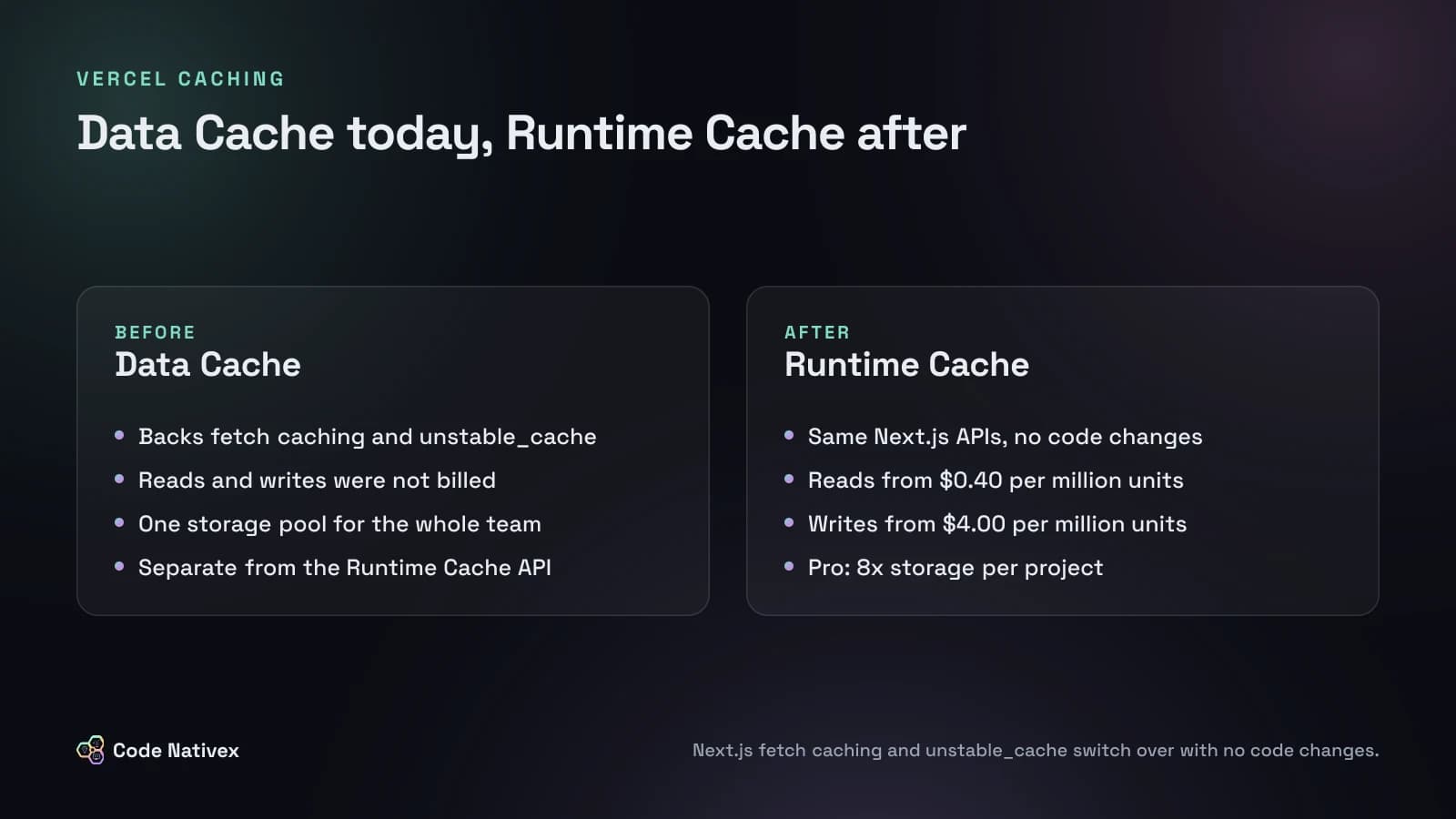
The Data Cache migration changelog covers four things.
- One cache product. Next.js
fetchcaching andunstable_cachemove from Data Cache to Runtime Cache on every Next.js version, with no code changes. They joingetCachefrom@vercel/functionsand the'use cache: remote'directive, so all four share one storage budget and one set of usage tools. - New billing. Data Cache reads and writes that were previously unbilled will be charged at Runtime Cache prices once your team migrates.
- More storage. On Pro, each project and environment gets its own allocation, 8x the old team-wide Data Cache pool. Enterprise projects get 10x their previous storage.
- A rollout by plan. Teams created on or after October 30 use Runtime Cache by default. Hobby teams migrate on November 29, 2026. Pro teams get a notice with their date, and Enterprise teams hear from their account team. Hobby and Pro teams can opt in early from CDN settings, and pricing applies from the moment they do.
The more storage is real good news. Fewer evictions mean more cache hits and fewer trips to your database. But the bill now depends on how your app reads and writes the cache, and most teams have never looked at that.
How Vercel Runtime Cache pricing works
According to the Runtime Cache docs, usage is billed as two line items, priced by the region where your functions run:
- Runtime Cache Reads: $0.40 to $0.64 per million read units.
- Runtime Cache Writes: $4.00 to $6.40 per million write units.
One read unit or write unit is 8 KB, rounded up for each operation. A 1 KB entry costs one unit to read. A 100 KB entry costs 13. Writes cost ten times as much as reads per unit, so an entry that is rewritten often can cost more than one that is read often.
What you pay depends on your plan:
- Hobby includes 1 million read units and 200,000 write units a month, shared across all projects. You are not charged for going over, but Runtime Cache is paused for the rest of the period, which means every request goes to your database or API.
- Pro usage draws from the $20 monthly infrastructure credit first, then bills at the regional rate.
- Enterprise rates come from your contract.
There are also limits that did not matter much before: 2 MB per item, 128 tags per item, and a cap on revalidation calls per second (50 per team on Hobby, 200 per team on Pro).
Estimate your bill before the migration
You do not need to guess. Here is how we would estimate it for a typical Next.js SaaS app, using made-up traffic and Vercel's published rates.
Say a product page reads three cached entries per request, each about 20 KB. Each read rounds up to 3 units, so one request costs 9 read units. At 10 million page requests a month, that is 90 million read units: $36 a month at the lowest regional rate, or $57.60 at the highest.
Writes are where surprises hide. Say a shared layout fetches a 500 KB navigation and catalog payload with revalidate: 60. Each refresh writes 63 units. If steady traffic keeps it refreshing once a minute for 30 days, that is 43,200 writes, or about 2.7 million write units: roughly $11 a month in one region at $4.00 per million, before you count any other region your functions run in.
Neither number is frightening on its own. The problem is that apps rarely have one of these. They have dozens, and nobody has added them up because the cost used to be zero. Run the same arithmetic on your five biggest cached calls and you will know whether this migration is a rounding error or a line item.
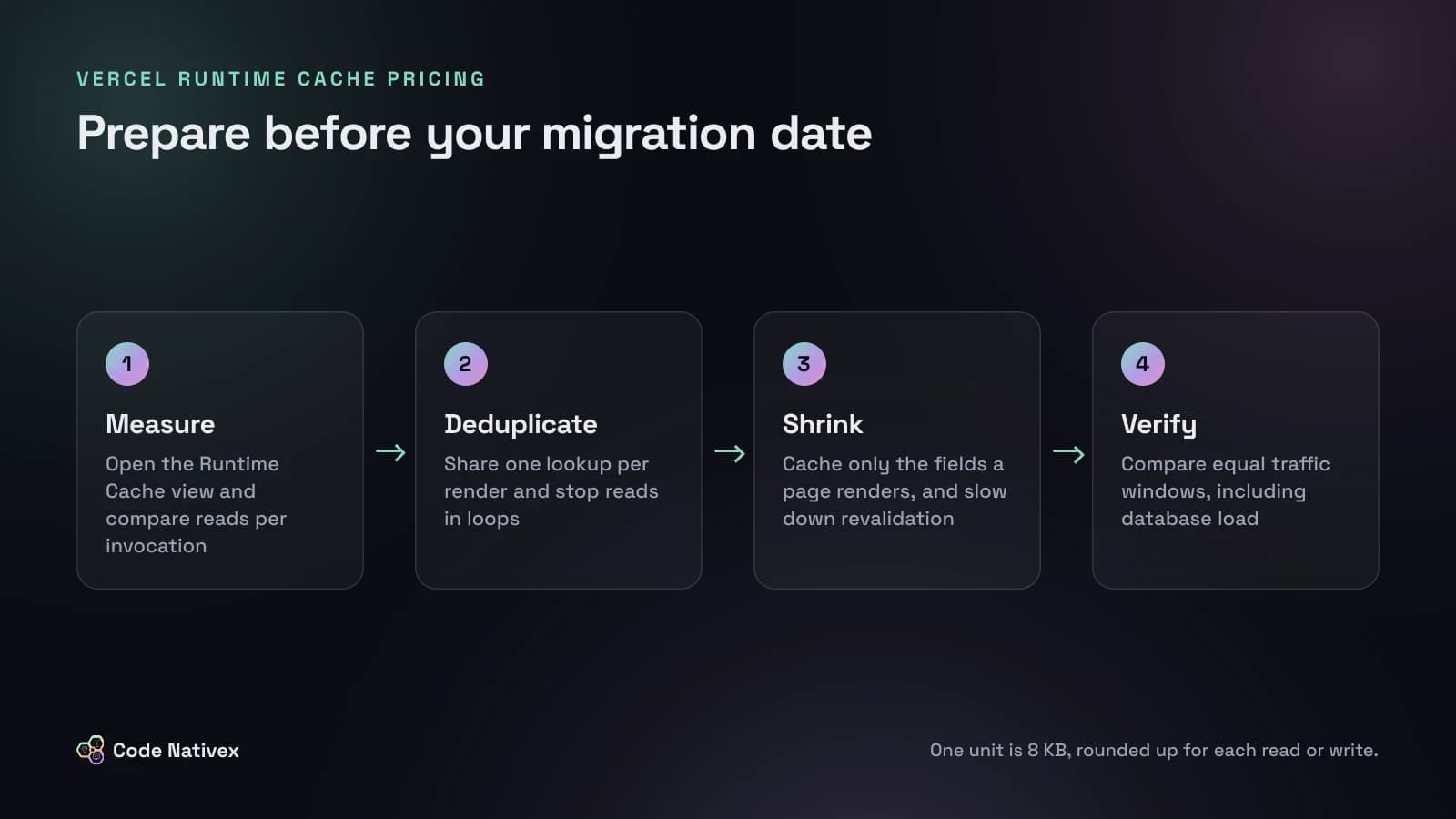
To get real numbers, open the Runtime Cache view under Observability for each project. Vercel's read optimization guide suggests dividing cache reads by function invocations over the same window. If one request needs three entries but the ratio says twelve, something is reading the same key repeatedly.
The five patterns that inflate cache costs
These are the patterns we look for first when we audit a Next.js app, and they line up with what Vercel's guide flags.
- 1.Repeated reads in one request. Three server components each call the same cached helper, and each call is a separate lookup.
- 2.Reads inside loops. Twenty-four products read as 24 separate 2 KB entries cost 24 read units. Grouped into one 48 KB entry, they cost 6.
- 3.Oversized entries. Caching a whole API response when the page uses three fields. Vercel's example: reading a 500 KB entry to use 2 KB costs 63 read units.
- 4.Short revalidate times in shared code. A
revalidate: 60fetch in a root layout can refresh every minute while traffic flows, and Vercel notes it also lowers the revalidation interval of every route that uses the layout. Each refresh is a full write. - 5.Caching cheap work. Vercel notes that an operation around 50 ms may gain little from a remote cache. Build-time values belong in the bundle or environment variables, not in a cache.
Grouping and splitting pull in opposite directions, so there is no single rule. Group small entries that are always read together. Split large entries when a route only needs a slice, or when parts change on different schedules.
Fixes worth making before your migration date
The cheapest fix is often deduplication. React's cache() makes repeated calls within one render share a single result, so several components can ask for the same data and you pay for one lookup:
import { cache } from "react";
import { getCache } from "@vercel/functions";
import { db } from "@/lib/db";

// Every component in one render shares this single lookup.
export const getFeaturedProducts = cache(async () => {
  const runtimeCache = getCache();
  const hit = await runtimeCache.get("products:featured");
  if (hit) return hit;

  const products = await db.product.findMany({
    where: { featured: true },
    select: { id: true, name: true, priceCents: true, imageUrl: true },
  });
  await runtimeCache.set("products:featured", products, {
    ttl: 3600,
    tags: ["products"],
  });
  return products;
});
Note the select: caching only the fields the page renders keeps each entry small, which cuts read and write units at the same time.
After that, work through this list in order:
- Move whole pages to the CDN where you can. A page served from the CDN with ISR or
Cache-Controlheaders never runs your function, so it never reads the runtime cache. Middleware is the exception, because it runs before the CDN. - Raise revalidate times, or switch to tags. Most data does not change every minute. Revalidating on the event that changes it, with
revalidateTag, usually means fewer writes and fresher data. - Choose `'use cache'` versus `'use cache: remote'` on purpose. Plain
'use cache'stays in memory on the instance instead of going to Runtime Cache. Use the remote variant only for data other instances genuinely need. Also note that in Next.js 16,'use cache: remote'entries are keyed by build, so every deployment starts with an empty cache and a burst of writes. - Verify with equal windows. Compare a week before and after with similar traffic, and check origin load too. Fewer cache reads are not a win if your database now takes the hit.
If your app does a lot of background refreshing, our guide to background jobs in Next.js covers when to move that work out of the request path entirely. And if you are already trimming client code, the same audit mindset from reducing Next.js bundle size applies here.
How we design caching on client projects
On Capitalista, an investment platform we built with Next.js and Stripe, we split the marketing site from the dashboard on purpose. Marketing pages are static and edge-cached, so visitors arriving from Google never trigger a function. The authenticated dashboard is server-rendered, and its server cache invalidates on the events that matter to an investor: a deposit, a position change, a payout.
That design ages well under the new pricing. Event-driven invalidation writes only when data changes, not on a timer, and edge-cached pages keep most traffic away from the runtime cache entirely. It is the same approach our web app development team uses on new builds: decide per route whether the CDN, an in-memory cache, or a shared remote cache is the right layer, and write that decision down.
Should you opt in early?
Early opt-in starts billing immediately, so the only reason to do it is to get clean numbers sooner. For most teams, a better plan is to review usage now, fix the obvious waste, and let the migration happen on Vercel's schedule.
Turning off fetch and unstable_cache caching in CDN settings is not an escape hatch. It does not stop the migration, and it sends every request to your data sources, which usually costs more in database load than the cache ever would.
Conclusion
The Data Cache migration is a reasonable change: one cache product, much more storage, and clearer tools. But it turns caching from a free default into a metered resource. Teams that measure reads per request, shrink their entries, and replace timer-based revalidation with events will barely notice the new line item. Teams that do not will find out on their first invoice.
If you want someone to audit your Next.js caching before your migration date, get in touch with our team.
Frequently asked questions
- Do I need to change my Next.js code for the Vercel Data Cache migration?
- No. Vercel says Next.js fetch caching and unstable_cache switch over to Runtime Cache on every version without code changes. What changes is billing and storage, so the work is reviewing usage, not rewriting code.
- How much does Vercel Runtime Cache cost?
- Reads cost $0.40 to $0.64 per million read units and writes cost $4.00 to $6.40 per million write units, depending on the region where your functions run. One unit is 8 KB, rounded up for each operation.
- When does my team move from Data Cache to Runtime Cache?
- Hobby teams migrate on November 29, 2026. Pro teams receive a notice with their migration date and billing start, and Enterprise teams hear from their account team. Teams created on or after October 30, 2026 already use Runtime Cache.
- What happens on the Hobby plan if I go over the Runtime Cache allowance?
- Hobby includes 1 million read units and 200,000 write units a month across all projects. You are not charged for going over, but Vercel pauses Runtime Cache for the rest of the period, so your app hits its data sources directly.
- Can I opt out of the Runtime Cache migration?
- No. You can disable fetch and unstable_cache caching in your team's CDN settings, but that only sends more requests to your database and APIs. It does not stop the migration.
Written by
Shumail Rafique
Senior full stack developer at Code Nativex, building scalable web applications with modern technologies.
Meet the team