Stripe Pause Subscription: How Native Pausing Works, and When to Offer It
Stripe can now truly pause a subscription, stop invoicing, and let customers do it themselves in the customer portal. Here is what changed, how it differs from pausing payment collection, and how to wire it into a SaaS app.
 Tayyeb FeroziSenior Full Stack Developer
Until this fall, "Stripe pause subscription" meant a workaround. You could pause payment collection, but the subscription kept generating invoices, and true pausing needed custom code or a third-party retention tool. That changed in two Stripe API releases: a native pause endpoint arrived on September 30, 2026, and on October 28 Stripe added self-serve pausing to the customer portal. This guide covers what shipped, how a pause differs from pausing collection, what to check before you turn it on, and how to wire it into a SaaS app so access and billing never drift apart.
What Stripe shipped in September and October 2026
Three entries in the Stripe API changelog matter here.
- Pause and resume on demand (2026-09-30.endive). Subscriptions get a
pausemethod and apausedstatus, plus astatus_detailsobject that says when and why the pause happened. Resuming gains apayment_behavioroption, and subscription schedules gainpause_schedulesfor pausing on a future date. - Automatic pause after payment failures (2026-09-30.endive). You can have Stripe pause an eligible subscription after the first failed renewal payment, or after retries run out, instead of leaving it past due.
- Pausing in the customer portal (2026-10-28.endive). Customers can pause from the redesigned portal, and you control whether they choose from preset durations or pause indefinitely.
All three are optional and non-breaking. Nothing changes for your customers until you turn them on.
Pause vs. pause collection: pick the right promise
Stripe now has two features with "pause" in the name, and they make different promises to the customer.
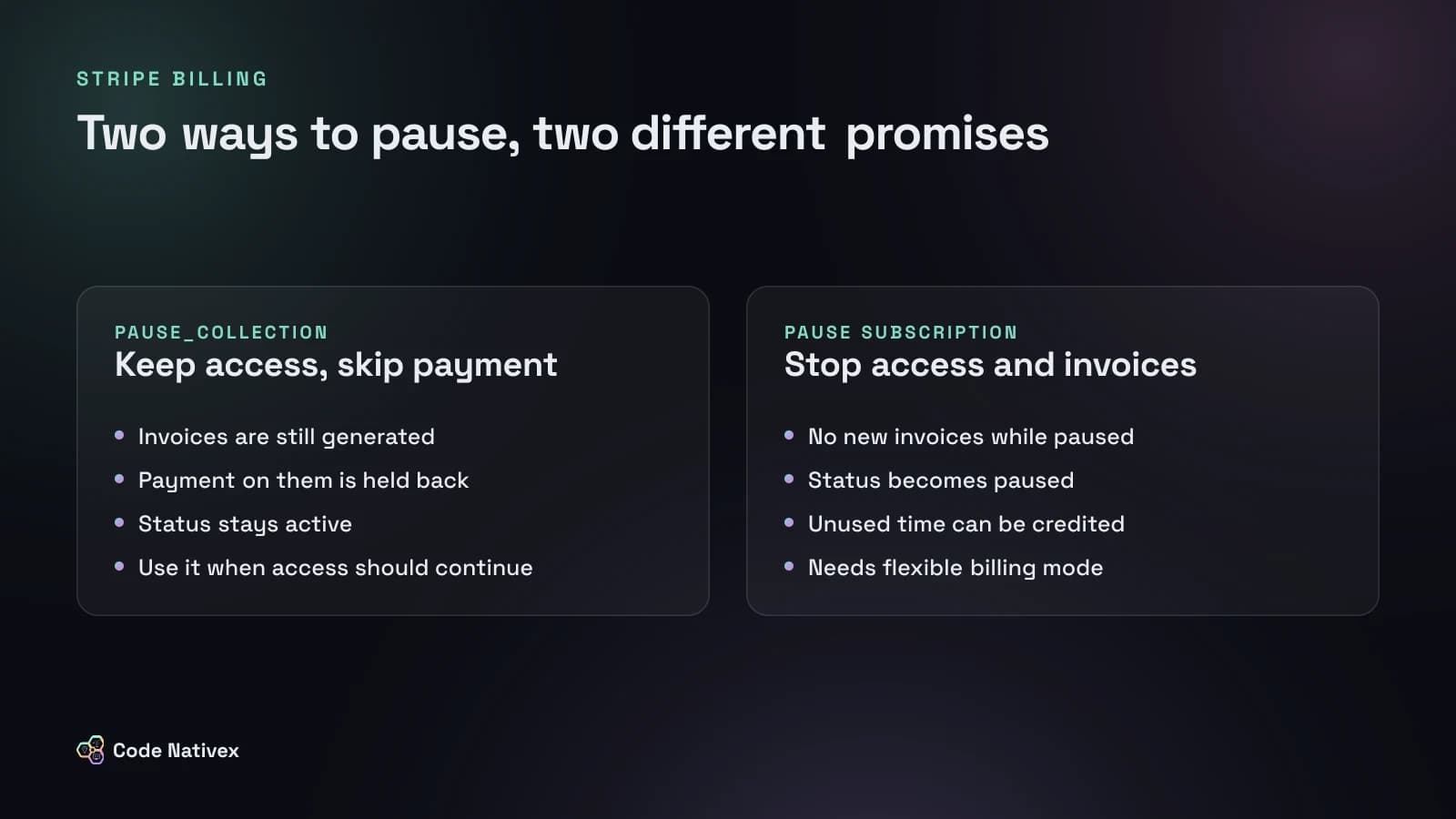
Pausing payment collection (pause_collection) keeps the subscription active. Stripe still generates invoices on schedule but holds back payment on them. Use it when you want the customer to keep using the product while you give them breathing room, for example during a billing dispute or a short cash-flow problem.
Pausing the subscription stops it. According to Stripe's pause guide, the status becomes paused, the current period ends at the moment of the pause, and no new invoices are generated until you resume. It is built for "I'm not using this for a while": a seasonal business, a team between projects, a customer on leave.
A simple test: if the customer should still be able to log in and work, use pause_collection. If you are switching their service off and they are not paying, use a real pause.
Before you turn it on: the eligibility checklist
Native pausing has conditions, and older Stripe integrations often fail several of them. Stripe will refuse to pause a subscription that:
- Uses classic billing mode. Pausing requires flexible billing mode. Accounts on API version 2025-09-30.clover or later create flexible subscriptions by default, but older subscriptions stay classic until you migrate them, and the migration is one-way.
- Uses send_invoice collection. The subscription must charge automatically.
- Has an active subscription-level free trial, an attached subscription schedule, or an active billing schedule.
- Is
unpaid,incomplete, or alreadycanceled.
Two side effects are easy to miss. A coupon keeps running while the subscription is paused, so a three-month discount can expire during a three-month pause. And if you call Stripe with a restricted API key, it needs the subscription_write permission.
Before enabling anything in production, run a query across your subscriptions for billing mode and collection method. It turns "why can't this customer pause?" support tickets into a one-time migration task.
How billing works when you pause and resume
When you pause through the API or the Dashboard, the bill_for parameter decides what happens to the current period. By default Stripe credits unused licensed time from the pause date and bills metered usage up to that point. The credits land as pending invoice items unless you ask for an immediate invoice.
Stripe's guide walks through a clear example: a 30 USD monthly plan paused on day 15 creates a 15 USD credit. When the customer resumes on day 45 with a fresh billing cycle, the resumption invoice nets that credit against a new 30 USD period, so they pay 15 USD and a new 30-day cycle starts.
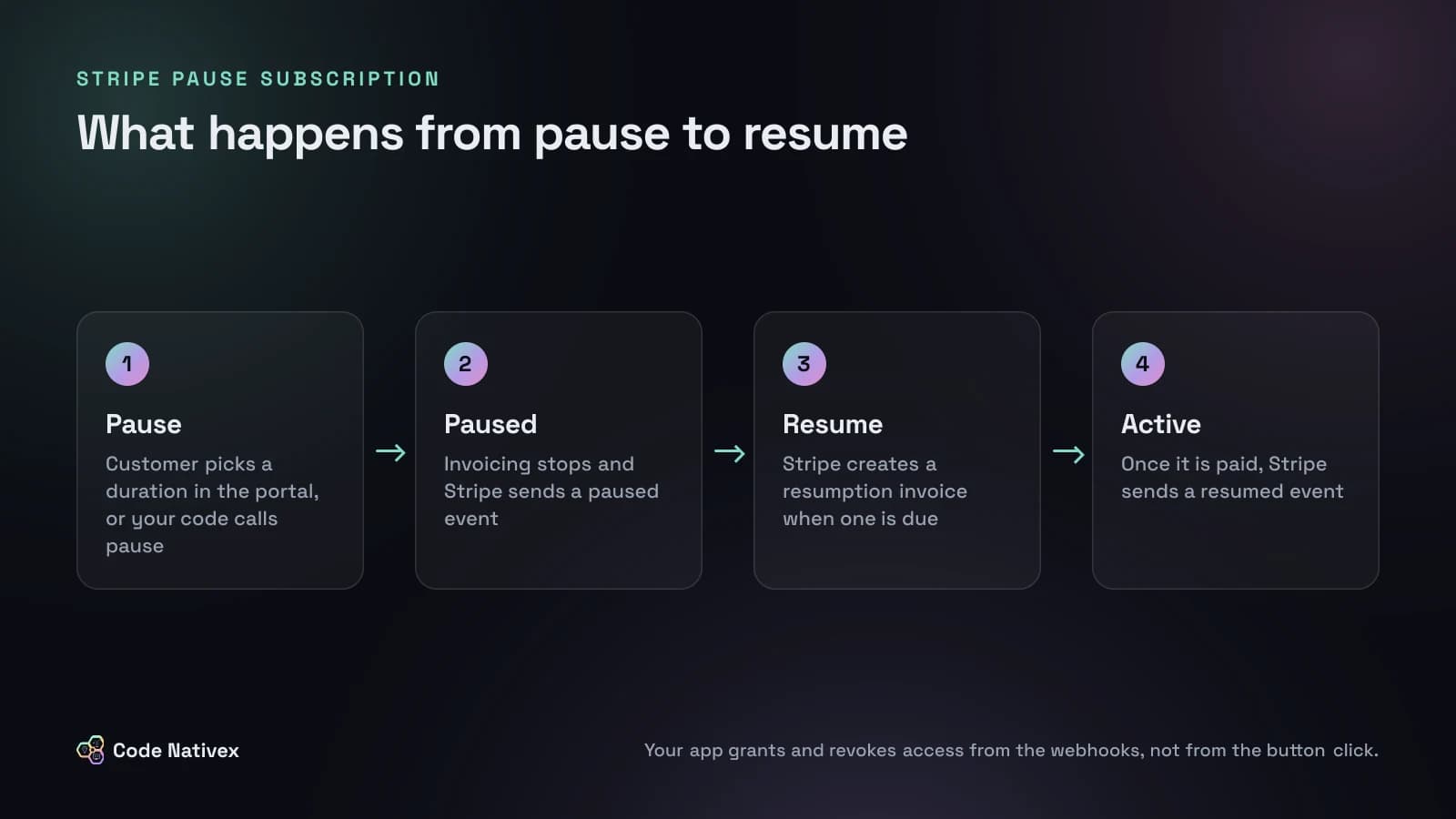
Resuming is where most bugs will hide. If resuming produces an invoice, the subscription is not active until that invoice is paid or marked uncollectible. Stripe offers two payment_behavior options:
- resume_on_payment_attempt (the default) does not charge the customer for you. If a later payment fails, the subscription goes
past_due, not back topaused. - resume_on_payment_success (Stripe's recommendation) charges the default payment method immediately. If the payment fails, the subscription stays paused and normal retries apply.
Stripe also warns that a resume request can return a 200 response while the subscription is still paused and waiting for payment. Always check the returned status before you restore access.
Wiring pause into a SaaS app
There are two ways to let customers pause. The low-effort option is the customer portal: enable features.subscription_pause in your portal configuration and set duration to the options you are willing to offer, such as one, two, or three months. You can also send a customer straight into the pause flow for one subscription by creating a portal session with flow_data.type set to subscription_pause. The custom option is your own settings page calling the pause and resume endpoints, which gives you full control over copy and offers.
Either way, the rule is the same: the webhook is the source of truth for access, not the button the customer clicked. Stripe sends customer.subscription.paused and customer.subscription.resumed, along with customer.subscription.updated and an entitlements event. A minimal handler looks like this:
// Inside your verified Stripe webhook route
switch (event.type) {
  case "customer.subscription.paused": {
    const sub = event.data.object as Stripe.Subscription;
    await db.account.update({
      where: { stripeSubscriptionId: sub.id },
      data: { access: "paused", pausedAt: new Date() },
    });
    break;
  }
  case "customer.subscription.resumed": {
    const sub = event.data.object as Stripe.Subscription;
    await db.account.update({
      where: { stripeSubscriptionId: sub.id },
      data: { access: "active", pausedAt: null },
    });
    break;
  }
}
A few more decisions to make up front:
- What a paused user sees. Read-only access to their data is usually kinder than a locked screen, and it reminds them why they should come back.
- Automatic pause after failed payments. Turn it on if your product is easy to switch off and back on. The triggering invoice stays collectible, and you can choose to resume automatically once it is paid.
- Reporting. Paused customers are neither active nor churned. Give them their own status in your database so MRR and churn numbers stay honest. If you mirror Stripe data into your own database, our guide on syncing Stripe data to Postgres covers how to keep those statuses current.
Test the whole flow with Stripe's test clocks, which let you jump forward through a pause and resume and confirm that the right webhooks fire at the right time.
What we would do on a real subscription product
On America Working, a subscription platform we built, we implemented Stripe end to end: checkout, plans, webhooks, dunning, and the Customer Portal. Stripe events update entitlements inside a single Postgres transaction, so a partial failure cannot leave a user half-upgraded. Pausing slots straight into that design. A paused event is one more entitlement change, handled in the same transaction as every other billing event.
If we were adding pause to a product like that today, we would ship it in this order: migrate subscriptions to flexible billing mode in a test environment first, add the two webhook handlers and a paused access state, enable portal pausing with two or three fixed durations, and only then consider automatic pausing on payment failure. If you want help planning the billing side of a product, that is the kind of work our SaaS development team does every week.
Should you offer a pause at all?
A pause is a retention tool, so treat it like one. It works best for products with natural off-seasons, such as tax, education, events, or agency tools, and for customers who would otherwise cancel for a temporary reason. It works less well when usage is daily and a pause is really a slow cancel.
Be careful with the churn numbers you find online. Most published figures come from vendors that sell pause and cancellation tools. A better measure is your own: of the customers who paused, how many resumed, and how does that compare with winning back customers who canceled? Put the pause option where people are already leaving, inside the cancel flow, and limit durations so a pause has a clear end date.
Conclusion
Stripe's native pause finally matches what customers mean when they ask to "pause my plan": no access, no invoices, and a clean way back. Getting it right is mostly preparation. Move subscriptions to flexible billing mode, drive access from webhooks, choose a resume behavior on purpose, and report paused customers on their own line.
If you are building or fixing subscription billing and want a second pair of eyes on the plan, tell us about your project.
Frequently asked questions
- Can you pause a subscription in Stripe?
- Yes. Stripe added a pause endpoint for subscriptions in the 2026-09-30.endive API release. A paused subscription has the status paused and stops generating invoices until it is resumed. It must use flexible billing mode and charge_automatically collection.
- Can customers pause their own subscription in the Stripe customer portal?
- Yes, since the 2026-10-28.endive release, in the redesigned customer portal. You turn it on with features.subscription_pause.enabled in a portal configuration and can limit customers to preset durations of days, weeks, months, or years, up to three years.
- What is the difference between pause_collection and pausing a subscription in Stripe?
- pause_collection keeps generating invoices but holds back payment on them, so it suits keeping a customer's access while you give them breathing room. Pausing the subscription stops invoices entirely and sets the status to paused, which is meant for stopping service.
- What happens to billing when a paused Stripe subscription resumes?
- If resuming produces an invoice, Stripe finalizes it right away and the subscription becomes active once it is paid or marked uncollectible. With payment_behavior set to resume_on_payment_success, a failed payment leaves the subscription paused instead of past_due.
- Does offering a pause option actually reduce churn?
- It can catch customers who would otherwise cancel for a temporary reason, such as a seasonal business or a budget freeze. Most published churn figures come from vendors selling pause tools, so measure it yourself: compare how many paused customers resume against your normal win-back rate.
Written by
Tayyeb Ferozi
Senior full stack developer at Code Nativex, delivering full-cycle products from the database and backend to the user interface.
Meet the team