WebSockets on Vercel Are Now GA: How to Add Real-Time Features to Your Next.js App
Vercel Functions can now hold WebSocket connections in production. Here is when that is the right tool for chat, presence, and live dashboards, and what to design around before you ship it.
 Shumail RafiqueSenior Full Stack Developer
For years the honest answer to "can I run WebSockets on Vercel?" was no: you deployed your Next.js app on Vercel and ran a separate socket server or paid for a real-time service. That changed on October 20, 2026, when Vercel made WebSockets on Vercel Functions generally available. This guide explains what shipped, when a WebSocket is the right choice over simpler options, how the Next.js setup works, and the four design decisions that decide whether your real-time feature stays reliable after launch.
What Vercel shipped
According to Vercel's announcement, WebSocket support in Vercel Functions moved from public beta, which started in late June, to general availability. Vercel says its CDN has already served 300 million WebSocket connections and handles about 15 million a day, mostly for AI chat, streaming, and multiplayer apps.
The details that matter for planning, from the WebSockets documentation:
- It is available on all plans, including Hobby.
- It requires Fluid compute, which is the default for projects created on or after April 23, 2025. Older projects may need to turn it on.
- A connection is pinned to one function instance for its whole life, and one instance can serve many connections.
- The upgrade request goes through your normal stack: Routing Middleware, rewrites, Firewall rules, and rate limits all apply before the socket opens.
- Billing is ordinary function billing. You pay for function usage while the connection is open, plus data transfer. With Active CPU pricing, CPU is charged only while messages are being processed.
That last point is why this matters for startups. A chat or presence feature no longer means a second piece of infrastructure, a second deploy pipeline, and a second bill. It lives in the same repository and the same deploy as the rest of your app.
Do you actually need WebSockets?
Before writing any socket code, check which direction your data flows. Most "real-time" features in a SaaS product only push data from the server to the browser: a notification badge, a job progress bar, a dashboard number that changes, an AI answer streaming in. For those, Server-Sent Events (SSE) or a streamed HTTP response are simpler. They run over plain HTTP, the browser reconnects SSE for you, and user actions go through ordinary POST requests or Server Actions.
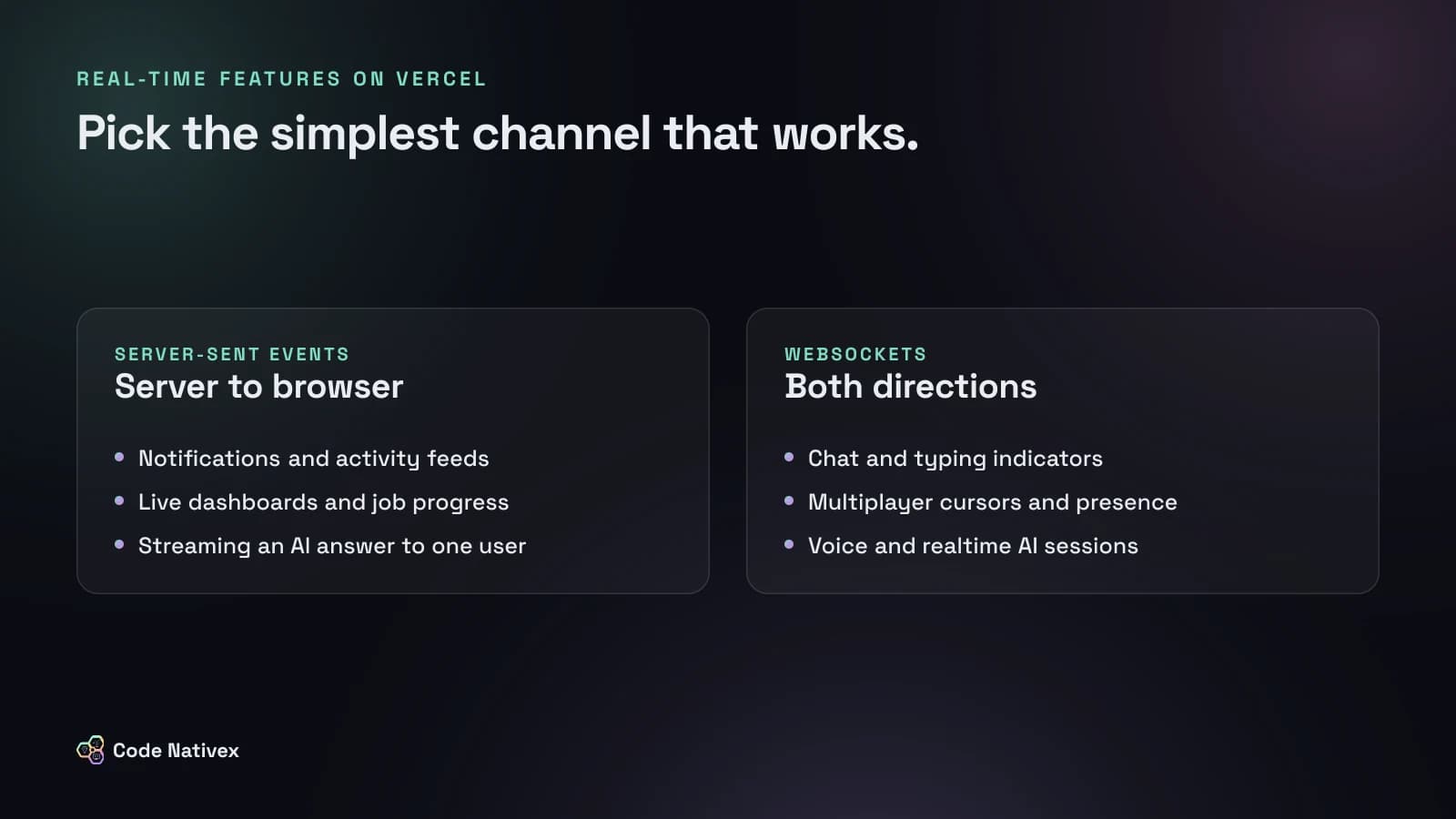
WebSockets earn their extra complexity when the browser also sends a steady stream of small messages:
- Chat with typing indicators and read receipts
- Presence: who is online, who is viewing this record
- Multiplayer cursors or collaborative editing
- Voice and realtime AI sessions, where audio flows both ways
A useful test: if you can describe the feature as "the server tells the user when something changes", start with SSE. If it is "users see each other act, live", you want a WebSocket.
How WebSockets work in a Next.js app on Vercel
Next.js itself has no API for upgrading a request to a WebSocket. Vercel fills the gap with upgradeWebSocket() from @vercel/functions, which needs version 3.10.0 or later and the ws package. You call it from a GET Route Handler. If your app uses Cache Components, call connection() first so the route is never prerendered.
Here is a room channel that relays messages between everyone in the same room, using Redis pub/sub so it works across instances:
// app/api/rooms/[id]/ws/route.ts
import { connection } from "next/server";
import { upgradeWebSocket, type WebSocketData } from "@vercel/functions";
import Redis from "ioredis";

export async function GET(_req: Request, ctx: { params: Promise<{ id: string }> }) {
  await connection();
  const { id } = await ctx.params;
  // Check the user's session and room access here, before upgrading.
  const channel = `room:${id}`;

  return upgradeWebSocket((ws) => {
    const pub = new Redis(process.env.REDIS_URL!);
    const sub = new Redis(process.env.REDIS_URL!);
    sub.subscribe(channel);
    sub.on("message", (_ch, msg) => ws.send(msg));
    ws.on("message", (data: WebSocketData) => pub.publish(channel, data.toString()));
    ws.on("close", () => { sub.quit(); pub.quit(); });
  });
}
Two practical notes. First, local development needs vc dev from the Vercel CLI (version 54.14.2 or later) instead of next dev, as the `upgradeWebSocket` reference explains. Second, this sketch opens two Redis connections per socket to stay short. In production, share one subscriber per function instance and route messages to local sockets in memory.
If your backend is a separate Express, Hono, Bun, or FastAPI service on Vercel, you do not need the helper at all: the standard ws library and native framework support work as they would on any server.
The four design decisions that matter
The code above is the easy part. These four decisions are where real-time features break in production.
1. Connections end, so reconnect by design
A WebSocket on Vercel closes when the function reaches its maximum duration: 300 seconds on Hobby, up to 800 seconds on Pro and Enterprise, and 1,800 seconds as an extended maximum in beta. A deploy also leaves old connections on the previous version until they close.
So treat a disconnect as normal, not as an error. The client should reconnect with backoff (Vercel's docs show 1 second doubling to a 30 second cap), resubscribe to its rooms, and reload any state it missed. If you use React, put this in one hook and never let components open sockets directly.
2. Keep state outside the function
Because each socket lives on one instance, and a reconnect can land on a different one, in-memory variables lie. A Set of online users inside the function only knows about the users on that instance. Rooms, presence, counters, and message fan-out belong in a shared store such as Redis, which Vercel offers through its Marketplace.
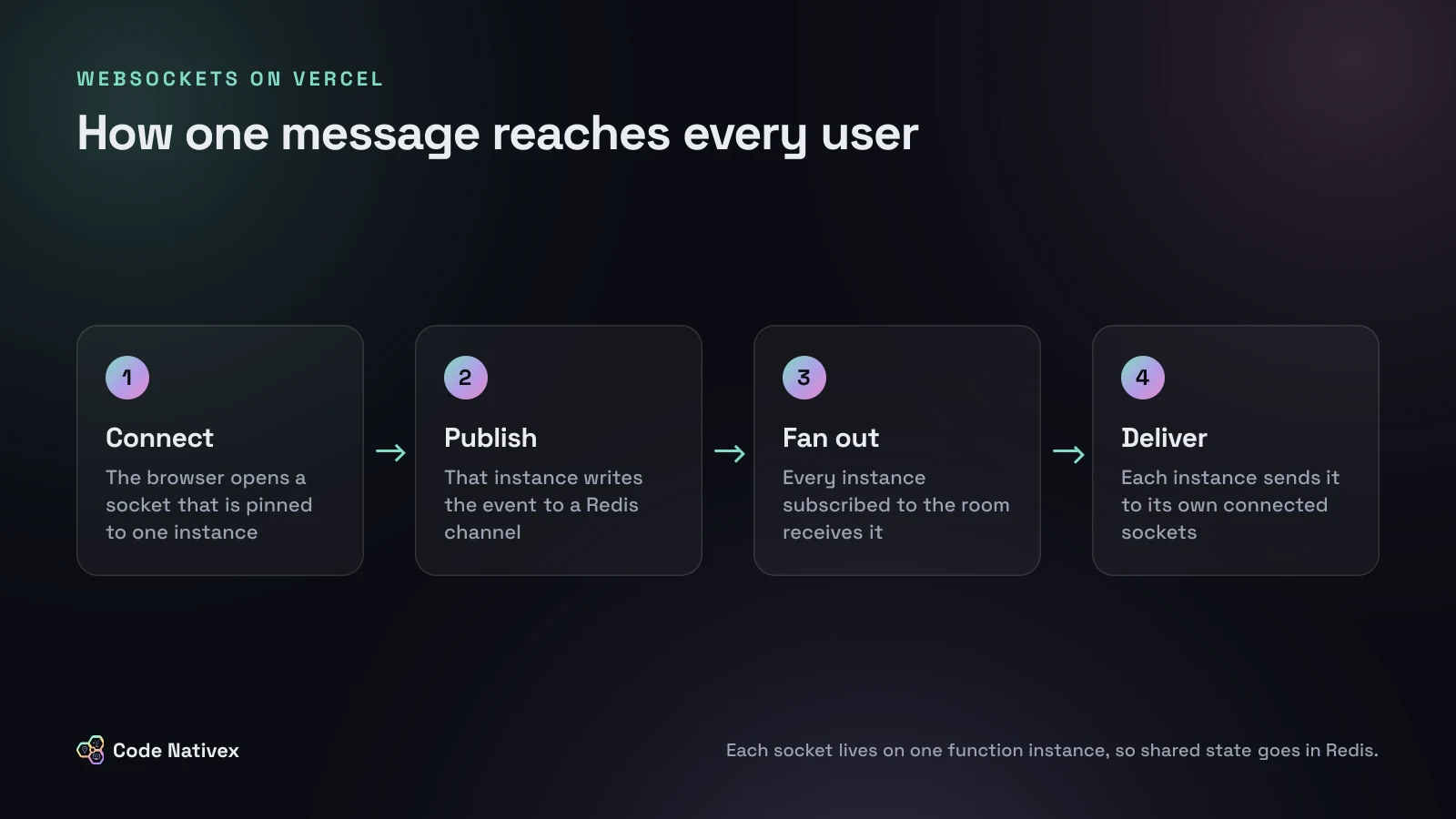
The same rule applies to durable data. A chat message should be written to Postgres first and broadcast second, so a user who reconnects can load what they missed. The socket is a delivery channel, not your database.
3. Authenticate before the upgrade
The upgrade starts as a normal GET request, so check the session cookie and the user's access to the room before calling upgradeWebSocket(). After the upgrade, validate every incoming message as untrusted input, cap message size (the helper's maxPayload defaults to 256 KiB), and use Vercel's Firewall rate limits on the socket path to stop one client from opening hundreds of connections.
4. Watch the cost of idle sockets
A connection counts as function usage for as long as it is open. One socket per active user on a collaboration screen is fine. A socket opened on every marketing page "just in case" is not. Open connections only on screens that need them, close them when the tab is hidden for a while, and check your usage dashboard during the first week. Our guide to scaling a SaaS application stage by stage covers how to keep infrastructure costs proportional to real usage.
When a managed real-time service still wins
Native WebSockets on Vercel will cover chat, presence, and live collaboration for most early and growth-stage products. A managed service such as Ably, Pusher, or Liveblocks can still be the better buy when you need guaranteed message ordering and history, very large broadcast audiences, or ready-made presence and conflict resolution for collaborative editing. That logic is genuinely hard, and buying it can be cheaper than building it.
A reasonable path for a startup: start with SSE for one-way updates, add native WebSockets for the one or two features that need two-way traffic, and move to a managed service only when you hit a concrete limit. If you also run long tasks such as imports or AI pipelines, pair this with the patterns in our post on background jobs in Next.js, so slow work never runs inside a socket handler.
How we approach real-time features for clients
Real-time is a product decision before it is a technical one. When we built Capitalista's fundraising platform, one of the core requirements was a real-time investor dashboard: positions, returns, and an activity feed that refresh without page reloads. The first question we ask on any project like that is which updates the user truly needs live and which can arrive a few seconds later, because that answer decides between SSE, WebSockets, or plain revalidation.
If you are planning a SaaS product with chat, live dashboards, or collaboration, our SaaS development service covers the architecture, the build, and the monitoring that keeps sockets healthy after launch.
Conclusion
WebSockets on Vercel remove the main reason Next.js teams ran a second server. They do not remove the design work: pick SSE when data flows one way, reconnect by design, keep shared state in Redis and Postgres, authenticate before the upgrade, and watch idle connections. Get those right and real-time becomes one more route in your app instead of a separate system.
Planning a real-time feature and not sure which approach fits? Tell us what you are building and we will recommend the simplest setup that will hold up.
Frequently asked questions
- Does Vercel support WebSockets?
- Yes. Vercel Functions support WebSocket connections on all plans. The feature entered public beta in June 2026 and became generally available on October 20, 2026. It requires Fluid compute, which is on by default for projects created since April 2025.
- How do I use WebSockets in a Next.js app on Vercel?
- Next.js has no built-in API for WebSocket upgrades, so Vercel provides upgradeWebSocket() in @vercel/functions version 3.10.0 or later. You call it from a GET Route Handler. For local development you run the app with vc dev instead of next dev.
- How long can a WebSocket connection stay open on Vercel?
- A connection closes when the function reaches its maximum duration. Vercel lists 300 seconds on Hobby, and up to 800 seconds on Pro and Enterprise, with a 1,800 second extended maximum in beta. Your client should reconnect automatically when that happens.
- Should I use WebSockets or Server-Sent Events for notifications?
- Server-Sent Events are usually enough for notifications, activity feeds, and progress bars, because data only flows from the server to the browser. Use WebSockets when the browser sends frequent messages too, such as chat, cursors, or collaborative editing.
- Do I still need Pusher, Ably, or another real-time service?
- Not always. Native WebSockets on Vercel cover many SaaS features if you add Redis for shared state. A managed service still makes sense if you need guaranteed message history, very large fan-out, or you do not want to own reconnect and presence logic.
Written by
Shumail Rafique
Senior full stack developer at Code Nativex, building scalable web applications with modern technologies.
Meet the team