App Store Age Rating Update: The Two New Questions Every App Must Answer by January 2027
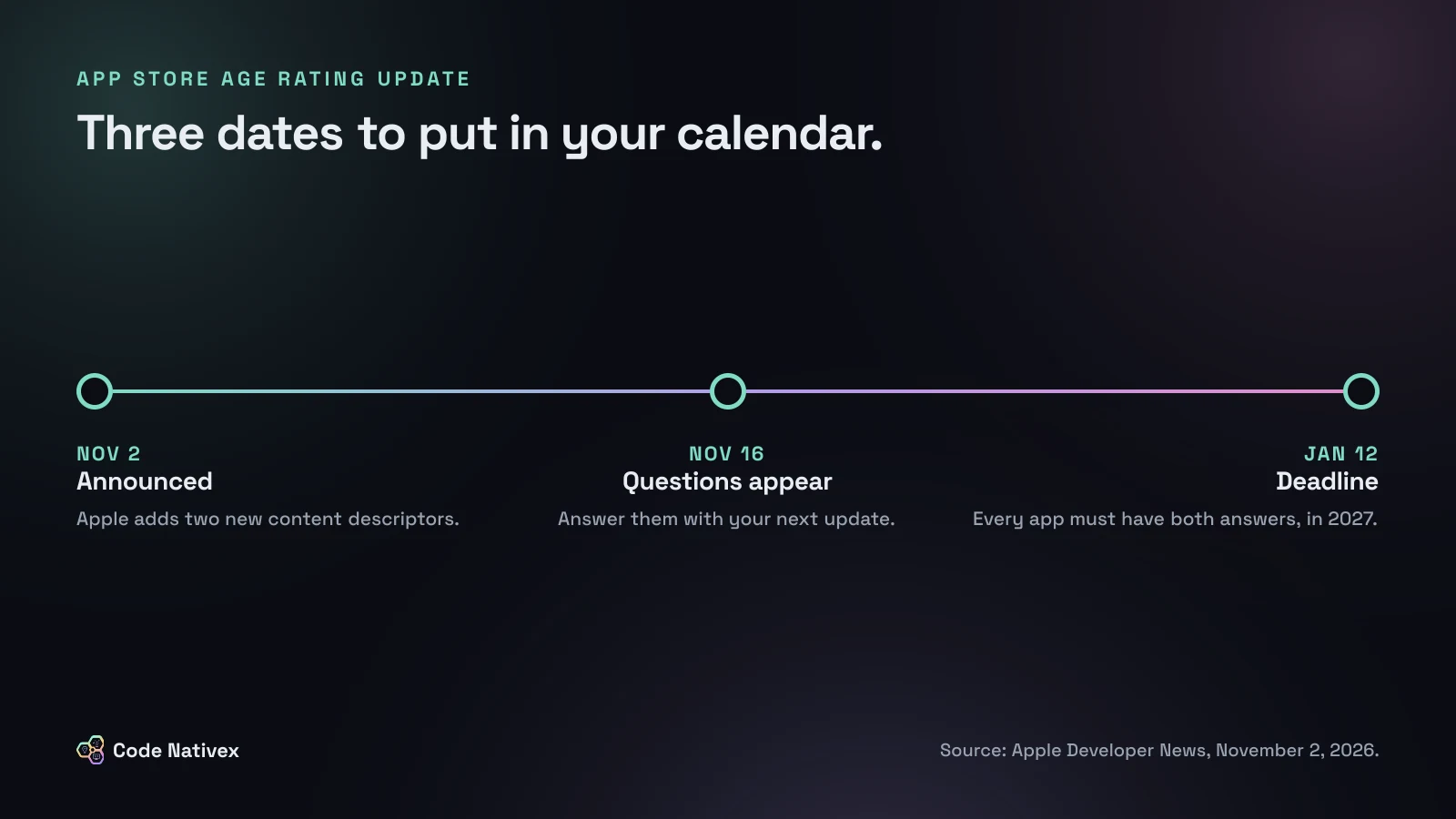
From November 16, App Store Connect asks two new age rating questions, and every app must answer them by January 12, 2027. Here is what they mean, which apps they affect, and how to answer without surprises.
 Raja ZiafatCEO & Founder
Apple has announced an App Store age rating update that touches every app on the store. From November 16, 2026, the age rating questionnaire in App Store Connect adds two new questions, one about sharing location and one about dating and relationships, and every app must answer them by January 12, 2027. For most apps, both answers will be no and nothing changes. For apps with live location sharing, matching, or AI companions, the answers can change who can download the app. This guide explains what Apple asks, which apps are affected, how the answers change your rating, and how to prepare before your next release.
What Apple announced
Apple's developer news post of November 2 says App Store Connect will add new content descriptors so that age ratings reflect app features and local regulations. When you complete the age rating questionnaire, you will need to declare whether your app includes:
- Shared Location: sharing of real-world location with another person or group.
- Dating and Relationships: features that enable dating or relationship connections between real people, and/or a virtual companion that engages a user in sexual or romantic content.
You must give these answers when you submit an app update or change your questionnaire. All apps must have them completed by January 12, 2027.
How the answers change your rating
Apple's age ratings run 4+, 9+, 13+, 16+, and 18+, and are generated from your questionnaire answers. Its age rating reference explains that parental controls use the rating, so it decides whether a child's device will allow your app at all.
The two new questions work differently:
- Dating and Relationships sets a minimum rating of 18+. That applies to dating and matchmaking apps, and to apps with a virtual companion that engages users in sexual or romantic content.
- Shared Location may not change the minimum rating in some regions, according to Apple. It is still a declaration you must make accurately.
- Brazil has its own rules. Local regulations require an A16 rating for Shared Location and A18 for Dating and Relationships. If you believe your app qualifies for a lower rating there, such as location sharing designed for parents and children, Apple says you can request an official rating from Brazil's Ministry of Justice and Public Security.
For an app that today sits at 4+ or 9+, moving to 18+ can remove it from every family and school device where parental controls are on. That is a product decision, not a form to fill in.
Which apps are affected
Shared Location is about one person's real-world location being shared with another person or group. Apps that should look closely include:
- family and friend locator apps
- social apps that let users share a live location or check in with friends
- fitness apps that share a live run or ride with others
- safety apps that send location to contacts
- team and field-service apps where staff share their position with colleagues
Apps that only use location for the user's own benefit, such as showing nearby stores or weather, are a different case from sharing it with another person. Read Apple's definition against what your app actually does.
Dating and Relationships is narrower but has bigger consequences. It covers dating and matchmaking features between real people, and AI companions with romantic or sexual content. If your product added an AI character feature this year, check how it behaves, not just how it was intended. Our guide to the App Store guidelines for AI apps covers the moderation rules that apply to AI features like these.
How to prepare
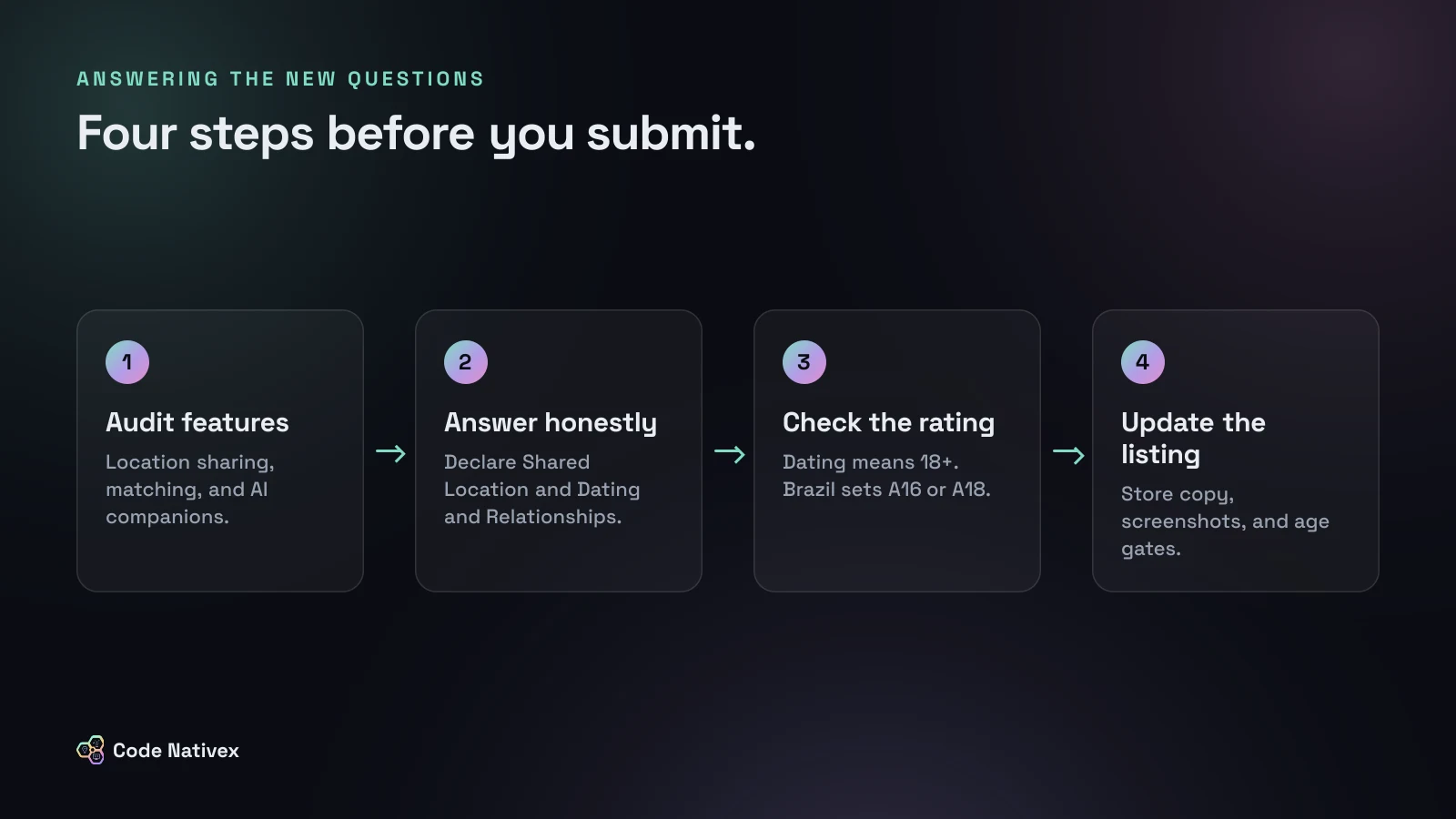
- 1.Audit your features. List every place your app shares location with another person and every feature that connects people or involves an AI companion. Include features behind flags, which reviewers may still find.
- 2.Answer honestly. Declare what the app does today. An answer that does not match the app is a review risk and, for an 18+ feature, a child safety risk.
- 3.Check the result in every region. Look at the rating App Store Connect generates, including Brazil's A16 and A18 values, before you submit.
- 4.Update the listing and the app. Make sure your description and screenshots match the rating, and that features meant for adults sit behind an age gate in the app itself.
If a feature pushes your rating higher than your audience allows, you have three options: remove the feature, change it so it no longer meets the definition, or accept the new rating. Decide that with the product team before release week, not at the submission screen.
Fit it into your release plan
The new questions arrive on November 16, and the busiest release weeks of the year follow. Two practical tips:
- Answer on your next routine update. You have to answer when you next submit anyway, so do it on a small release rather than a big holiday launch.
- Do not wait for January 12. Apple has not said what happens to apps that miss the deadline. App Review is often slower over the holidays, so plan to finish in November or early December.
- Brief support and marketing. If your rating goes up, parents, schools, and businesses that manage devices may find the app suddenly blocked. A short help-center note explaining the change, and why, saves your support team a week of tickets.
- Check your other storefronts. If you also ship on Google Play, review your content rating answers there at the same time, so the two stores describe the same app the same way.
This is the latest in a run of store deadlines this year, alongside Google Play's target API level requirement. Keeping a simple calendar of store requirements, with an owner for each, saves a scramble every time.
How we help app teams with store changes
When we build and maintain apps, store requirements are part of the release checklist: age ratings, privacy labels, target SDK levels, and review guidelines are checked on every submission, not only when a deadline email arrives. Our mobile app development service covers iOS and Android apps from build to store submission and ongoing updates. If you are also planning new platform features this winter, our guide on how to integrate your app with Siri AI covers what Apple opened to developers in November.
The bottom line
The App Store age rating update adds two questions: Shared Location and Dating and Relationships. Most apps will answer no to both. Apps that share location between people, connect people for dating, or include romantic or sexual AI companions need to check what the answers do to their rating, especially the 18+ minimum for dating and Brazil's stricter values. Answer on your next update, and finish well before January 12, 2027.
Need help reviewing your app before its next submission? Contact us and we will take a look.
Frequently asked questions
- What are the new App Store age rating questions?
- Apple added two content descriptors. Shared Location covers sharing real-world location with another person or group. Dating and Relationships covers features that connect real people for dating or relationships, or a virtual companion that engages a user in sexual or romantic content.
- When do I need to answer them?
- The questions appear in App Store Connect from November 16, 2026. You must answer them when you submit an app update or change your age rating questionnaire, and all apps must have them completed by January 12, 2027.
- Will my app be rated 18+?
- Only if it includes Dating and Relationships, which sets a minimum rating of 18+. Apple says Shared Location may not affect the minimum rating in some regions, though Brazil requires A16 for it.
- Does an AI companion app count as Dating and Relationships?
- If the virtual companion engages users in sexual or romantic content, Apple's definition includes it, and the app receives a minimum rating of 18+.
- Can I get a lower rating in Brazil?
- Apple says that if you believe your app qualifies for a lower rating in Brazil, for example location sharing designed for parents and children, you can request an official rating from Brazil's Ministry of Justice and Public Security.
Written by
Raja Ziafat
Founder and CEO of Code Nativex. Raja scopes every project with clients directly and leads the engineering behind the web, SaaS, and AI products the team ships.
Connect on LinkedIn