Android AppFunctions vs MCP: How to Make Your App Usable by Gemini and Other AI Agents
Google moved the AppFunctions library to release candidate on November 4 and called it Android MCP a day later. Here is how it compares with a remote MCP server, what is still restricted, and what to build first.
 Tayyeb FeroziSenior Full Stack Developer
Users are starting to ask an assistant to do things instead of opening apps to do them. On Android, Google has now given product teams two ways to answer that, which makes Android AppFunctions vs MCP a real planning question for anyone with an Android app. This guide explains what Google shipped this month, how on-device AppFunctions compare with a remote MCP server, what is still restricted, and a practical order to build things in so your app is ready when access opens.
What Google shipped in November
Two announcements landed a day apart.
On November 4, the AppFunctions Jetpack library reached version 1.0.0-rc01, its first release candidate. The beta two weeks earlier, on October 21, renamed the app-level description field to instructions "to align with MCP naming conventions". The API is settling, and it is settling around MCP.
On November 5, Google's Android Developer Summit post on intelligent apps gave the library a new name in practice: Android MCP, described as Google's unified tool-calling framework for connecting apps with AI agents on the device. The same post introduced the Connected Apps Platform, which lets users reach your app through the Gemini app and Google Search on Android by combining Android MCP with remote MCP servers.
For a product team, the message is simple. Google expects agents such as Gemini to complete multi-step tasks across apps, and it wants your app to describe its actions as tools those agents can call.
What AppFunctions actually are
According to the AppFunctions documentation, AppFunctions are an Android platform API with a Jetpack library that lets your app "behave like on device MCP servers". You mark functions in your Kotlin code, and the library generates a schema file that the Android OS indexes. An agent with the EXECUTE_APP_FUNCTIONS permission can then discover those functions, read their descriptions, and run them with the right parameters.
A function is ordinary Kotlin with an annotation and a good KDoc comment, because the comment is what the model reads:
/**
 * Reorder a past order for the signed-in user.
 *
 * @param orderId The ID of a previous order to repeat.
 * @return The new order, including its delivery estimate.
 */
@AppFunctionDeclaration(isDescribedByKDoc = true)
suspend fun reorder(orderId: String): Order {
    // Same repository and permission checks the UI uses.
    return orderRepository.reorder(orderId)
        ?: throw AppFunctionElementNotFoundException("No order $orderId")
}
Notice what the function does not do: it does not trust the model to decide what the user may change. It calls the same code path as your screens, and that code enforces the rules. We make the same point in our guide to building an MCP server for SaaS, and it applies here unchanged.
Two hard requirements matter for planning. AppFunctions work only on devices running Android 16 or higher, and the docs still carry an "experimental preview" banner, so the surface can change before a stable 1.0.
Android AppFunctions vs MCP: the real difference
Both approaches describe small, typed actions an agent can call. The difference is where those actions run.
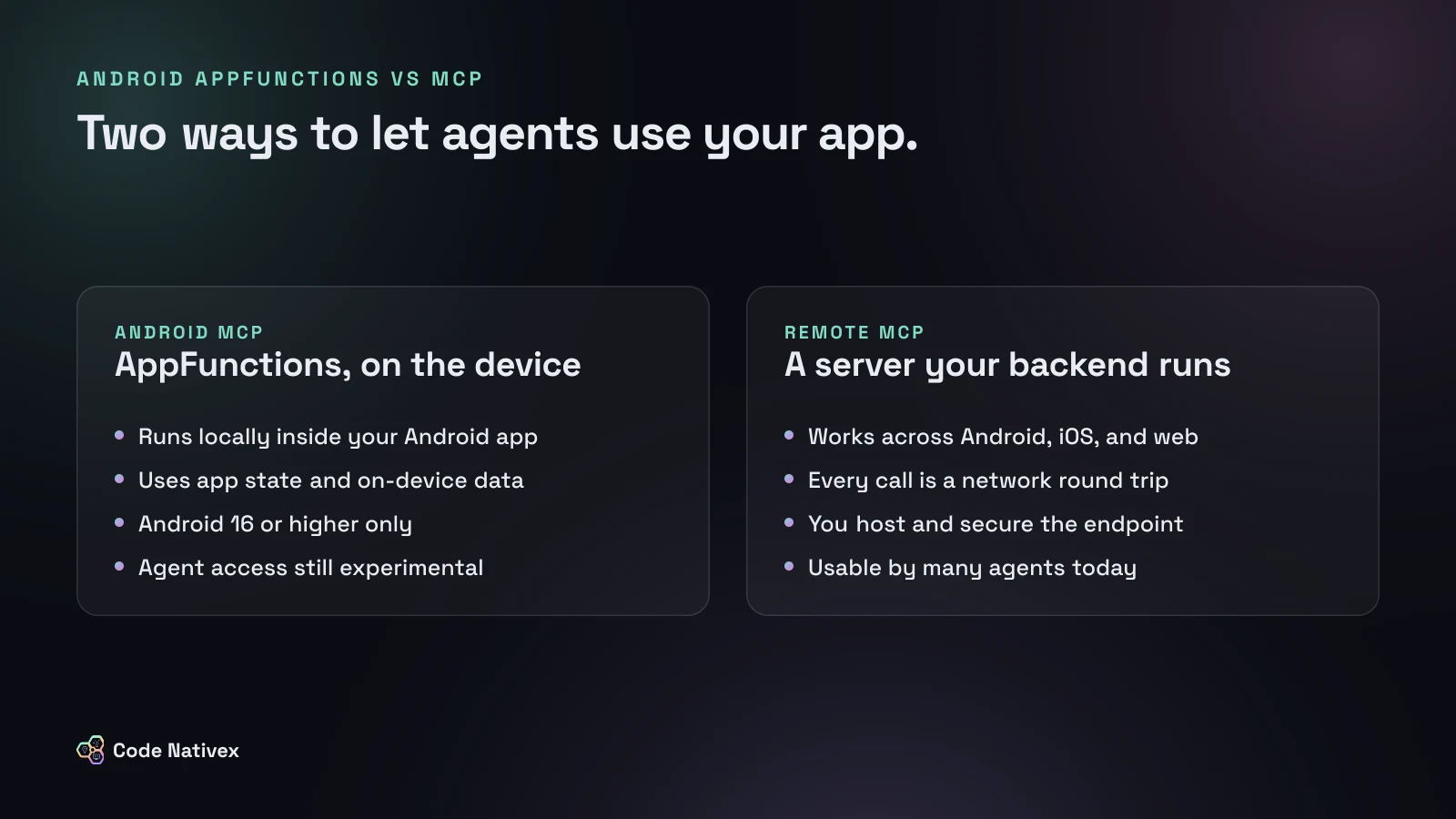
Google's own FAQ puts it plainly: AppFunctions are built-in OS-level hooks, exclusive to Android, that execute locally, while a standard MCP server is platform-agnostic and relies on cloud execution and network round trips. AppFunctions can use the app's existing state on the device and do not require you to run services outside your app.
Google's summit post is specific about when to prefer Android MCP. It recommends it when a user journey:
- uses end-to-end encryption or sensitive local device data,
- needs device sensors or hardware,
- has to execute locally, or
- has no server endpoint at all.
Everything else, such as checking an order, booking a slot, or updating an account, already lives on your backend. A remote MCP server exposes those actions once, and agents on Android, iOS, the web, and desktop can all use them. Google calls the two "complementary", and says you can integrate with Gemini using remote MCP, Android MCP, or both.
Who can call your AppFunctions today
This is the part most announcements skip. You can build and test AppFunctions now, but production access for agents is gated.
- Experimental access. Google's documentation says that during this phase "only a limited number of apps and system agents can access the entire pipeline".
- Early Access Program. Google runs an EAP for select apps to test the full path to production. Registering interest does not guarantee a place.
- Connected Apps Platform. You can build and test locally with Gemini Apps Developer Mode. For production, Google says preview capacity is limited to selected production-ready apps in supported categories, with broader self-serve access later.
- A fallback you do not control. The Android intelligence system overview lists Computer Control, an upcoming API that lets an OEM-preloaded assistant operate your app's user interface with no code changes from you.
That last point is worth thinking about. If you do nothing, an assistant may still try to use your app by tapping through its screens. Declaring proper functions is how you decide which actions are offered, with which parameters, and with which checks.
Which one should you build first?
For most products, the honest answer is a remote MCP server first, then AppFunctions for the actions that only make sense on the phone.
Start with a remote MCP server when your core actions already go through your API, you have users on iOS or the web as well as Android, or you want agents outside Google's ecosystem to use your product. It is also usable by many agents today, not only those in an early access program.
Add AppFunctions when an action depends on data your server never sees, such as encrypted messages, health readings, or files stored only on the device; needs the camera, location, or other hardware; must work offline; or would feel slow with a network round trip in the middle.
Do both when you want the Connected Apps Platform route to Gemini and Search, which Google describes as combining the two.
If you are also planning for iPhone, the same thinking applies to Apple's side. Our guide on how to integrate your app with Siri AI covers App Intents, Apple's equivalent, so you can plan one set of actions for both platforms.
A practical plan for the next quarter
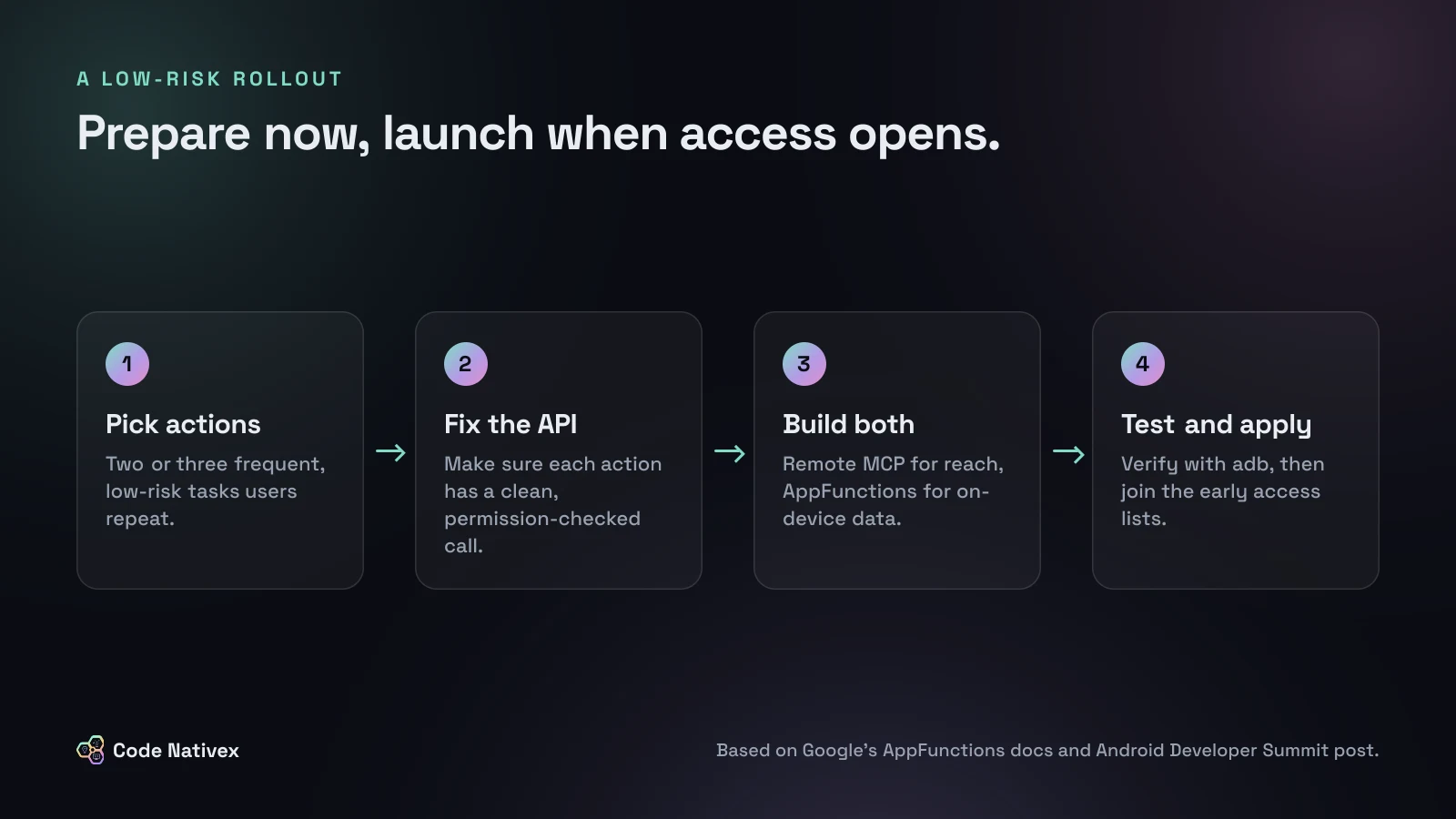
- 1.Pick two or three actions. List what users repeat most, and choose short, frequent, low-risk tasks. Avoid anything that moves money or deletes data until you have confirmation steps and a way to switch the feature off, as described in our post on building an AI agent kill switch.
- 2.Fix the API behind them. Each action needs a clean call that enforces permissions on the server. This is usually the largest piece of work, especially when the logic lives inside screens.
- 3.Build the remote MCP tools, then the AppFunctions. Reuse the same names, parameters, and descriptions on both, so agents see one consistent product.
- 4.Test on a device. Google's docs suggest checking registration with
adb shell cmd app_function list-app-functions --packagefollowed by your package name, and its AppFunctions sample and agent skill help with testing. - 5.Register interest. Join the Early Access Program and the Connected Apps Platform preview list, so you hear when access widens.
React Native and Flutter apps can follow the same plan. AppFunctions are Kotlin, so a cross-platform app adds a small native Android module that exposes the functions and calls the shared business logic.
How we can help
Our mobile app development service builds native and cross-platform apps, including the native modules and APIs that agent integrations depend on. For the server side, our AI agent development work covers multi-step agents, their tools and guardrails, and human review queues. When an app's logic still lives inside its screens, moving it behind a clean API is usually where we start.
The bottom line
Google has made its direction clear: Android MCP, built on AppFunctions, for actions on the device, and remote MCP for everything your backend already does. The library is at release candidate, but agent access is still limited to selected apps. The right move now is to choose a few safe actions, put them behind a clean API, ship a remote MCP server for reach, and add AppFunctions where on-device data makes them worth it. In the Android AppFunctions vs MCP decision, most teams need both, in that order.
Want your Android app ready for Gemini and other agents? Tell us about it and we will send a fixed-scope proposal.
Frequently asked questions
- What is the difference between Android AppFunctions and MCP?
- AppFunctions are OS-level hooks that let your Android app act like an on-device MCP server, with functions that run locally. A standard remote MCP server runs on your backend, works across platforms, and needs a network round trip for every call. Google describes AppFunctions as the mobile equivalent of MCP tools.
- Can Gemini call my app's AppFunctions today?
- Not for most apps. Google's documentation says only a limited number of apps and system agents can access the entire pipeline during the experimental phase. You can build and test AppFunctions now, and register interest in Google's Early Access Program or the Connected Apps Platform preview.
- Which Android versions support AppFunctions?
- AppFunctions are available on devices running Android 16 or higher. On older devices, the Jetpack library reports that the feature is not supported, so your app keeps working normally.
- Do I need AppFunctions if I already have an MCP server?
- Not always. A remote MCP server already gives agents on every platform access to your backend. AppFunctions add value when an action depends on data that only exists on the phone, needs device hardware, must work offline, or uses end-to-end encryption your server cannot read.
- Can a React Native or Flutter app use AppFunctions?
- Yes, but AppFunctions are declared in Kotlin with a Jetpack library and annotation processor. A cross-platform app adds a small native Android module that exposes the functions and calls the same business logic or API the rest of the app uses.
Written by
Tayyeb Ferozi
Senior full stack developer at Code Nativex, delivering full-cycle products from the database and backend to the user interface.
Meet the team