How to Integrate Your App With Siri AI: What Apple's Developer Preview Means for Your Product
On November 3, Apple opened Siri AI to every developer through App Intents. Here is what it lets your app do, which actions to build first, and a realistic plan for launch.
 Tayyeb FeroziSenior Full Stack Developer
On November 3, Apple announced that Siri AI is open to all developers. Starting with the iOS 27.3 betas, any app can bring its actions and content into Siri AI using App Intents. For a product team, the question is no longer whether you can integrate your app with Siri AI, but which actions to expose first and when it is worth the work. This guide explains what Apple announced, how the integration works, what to build first, how cross-platform apps fit in, and a realistic timeline for launch.
What Apple announced
Apple's developer news post sets out the details:
- Who can use it: a Developer Preview lets any developer integrate their app with Siri AI using App Intents, starting with the iOS 27.3, iPadOS 27.3, macOS 27.3, and visionOS 27.3 betas.
- What Siri AI can do: carry out custom actions in your app, such as checking a delivery, booking a reservation, or placing an order.
- Skills: you can define skills that combine several actions into one experience.
- Content: Siri AI can surface any entity in the Spotlight semantic index, not only ones that fit an existing schema.
- Apple's own apps: Apple is rolling the same capabilities out across Calendar, Mail, Maps, Messages, Notes, Photos, Reminders, Safari, and Shortcuts.
That last point matters for planning. When Apple's own apps answer requests through Siri AI, users will learn to expect the same from yours.
How the integration works
App Intents is the framework Apple apps already use for Shortcuts and Spotlight. You describe an action in Swift, with a title, a description, and typed parameters. Siri AI reads those definitions, matches a user's request to the right one, and runs your code:
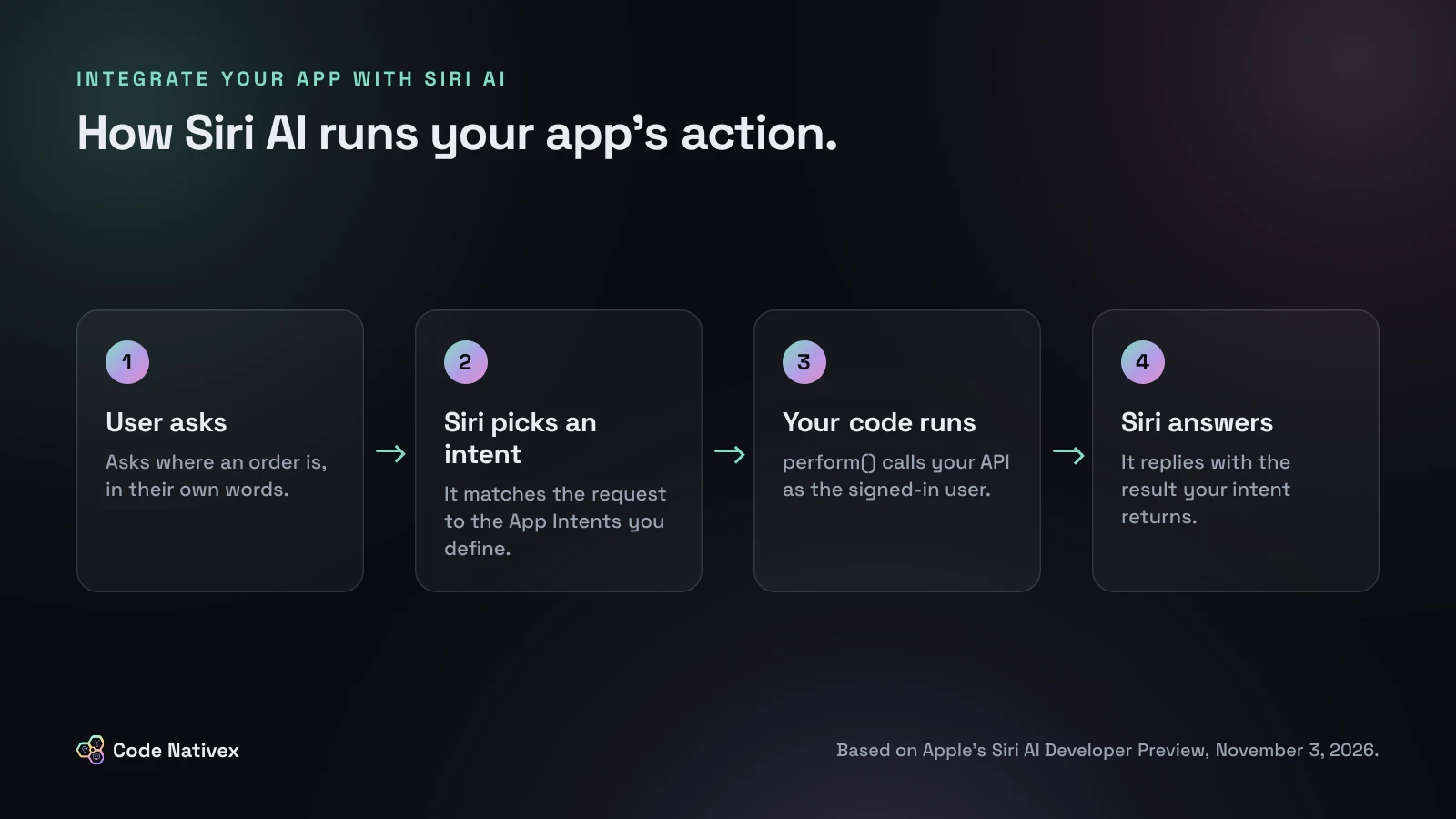
A simple intent looks like this:
import AppIntents

struct CheckDeliveryIntent: AppIntent {
    static let title: LocalizedStringResource = "Check Delivery Status"
    static let description = IntentDescription("Shows where the user's latest order is.")

    @Parameter(title: "Order")
    var order: OrderEntity

    func perform() async throws -> some IntentResult & ProvidesDialog {
        // Same API, same permissions as the rest of the app.
        let status = try await OrdersAPI.shared.status(for: order.id)
        return .result(dialog: "Your order is \(status.summary).")
    }
}
OrderEntity is an AppEntity you define for your orders, so Siri AI can understand which one the user means. Notice what the code does not do: it does not trust the model to decide what the user may see. It calls your API as the signed-in user, and your server enforces the rules.
If you have read our guide to building an MCP server for SaaS, the shape will look familiar. Both are ways of describing small, typed actions that an AI assistant can call, and the same principles apply: clear names, honest descriptions, and permission checks in your code, not the prompt.
Which actions to build first
Most apps should start with two or three intents, not twenty. Good first candidates share four traits:
- 1.Frequent. Things users do every week, like checking a status, finding a record, or repeating a recent action.
- 2.Short. Tasks that end in one answer or one confirmation, not a long form.
- 3.Low risk. Reading data and drafting are safer than sending, paying, or deleting.
- 4.Already backed by a clean API. If the action is tangled up in screen code, fix that first.
Apple's own examples show the pattern: checking a delivery, booking a reservation, placing an order. A restaurant platform like Dineri, which we built with commission-free reservations and food ordering, is exactly the kind of product where those three actions map one to one.
For anything that spends money or changes data, return a confirmation step rather than acting at once. Our guide to the App Store guidelines for AI apps covers the review rules that apply to AI features.
Siri AI in React Native and Flutter apps
App Intents are a Swift framework, so there is no JavaScript or Dart version. That does not rule out cross-platform apps. The usual approach is a small native iOS module that defines the intents and entities in Swift and calls the same backend API as the rest of the app. The business logic stays on your server, and the native layer stays thin.
Two practical notes. First, keep entity IDs identical between the native module and the shared code, so Siri AI and the app always agree on which order or booking is meant. Second, budget time for testing on real devices, because the preview requires Apple Intelligence hardware. If you are still deciding on a framework, our comparison of Flutter vs React Native for startups covers how each handles native modules like this one.
Timeline and availability
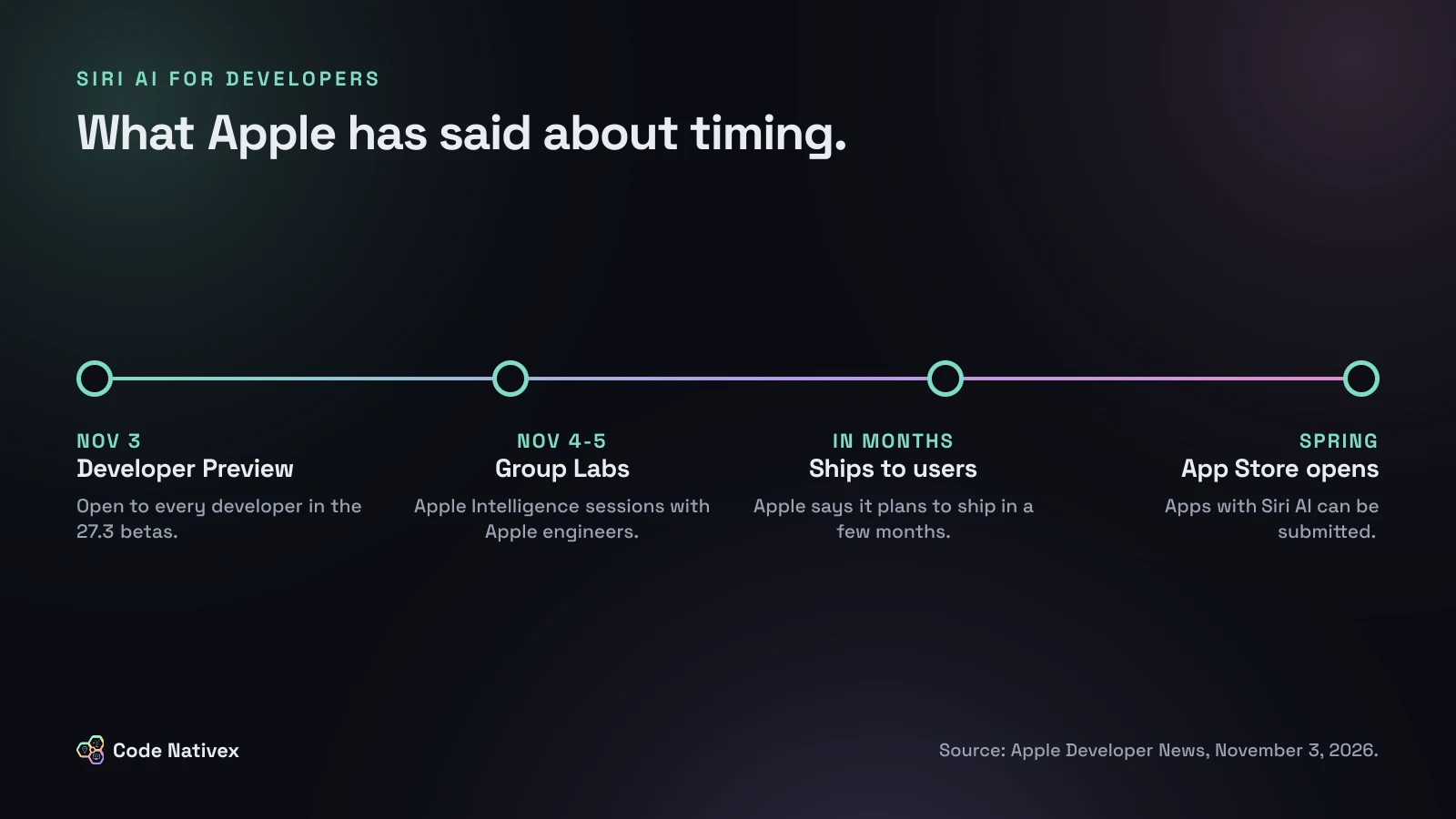
Apple says it plans to ship these capabilities to customers in a few months, and that App Store submission opens in the spring. Until then, the preview runs only on beta software, so nothing you build now reaches users yet.
The limits are worth knowing before you promise anything to customers:
- It needs an Apple Intelligence-enabled device and a supported language: English, French, Japanese, Korean, Portuguese, or Spanish.
- It is not available in the EU on iOS, iPadOS, and watchOS.
- It is not available to users under 13.
- Some server-side features have daily usage limits.
If many of your users are in the EU or on older devices, Siri AI will be a bonus for some users rather than a feature everyone sees at launch. Plan the roadmap accordingly.
A realistic plan
- 1.This month: list the five actions users repeat most, and pick two that are frequent, short, and low risk.
- 2.Next: make sure each one has a clean API endpoint that enforces permissions on the server.
- 3.Then: build the intents and entities on the 27.3 betas, and test with the phrases real users type into your support chat.
- 4.Before spring: add one skill that combines actions, write App Store copy that explains what Siri can do in your app, and be ready to submit when Apple opens submissions.
This is a modest project for an app with a good API, and a larger one for an app whose logic lives inside its screens. Either way, starting early means you are ready on the day submissions open.
How we can help
Our mobile app development service builds native and cross-platform apps, including the native modules and APIs that features like this depend on. If your app needs API work before it is ready for Siri AI, that is usually where we start.
The bottom line
Apple has opened Siri AI to every developer, with a clear direction even if the dates are still loose: a Developer Preview now, customers in a few months, App Store submissions in the spring. To integrate your app with Siri AI, start with two or three frequent, low-risk actions, back them with a clean API that enforces permissions, and use the months before launch to test with real users' words.
Want your app ready for Siri AI when submissions open? Tell us about it and we will send a fixed-scope proposal.
Frequently asked questions
- How do I integrate my app with Siri AI?
- Define App Intents for the actions and content you want Siri AI to use, then test them on the iOS 27.3, iPadOS 27.3, macOS 27.3, or visionOS 27.3 betas with Xcode 27.3. Apple's Siri AI Developer Preview documentation covers the details.
- When can users get my app's Siri AI features?
- Apple says it plans to ship Siri AI support to customers in a few months, and that App Store submissions with these features open in the spring. Until then, the integration is for testing on beta software.
- Can a React Native or Flutter app work with Siri AI?
- Yes, but App Intents are written in Swift. Cross-platform apps add a small native iOS module that defines the intents and calls the same API the rest of the app uses.
- Is Siri AI available everywhere?
- Not yet. Apple says the preview requires an Apple Intelligence device and a supported language, is not available in the EU on iOS, iPadOS, and watchOS, and is not available to users under 13.
- What are Siri AI skills?
- Skills are developer-defined experiences that combine several of your app's actions into one. For example, a reorder skill might find a past order, check stock, and place the order.
Written by
Tayyeb Ferozi
Senior full stack developer at Code Nativex, delivering full-cycle products from the database and backend to the user interface.
Meet the team