How to Price AI Features in SaaS: Seats, Credits, or Both?
Microsoft and GitHub both moved AI usage onto credits this month, on top of the seat price. Here is what that pattern means for your own product, and how to measure, price, and bill AI features without losing margin.
 Raja ZiafatCEO & Founder
If you are working out how to price AI features in SaaS, this month gave you a clear signal. Microsoft and GitHub both kept their seat prices and moved AI usage onto credits, with limits that admins control. This guide covers what changed, why the "seat plus credits" model is winning, and the four steps we use to turn a model bill into a price: measure the cost of each action, name a unit, bundle an allowance, and meter the rest. It ends with a working Stripe example, because a pricing page is only as good as the billing code behind it.
What Microsoft and GitHub changed in November 2026
Two announcements in the first week of November show where large vendors are heading.
On November 3, Microsoft updated its Partner Center announcement on usage-based billing for Microsoft 365 Copilot Business. New Copilot Business subscriptions bought through its reseller program will have usage-based billing on by default from Microsoft's FY27 Q3 (January to March 2027), instead of December 1, 2026 as first planned. Some AI experiences are billed on usage on top of the license fee, and Microsoft applies a default spending limit of 4,000 Copilot Credits per user per month, which admins can change. Microsoft's own example: 100 users could consume up to 400,000 credits a month under the default.
The same page notes that, from November 4, GitHub Enterprise includes GitHub Copilot usage rights at no extra cost with the Enterprise seat, while AI usage is billed through AI Credits.
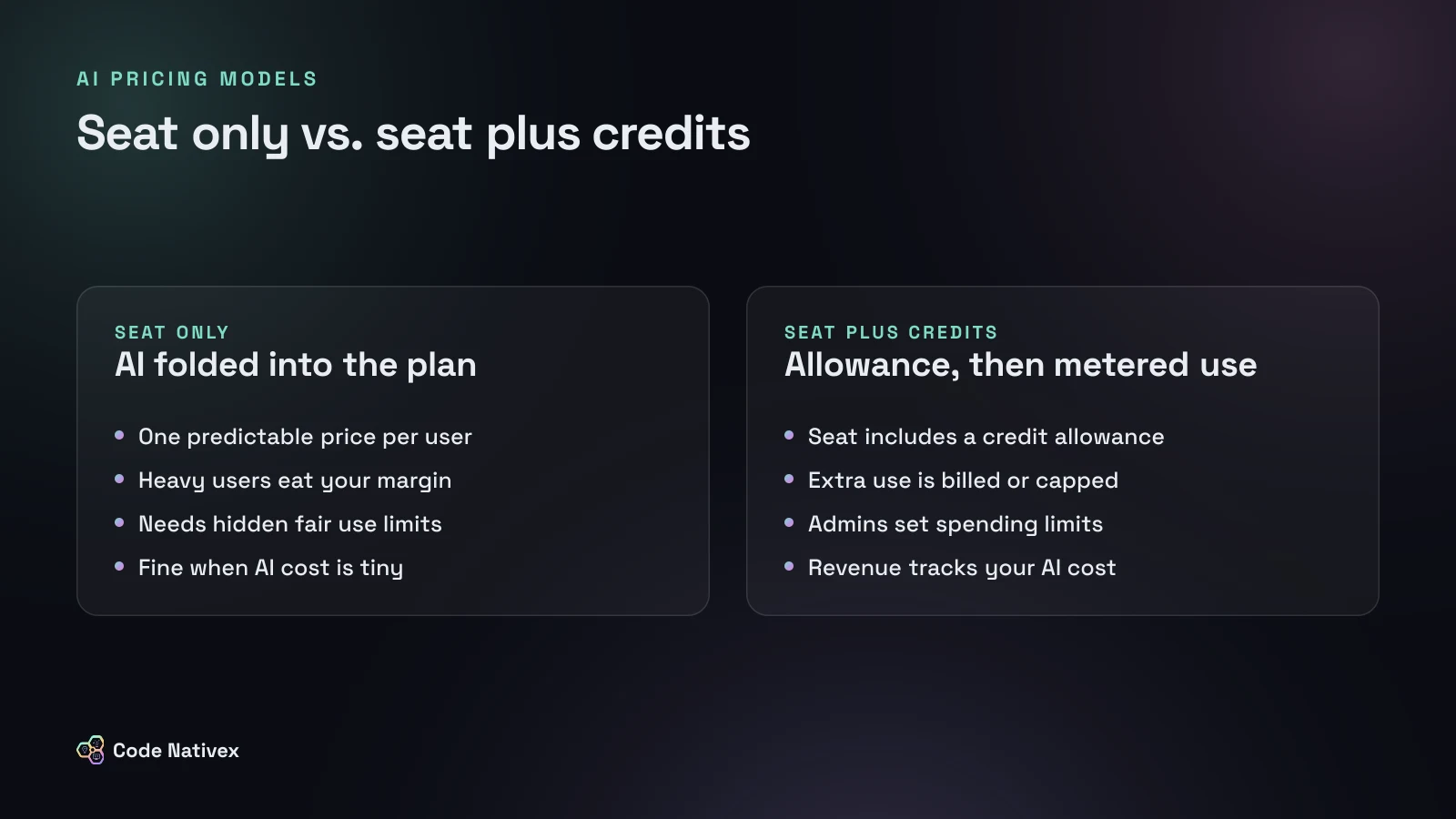
The pattern is the same in both cases. The seat buys access. Credits pay for the expensive work. Admins get a ceiling. Microsoft also added fair use limits to Copilot Chat for unlicensed users from November 2, and it does not publish the exact limits. That is the other way to handle cost: limits customers cannot see, which is fine for a free tier and frustrating for a paying one.
Why flat AI pricing breaks
For most SaaS features, the cost of serving one more user is close to zero. AI features are different. Every summary, search, or agent run calls a model, and the bill scales with how much people use it, how long their documents are, and which model you route to.
That creates three problems with a single flat price:
- Heavy users eat your margin. A small group of power users can cost more than the rest of an account combined, while paying the same seat price.
- Your cost changes under you. Model prices move, and models get retired. A price set on one model's token rate can be wrong a quarter later.
- Hidden limits erode trust. If you quietly throttle heavy users, the customer finds out when the feature stops working mid-task.
If your AI cost per user is tiny and steady, a flat price is fine. Once it grows with use, you need a price that grows with it.
How to price AI features in SaaS: four steps
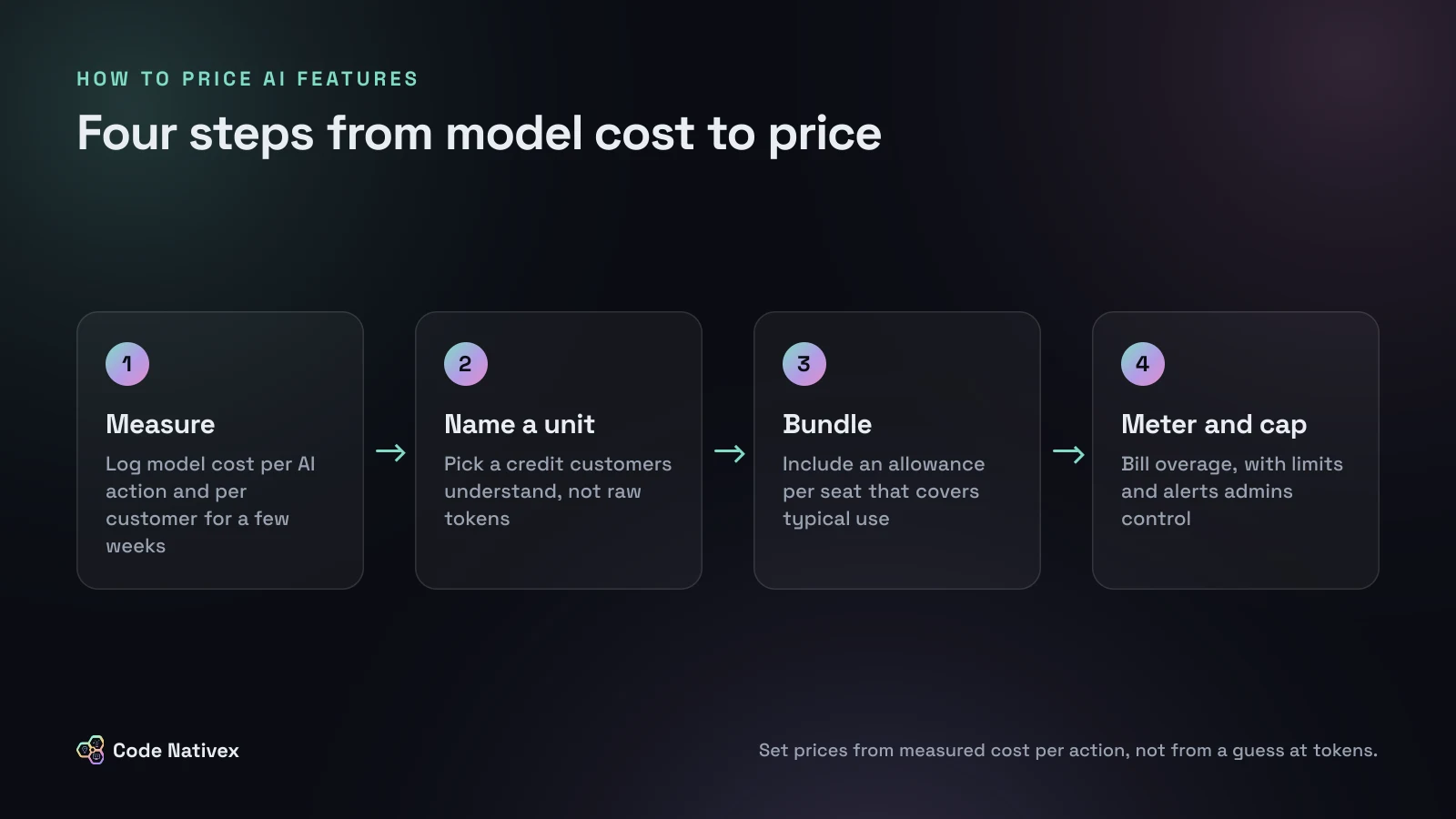
1. Measure cost per action, per customer
Before you pick a number, log every model call with the feature name, customer, model, input and output tokens, and cost. Run it for a few weeks with beta users or your own team. You are looking for two figures: the cost of a typical user per month, and the cost of your heaviest ten percent. Averages hide the users who will break your margin.
This is also where cost work pays off twice. Caching, smaller models for simple steps, and shorter prompts lower the cost you are pricing against. We covered those in our guide to reducing LLM API costs.
2. Name a unit customers understand
Do not sell tokens. Customers cannot predict them, and your token cost changes every time you switch models. Sell a credit tied to an action they recognize: one summary, one agent run, one generated report. Microsoft calls its unit a Copilot Credit and describes it as a common currency across its usage-billed services, as its Copilot Credits overview explains.
A credit gives you room to move. If a cheaper model arrives, you keep the credit price and gain margin, or you lower the credits per action and pass on the saving.
3. Bundle an allowance with each seat
Include enough credits in each seat to cover typical use, based on step 1. Most customers should never think about credits at all. The allowance is what makes the product feel generous and keeps the sales conversation about value, not meters.
4. Meter the rest, and give admins the controls
Above the allowance, either bill overage or stop at a cap, and let the customer choose. Microsoft's admin center gives a useful checklist of what buyers now expect: spending limits per user and per policy, alerts when a limit is close, a way for users to request more credits, and a consumption view by user and service. If you sell to teams, build at least the limit and the alert before you launch overage billing.
Billing it in Stripe without double-charging
Stripe can run this model with two pieces. You report usage with Billing Meter events, and you attach a metered price to the subscription. Here is the function we would call after an AI action finishes:
import Stripe from "stripe";

const stripe = new Stripe(process.env.STRIPE_SECRET_KEY!);

// Call only after the AI action succeeds, never before.
export async function recordAiUsage(opts: {
  stripeCustomerId: string;
  jobId: string;   // your own ID for this AI action
  credits: number; // credits this action costs under your price list
}) {
  await stripe.billing.meterEvents.create({
    event_name: "ai_credits",
    identifier: opts.jobId, // a retry with the same ID is not counted twice
    payload: {
      stripe_customer_id: opts.stripeCustomerId,
      value: String(opts.credits),
    },
  });
}
Three details matter. Stripe enforces uniqueness on identifier for a rolling period of at least 24 hours, so using your job ID protects you from retries. The timestamp must be within the past 35 days, so a backlog of failed events has a deadline. And record usage after the action succeeds, so customers never pay for an error.
For the included allowance, Stripe's billing credits let you issue credit grants with an expiry date and a priority. They only apply to metered prices that report through Meters, they are applied when an invoice is finalized, and a customer can have at most 100 unused grants at a time. Stripe also does not allow billing credits to act as gift cards or stored value.
Keep your own ledger too. Stripe sees usage once it is sent, but your app needs to know the balance in real time to show it and enforce caps. Our post on syncing Stripe data to Postgres covers how to keep the two in step.
Where we have seen this go wrong
The failure we see most is not the price. It is the plumbing between billing and access. On America Working, a subscription platform we built, one rule held throughout: Stripe webhooks are the only place tier entitlements get written, and each Stripe event, entitlement update, and access change happens in one Postgres transaction, so a partial failure cannot leave a user half upgraded. Credits need the same discipline. If the balance a user sees, the cap your API enforces, and the usage Stripe bills come from three different places, they will drift, and support tickets follow.
When we scope a SaaS development project with AI features now, we put the usage log and the entitlement model in the first sprint, before the AI feature itself. It is far easier to price a feature you have measured from day one. If the feature is an agent that takes actions, see our AI agent development service for how we add limits and controls around it.
A simple starting point
If you need a default today:
- 1.Keep your current seat price and include AI features in it.
- 2.Give each seat a monthly credit allowance that covers your typical user with room to spare.
- 3.Show the balance in the product, with an alert at 80 percent.
- 4.Let admins choose between a hard cap and paid overage.
- 5.Review cost per credit every month, and every time you change models.
You can change the numbers later. Changing the structure after customers are used to it is much harder.
Conclusion
The seat is not going away, but it no longer covers everything. Microsoft and GitHub have both settled on a seat for access and credits for expensive AI work, with limits buyers control. For a smaller SaaS company, the same model protects margin and keeps pricing honest, as long as you price from measured cost and the billing code is built as carefully as the feature.
If you are planning AI features and want the pricing, metering, and billing built in from the start, get a quote and we will scope it with you.
Frequently asked questions
- Should AI features be included in the base SaaS price?
- Light, cheap features such as autocomplete or short summaries can usually be included in the seat price. Features whose cost grows with use, such as agents, long documents, or image generation, need an allowance and a metered overage, or heavy users will cost more than they pay.
- What is a credit-based pricing model for AI?
- Customers get a balance of credits, usually included with each seat or bought in packs, and each AI action spends a set number of credits. It gives buyers a predictable unit and gives the vendor a way to recover variable model costs without exposing token prices.
- How do I estimate the cost of an AI feature before launch?
- Run the feature with internal users or a beta group and log the input and output tokens, model, and cost of every call, tagged by feature and customer. Use the typical and the heaviest users from that log, not an average, to set the allowance and the overage price.
- Can Stripe bill for AI usage credits?
- Yes. You report usage with Billing Meter events and attach a metered price to the subscription. Credit grants can then cover prepaid or promotional usage, but they only apply to metered prices that report through Meters, and they are applied when the invoice is finalized.
- Is usage-based pricing bad for enterprise buyers?
- Pure usage pricing can be hard for procurement to budget. That is why most vendors pair it with a seat price, an included allowance, and admin spending limits, so finance can set a ceiling while teams still get the features they need.
Written by
Raja Ziafat
Founder and CEO of Code Nativex. Raja scopes every project with clients directly and leads the engineering behind the web, SaaS, and AI products the team ships.
Connect on LinkedIn