MCP Server for SaaS: Should You Build One, and How to Do It Right
Your customers want to use your product from Claude, ChatGPT, and other assistants. Here is how to decide whether to ship an MCP server, what the current spec requires, and how to keep it safe.
 Shumail RafiqueSenior Full Stack Developer
Your customers increasingly start their work inside an AI assistant, and they want that assistant to reach their data in your app. An MCP server for SaaS is how you make that possible: one standard integration that Claude, ChatGPT, and other assistants can connect to, instead of a separate connector for each. This guide covers when building one is worth it, what the July 2026 revision of the protocol changed, how authorization works, and the build order we recommend so the first version is useful and safe.
What an MCP server does for a SaaS product
The Model Context Protocol (MCP) is an open standard for connecting AI applications to outside tools and data. An MCP server exposes three kinds of things:
- Tools: actions the model can call, such as "list overdue invoices" or "create a draft campaign".
- Resources: data the user or model can read, such as a document or a report.
- Prompts: reusable templates a user can pick, such as "summarize this account".
For most SaaS products, tools do the heavy lifting. A customer asks their assistant a question, the assistant sees your tools and their descriptions, and calls the right one with the user's permission. The server is usually a thin layer over the API you already have, which is why the quality of that API decides most of the work.
If you are weighing an MCP server against building an agent into your own product, our guide to AI agents for SaaS compares the two. They share the same foundation: small, typed, permission-aware actions.
Should your SaaS build one?
MCP is popular, and business software vendors keep announcing MCP servers. That alone is not a reason to build one. The question is whether your customers would get real work done through it.
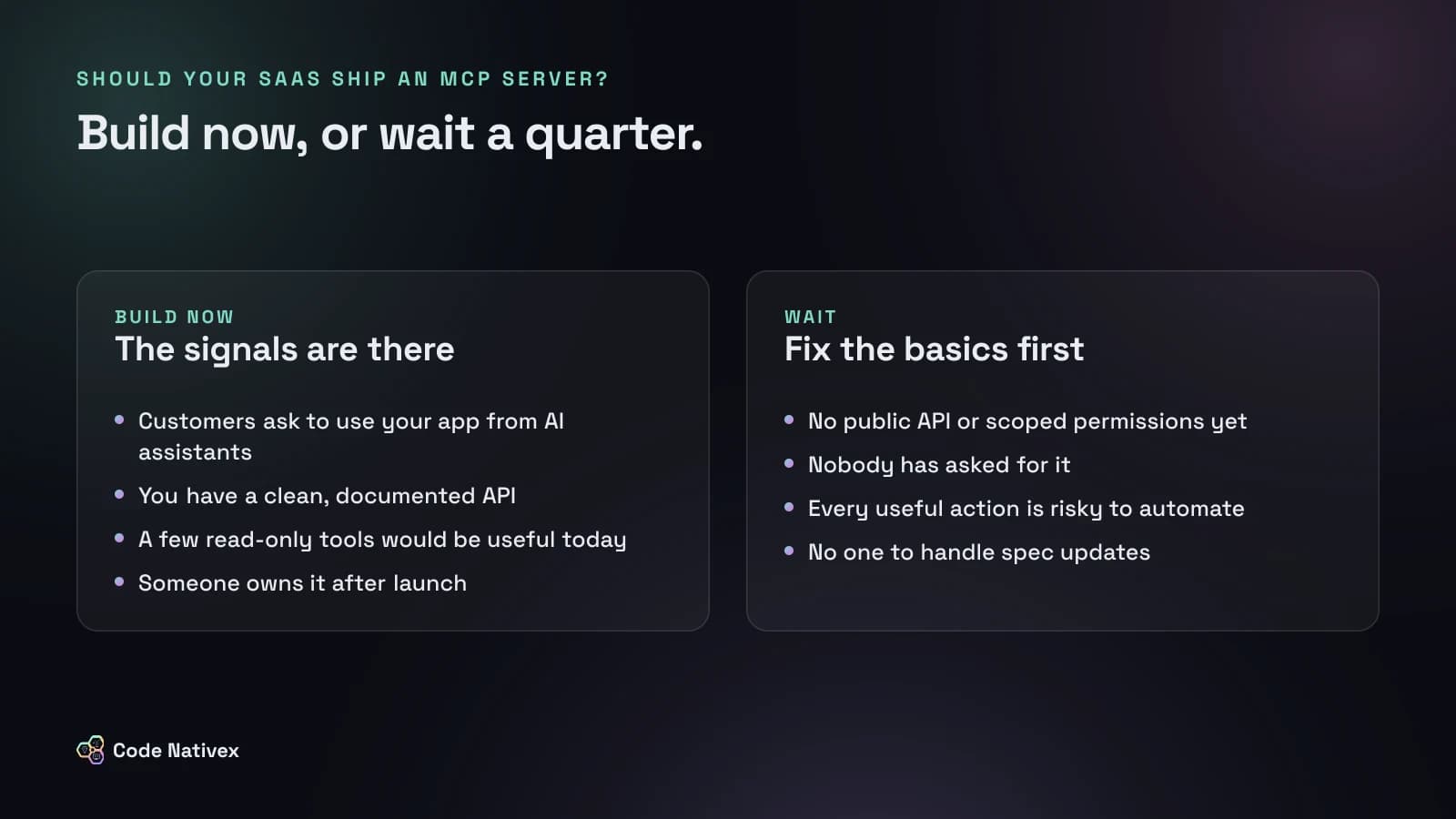
Build now when customers ask to use your product from their assistant, you already have a clean, documented API, and a handful of read-only tools would be useful on day one. Reporting, search, and status questions are the usual winners: "Which deals stalled this month?" or "What did support close yesterday?"
Wait when you have no public API or scoped permissions, nobody has asked, or every useful action is risky to automate, such as moving money or deleting records. Also wait if nobody will own the server after launch. The protocol is still changing, and a server nobody maintains will break quietly.
What the July 2026 spec changed
The current MCP specification is dated July 28, 2026. Its changelog lists several changes that matter if you are building a remote server today:
- MCP is now stateless. Protocol-level sessions and the
Mcp-Session-Idheader are gone, and so is theinitializehandshake. Every request carries its protocol version and the client's capabilities. - Servers must implement `server/discover`, a call that advertises supported versions, capabilities, and identity.
- Long-running tasks moved to an official extension, rather than the core protocol.
- Roots, Sampling, and Logging are deprecated. New servers should not add them.
- Dynamic Client Registration is deprecated in favor of Client ID Metadata Documents for registering clients.
- A formal deprecation policy promises at least twelve months' notice before a feature is removed.
The stateless change is the big one for product teams. A remote MCP server is now an ordinary HTTP service: any instance can answer any request, so it sits behind a load balancer and scales like the rest of your API. If state has to carry across calls, the spec says to pass explicit handles minted by your server as ordinary tool arguments.
How authorization works
Authorization is the part to get right first. The MCP authorization spec makes it optional overall, but any remote server that touches customer data should use it. It is based on OAuth 2.1, and your MCP server acts as a resource server:
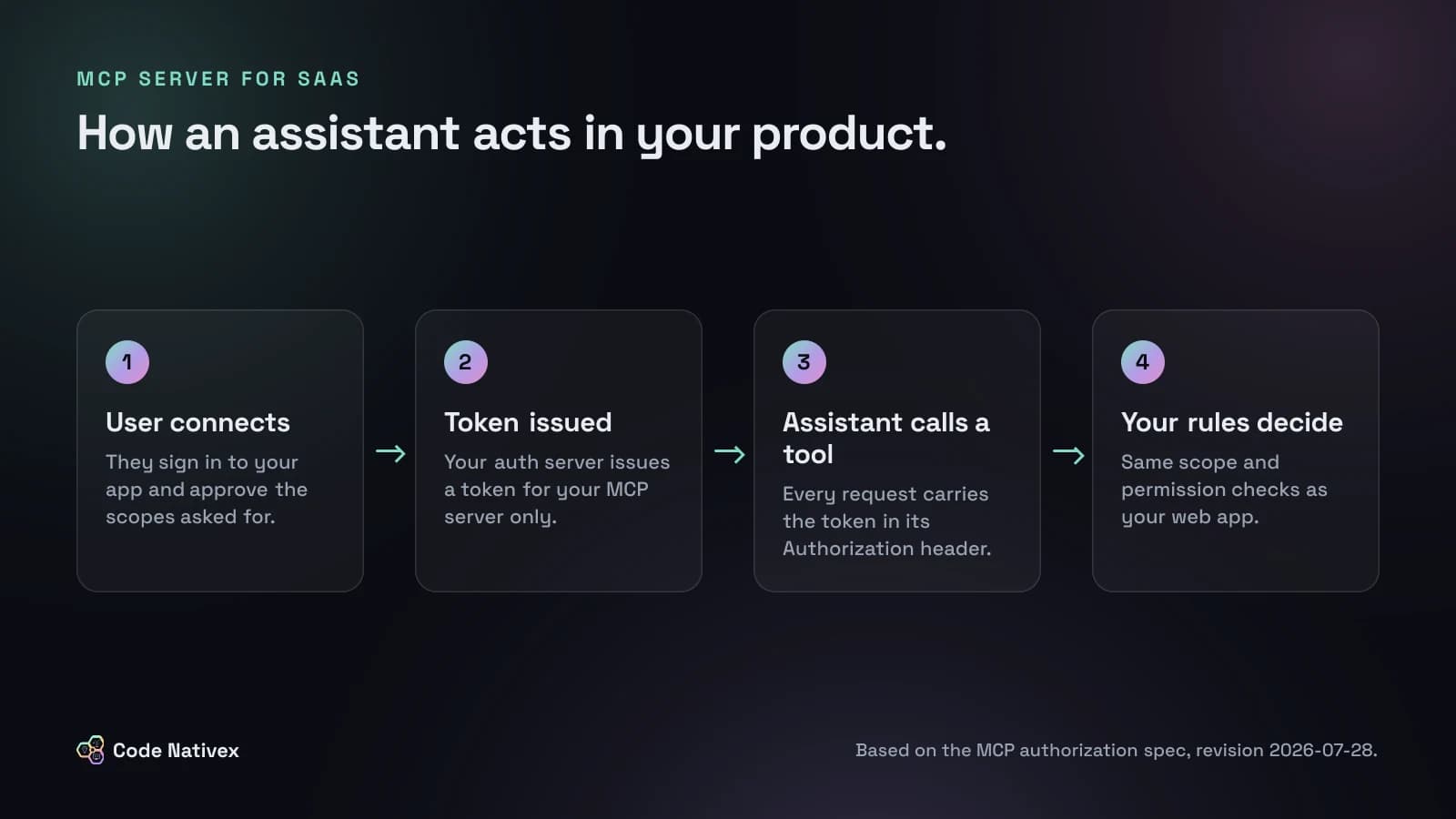
The requirements that matter most:
- 1.Publish Protected Resource Metadata. MCP servers must implement OAuth 2.0 Protected Resource Metadata (RFC 9728), which tells clients where to sign in.
- 2.Answer unauthenticated requests with a 401 and a
WWW-Authenticateheader that points to that metadata and, ideally, names the scopes needed. - 3.Accept only tokens issued for your server. The spec requires servers to validate that the token's audience is them, and forbids accepting or passing through any other token. Never forward a customer's token to another service.
- 4.Use scopes for least privilege. When a token lacks a scope, return a 403 with
insufficient_scopeand list every scope the operation needs in one challenge.
Behind the token, apply the same permission checks your web app uses. If a user cannot see an invoice in your UI, an assistant acting for them must not see it either. Treat these tokens like any other credential, too: our guide to rotating secrets after a breach covers what to do if one leaks.
Designing tools a model can use well
A model only knows what your descriptions tell it. Good tools are narrow, clearly named, and honest about their limits. The official TypeScript SDK keeps the definition short:
import { McpServer } from "@modelcontextprotocol/server";
import * as z from "zod/v4";
import { listOverdueInvoices } from "@/lib/billing";

// Built per request, for the signed-in user only.
export function createMcpServer(user: { accountId: string }) {
  const server = new McpServer({ name: "acme-billing", version: "1.0.0" });

  server.registerTool(
    "list_overdue_invoices",
    {
      description: "List this account's unpaid invoices that are past due. Read-only.",
      inputSchema: z.object({ limit: z.number().int().max(50).default(10) }),
      annotations: { readOnlyHint: true },
    },
    async ({ limit }) => {
      const invoices = await listOverdueInvoices(user.accountId, limit);
      return { content: [{ type: "text", text: JSON.stringify(invoices) }] };
    },
  );

  return server;
}
A few habits make a large difference:
- Name tools for the task, not the endpoint.
list_overdue_invoicesbeatsget_invoiceswith five filters. - Say when not to use a tool in its description, and keep inputs small and validated.
- Return compact results. Large payloads cost tokens on every call. Our guide to reducing LLM API costs explains why that adds up.
- Return tools in a stable order. The spec now recommends a deterministic order from
tools/listso clients can cache it. - Do not rely on hints for security. The spec says tool annotations should be treated as untrusted unless they come from a trusted server, so enforce read-only access in your code, not in a hint.
A safe build order
- 1.Pick three to five read-only tools that answer the questions customers ask most.
- 2.Add OAuth with scoped access, starting with a read-only scope.
- 3.Log every call with the user, tool, and inputs, and rate limit per user.
- 4.Test with real assistants, using real customer phrasing, and rewrite descriptions where the model picks the wrong tool.
- 5.Add write actions one at a time, each asking the user to confirm before anything changes.
- 6.Document it on a public page: what it can do, which scopes it asks for, and how to disconnect.
How we approach AI that acts on customer data
On Carvise, an AI advisory platform we built, AI does the fast first pass on a repair quote and a certified expert validates every result before a driver sees it. Nothing is published automatically. We apply the same rule to MCP write actions: the model can propose, but a person approves anything that changes data.
Our AI agent development service covers this work end to end, from choosing the first tools to the OAuth setup, logging, and review flows around them.
The bottom line
An MCP server for SaaS is worth building when customers want to work with your product from their assistant and your API is ready for it. The July 2026 spec made remote servers simpler to run, but the hard parts are still yours: tight authorization, honest tool descriptions, and the same permission checks as your app. Start small and read-only, watch how assistants use it, and grow from there.
Thinking about an MCP server or an AI agent for your product? Tell us about it and we will send a fixed-scope proposal.
Frequently asked questions
- What is an MCP server for a SaaS product?
- It is a small service that describes your product's actions and data in the Model Context Protocol format, so AI assistants such as Claude or ChatGPT can call them for a signed-in user. It usually sits on top of your existing API.
- Is an MCP server the same as an API?
- No. Your API is for developers who write code against it. An MCP server wraps a curated part of that API as tools with plain-language descriptions, so an AI model can decide when to use each one.
- Does an MCP server need OAuth?
- Authorization is optional in the spec, but any remote server that touches customer data should use it. The spec's authorization flow is based on OAuth 2.1, and servers must only accept tokens issued for them.
- What changed in the 2026-07-28 MCP spec?
- It removed protocol-level sessions and the initialize handshake, so each request carries its own version and capabilities. It also moved tasks into an extension and deprecated Dynamic Client Registration in favor of Client ID Metadata Documents.
- Should an MCP server let AI take write actions?
- Yes, but carefully. Start with read-only tools, mark them as read-only, and make write actions ask the user to confirm. Never give an assistant more access than the user who connected it.
Written by
Shumail Rafique
Senior full stack developer at Code Nativex, building scalable web applications with modern technologies.
Meet the team