Supabase CLI v3 Upgrade: What Breaks in CI and How to Fix It
Supabase CLI v3 shipped on November 2, 2026 and is now the default install. It targets your local stack by default and asks before touching production, which breaks unattended deploys. Here is what to change.
A Supabase CLI v3 upgrade is probably already happening in your deploy pipeline, whether you planned it or not. Supabase released CLI v3.0.0 on November 2, 2026, and every main install channel now pulls it by default. This guide explains the two behavior changes that break CI, the one failure mode that does not look like a failure at all, the exact command changes, and how to decide between upgrading this week and pinning v2 for now.
What changed on November 2, 2026
According to the Supabase CLI v3 changelog, v3.0.0 became the default on npm, Scoop, the Linux packages, and the supabase/setup-cli GitHub Action on November 2. Homebrew followed on November 3. v2 now receives only security fixes and fixes for broken behavior, with no new features.
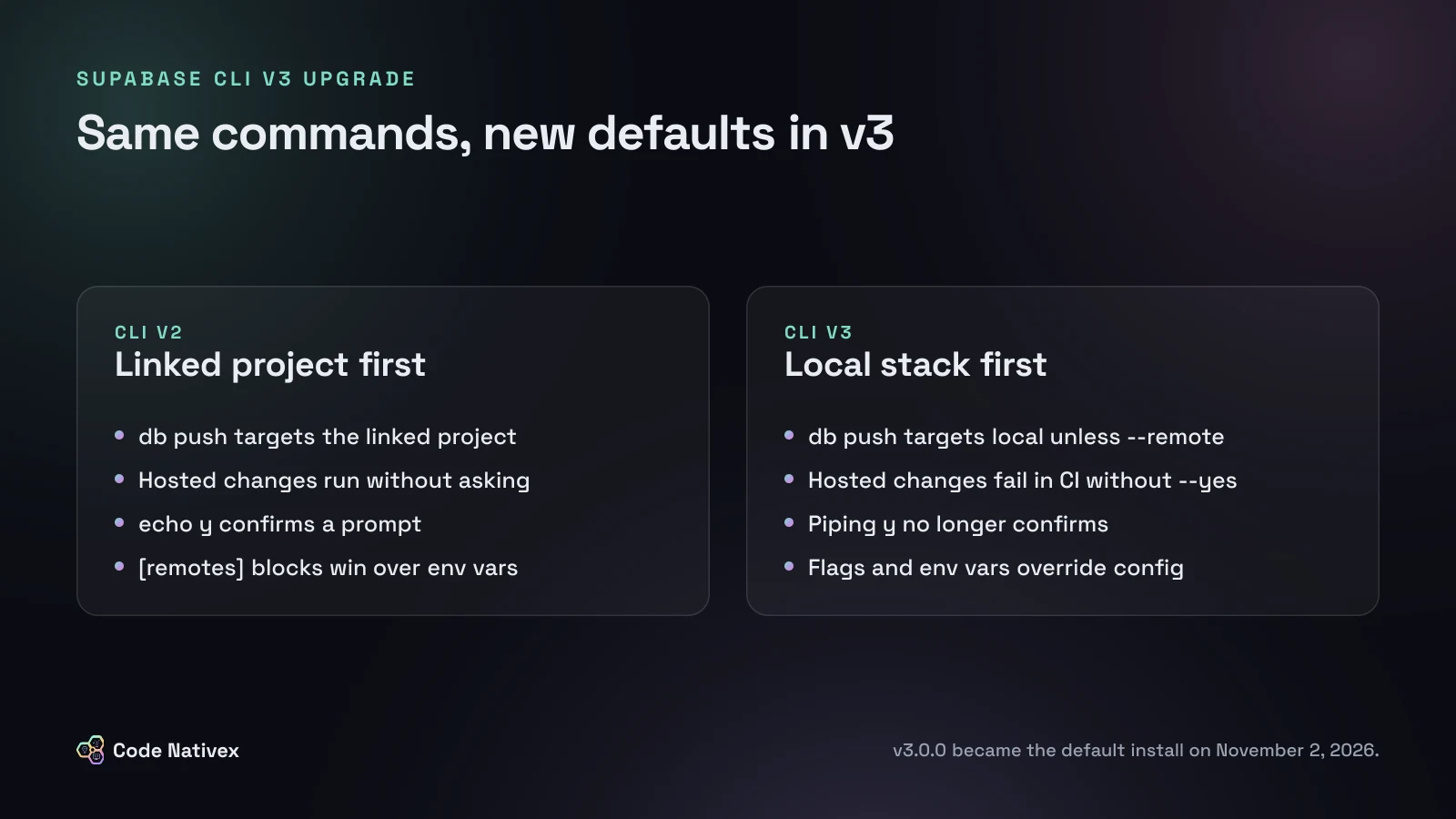
Two defaults flipped:
- Local by default. Database and storage commands, including
db push,db pull,db dump,migration list,gen types, andstorage, now target your local stack unless you pass--remote. - Hosted changes need confirmation. Commands that change a hosted project ask first, and the default answer is No. In CI, where nobody can answer, they fail unless you pass
--yes. Pipingyinto the command no longer works.
Supabase is clear that hosted projects, their data, and self-hosted Supabase are not affected. Your database is fine. What changes is what your scripts actually do when they run.
Who needs to act
If a person runs the CLI by hand, v3 mostly adds a confirmation prompt. The teams who need to act are the ones where the CLI runs unattended:
- CI and deploy pipelines that run
db push,functions deploy,secrets set, orconfig pushagainst production or staging. - Older projects created before CLI v2.108.0 whose
supabase/config.tomlstill has an[inbucket]section. In v3,supabase start,stop,status, and thedbcommands fail until it is renamed to[local_smtp]. - *Projects mixing `[remotes.<name>]` blocks with `SUPABASE_
environment variables.** Flags and environment variables now overrideconfig.toml, so a stray variable in CI can change whatconfig push` sends. - Teams using declarative schemas in
supabase/schemaswithdb diff, because pg-delta is now the default diff engine. - AI coding agents that run Supabase commands for you. They are unattended runs too, and they need the same flags.
If your GitHub Actions workflow uses supabase/setup-cli without a version input, it already installs v3 on its next run. The migration guide notes one exception: a lock file at the repository root that pins the supabase package.
The failure you will not notice
Most v3 breakage is loud. A deploy step fails with HostedMutationConsentRequiredError, someone reads the log, and the fix takes five minutes.
The quiet case is worse. Many pipelines start a local Supabase stack to run tests, then deploy migrations in the same job. In v3, a bare supabase db push in that job succeeds against the local stack and never touches your hosted project. The step is green. The migration is not in production.
You find out later, when the app code that expects a new column ships and the column does not exist. For a SaaS product that means errors in front of customers, and it is the kind of incident that takes a while to trace because the deploy log says everything worked.
The fix is simple: every command that should reach a hosted project gets --remote, and every unattended hosted change gets --yes. The point is to make that rule explicit in your pipeline, not to rely on whatever the default happens to be.
The command changes for CI
The migration guide includes a quick reference for CI. These are the changes most pipelines need:
supabase db pushbecomessupabase db push --yes --remotesupabase db push --db-url "$DB_URL"becomessupabase db push --yes --remote="$DB_URL"supabase migration list --linkedbecomessupabase migration list --remotesupabase gen types typescript --project-id "$REF"becomessupabase gen types typescript --remote="$REF"supabase functions deploy,secrets set, andconfig pusheach need--yesecho y | supabase <command>becomessupabase <command> --yes
Two syntax details catch people. Attach a value to --remote with =, as in --remote=<branch>, not --remote <branch>. And when a command also takes an argument, put --remote last, for example supabase db pull add_profiles --remote.
Here is a migration deploy step in GitHub Actions written for v3:
- uses: supabase/setup-cli@v3
  with:
    version: latest

- name: Push migrations to production
  run: supabase db push --yes --remote="$SUPABASE_DB_URL"
  env:
    SUPABASE_DB_URL: ${{ secrets.SUPABASE_DB_URL }}
The old target flags, --linked, --project-ref, and --db-url, still work on database commands in v3. They are hidden, print a warning, and are scheduled for removal in v4. Replace them now while the warning tells you what to use instead.
A safe upgrade plan in five steps
Supabase's own sequence is sound. Here it is in the order we would run it on a production app:
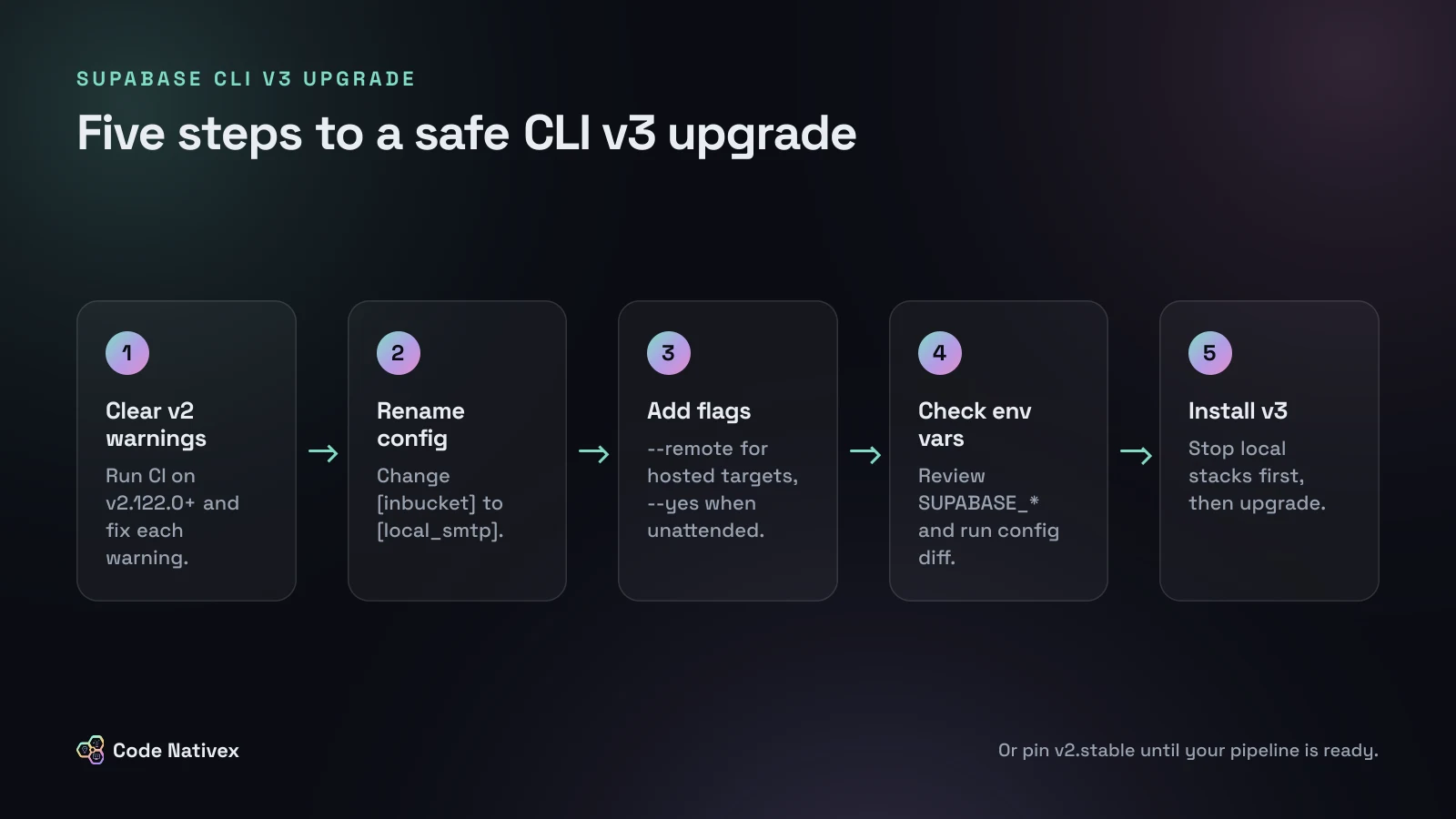
- 1.Clear the warnings on v2 first. Update to v2.122.0 or later and run your normal workflows, CI included. Fix every deprecation and default-change warning it prints.
- 2.Rename `[inbucket]` to `[local_smtp]` in
supabase/config.toml, and in any[remotes.<name>.inbucket]block. The keys inside stay the same, and v2.108.0 and later already read the new name, so this change is safe to merge before the upgrade. - 3.Add `--remote` and `--yes` wherever a command should reach a hosted project unattended. Search your workflows,
package.jsonscripts, and shell scripts, not just.github. - 4.Check environment variables. If you use
[remotes.<name>]blocks, review theSUPABASE_*variables in CI and env files, then runsupabase config diffbefore your firstconfig pushon v3. - 5.Stop local stacks, then install v3. If
config.tomlhas noproject_id, runsupabase stopbefore upgrading, because container and volume names can change.
To find every call site quickly, a search like this covers the usual suspects:
grep -rnE "supabase (db push|db dump|migration list|gen types|functions deploy|secrets set|config push)|--linked|--project-ref|--db-url|echo y" \
  .github package.json scripts
Two smaller changes deserve a look before your first production deploy on v3. secrets unset now defaults to No and needs --all to remove every secret. And config push applies [auth.sms] enable_confirmations exactly as written in your config. If you have been relying on the old behavior for either, check the values first. If you ever do need to clear and reset secrets, our guide on how to rotate secrets after a breach covers the order to do it in.
Upgrade now or pin v2?
For most teams, upgrading is the right call. The changes are mechanical, v2 will not get new features, and the deprecated flags disappear in v4 anyway. In a typical Next.js and Supabase project, the change is a handful of lines in your workflows and scripts.
Pin v2 deliberately if:
- You are in the middle of a release and cannot test pipeline changes this week.
- You depend on declarative schemas with
db diffand need time to move tosupabase db schema declarative sync. - Third-party scripts or templates in your repo still call removed commands or the old
supabase-gobinary.
To pin, set version: v2.stable on supabase/setup-cli@v3 in GitHub Actions, or run npm install supabase@v2.stable --save-dev. The worst option is the one many teams are on by accident: an unpinned install that switched to v3 without anyone deciding it should.
How we handle tooling upgrades on client projects
We treat deploy tooling like application code. On America Working, part of the foundation phase was a CI pipeline with a staging mirror, so changes to how deploys run get proven on staging before they touch production. The same habit applies here: open a branch, make the flag changes, let the pipeline push migrations to staging, and confirm the schema actually changed there before merging.
Supabase is part of our default backend stack for web app development, alongside Postgres on other providers when a project needs it. If you are weighing those options, our guide to choosing a managed Postgres provider covers the trade-offs.
Conclusion
The Supabase CLI v3 upgrade is not hard, but it changes what familiar commands do. Add --remote wherever you mean production, add --yes wherever no human is watching, rename [inbucket], and pin the version you actually want. Then check that your last deploy really reached the hosted database, not a local stack that vanished with the CI runner.
If you would rather have someone audit your deploy pipeline or take a Supabase and Next.js project the rest of the way, tell us about your project.
Frequently asked questions
- When was Supabase CLI v3 released?
- Supabase released CLI v3.0.0 on November 2, 2026. From that day npm, Scoop, the Linux packages, and the supabase/setup-cli GitHub Action install v3 by default, and Homebrew followed on November 3.
- Why does my Supabase deploy fail with HostedMutationConsentRequiredError?
- In v3, commands that change a hosted project ask for confirmation, and in CI there is nobody to answer, so they fail. Add --yes to unattended hosted changes such as db push, functions deploy, secrets set, and config push.
- Does the Supabase CLI v3 upgrade affect my hosted database?
- No. Supabase says hosted projects, their data, and self-hosted Supabase are not affected. Only the CLI's behavior changes, which matters for your scripts, CI pipelines, and anything else that runs the CLI for you.
- How do I stay on Supabase CLI v2?
- Pin the v2.stable channel: set version: v2.stable on supabase/setup-cli in GitHub Actions, or install supabase@v2.stable from npm. v2 still gets security and broken-behavior fixes, but no new features.
- Is --linked removed in Supabase CLI v3?
- Not yet. --linked, --project-ref, and --db-url still work on database commands in v3, but they are hidden, print a warning naming --remote as the replacement, and are scheduled for removal in v4.