Vercel Workflow SDK 5: What Changed, What Breaks, and Whether to Upgrade
Vercel shipped Workflow SDK 5 on November 12, 2026, with big latency gains, encryption by default, and multi-region runs. Here is what it means for teams running durable jobs in Next.js, and how to upgrade without breaking in-flight runs.
 Tayyeb FeroziSenior Full Stack Developer
Vercel Workflow SDK 5 shipped on November 12, 2026, and it is the biggest change to Vercel's durable workflow engine since Workflows reached general availability in April. If your Next.js app sends onboarding emails, runs imports, or chains AI calls through "use workflow" functions, this release affects you. This guide covers what changed, which breaking changes to check, what it means for EU and UK data, and a safe plan to upgrade without losing runs that are already in flight.
What Vercel Workflow SDK 5 actually is
The Workflow SDK lets you write long-running, multi-step jobs as ordinary async TypeScript. You mark the outer function with "use workflow" and each unit of work with "use step". Each step's result is saved to an event log, failed steps retry, and a workflow can sleep for days without using compute. If a function crashes halfway through, the run resumes from the last completed step instead of starting over.
Vercel says in its general availability announcement that Workflows went GA on April 16, 2026, after a beta that began in October 2025. By the time of the Workflow SDK 5 announcement, the platform had processed more than 4 billion steps and 700 million runs.
If you are still deciding whether you need durable workflows at all, our guide to background jobs in Next.js compares workflows with after(), Cron Jobs, Queues, and Daemons. The short version: use a workflow for any job a customer would notice if it silently failed.
What changed in version 5
Vercel benchmarked version 5.2.0 against version 4.8.12 on its own production infrastructure, and reports "1.6× to 25× improvements in measured latency and overhead." The numbers that matter most for a product team:
- Time between steps (p75): down from 618 ms to 109 ms. Workflows with many small steps feel much snappier.
- First step (p75): down from 418 ms to 172 ms, so a job starts doing work sooner after a user clicks.
- A 1,020-step run: median time fell from 21 minutes to 3 minutes.
- Streaming: AI token streams are around 80% smaller after compression, and in Vercel's test no runs had a chunk delayed by more than a second.
Beyond speed, version 5 adds features teams have been working around:
- Encryption by default. Run inputs, outputs, step data, and streams are encrypted with AES-256-GCM using a unique key per run, with no configuration on Vercel.
- Multi-region runs. A run can be pinned to a region you choose instead of always living in the US.
- In-flight cancellation. You can pass an
AbortSignalinto a step and stop it while it is running, not only between steps. - Searchable run attributes and a redesigned trace viewer, which make it far easier to find "the import that failed for this customer".
The breaking changes to check before you upgrade
Vercel's blog says the release introduces "no major breaking changes", and for most apps that is true. The official what's new page still lists several smaller ones. These are the ones we would check first in a typical Next.js codebase:
- `runStep` is gone from
workflow/api. Call the step function directly instead. - `hook.metadata` is now a Promise on hooks returned by
getHookByToken()andresumeHook(), so addawait. - `getWorld()` is async. Write
await getWorld(). This also works on 4.x, so you can change it before upgrading. - Duplicate step or workflow IDs fail the build. Two functions with the same name in different files will now break deployment until you rename one.
- The workflow sandbox is stricter.
WeakRef,FinalizationRegistry, and async WebAssembly compilation are not available inside workflow functions, and callingDate()withoutnewreturns a string. - There is a per-run event limit. A run that exceeds it fails with
MAX_EVENTS_EXCEEDED. A workflow that loops over thousands of records one step at a time is the likely place to hit this, so batch the work. - `experimental_setAttributes` is removed. Use
setAttributesinstead.
If you run your own World or wire up the build output yourself, there is more: bundle file names changed and some internal imports were removed. Most teams on Vercel will not touch those.
A safe upgrade plan
The best news in this release is how it treats existing runs. Runs created on 4.x keep executing on the deployment that created them, and upgrading does not migrate them. That means a welcome sequence that started yesterday with a three-day sleep will finish on the old code, while new runs start on version 5.
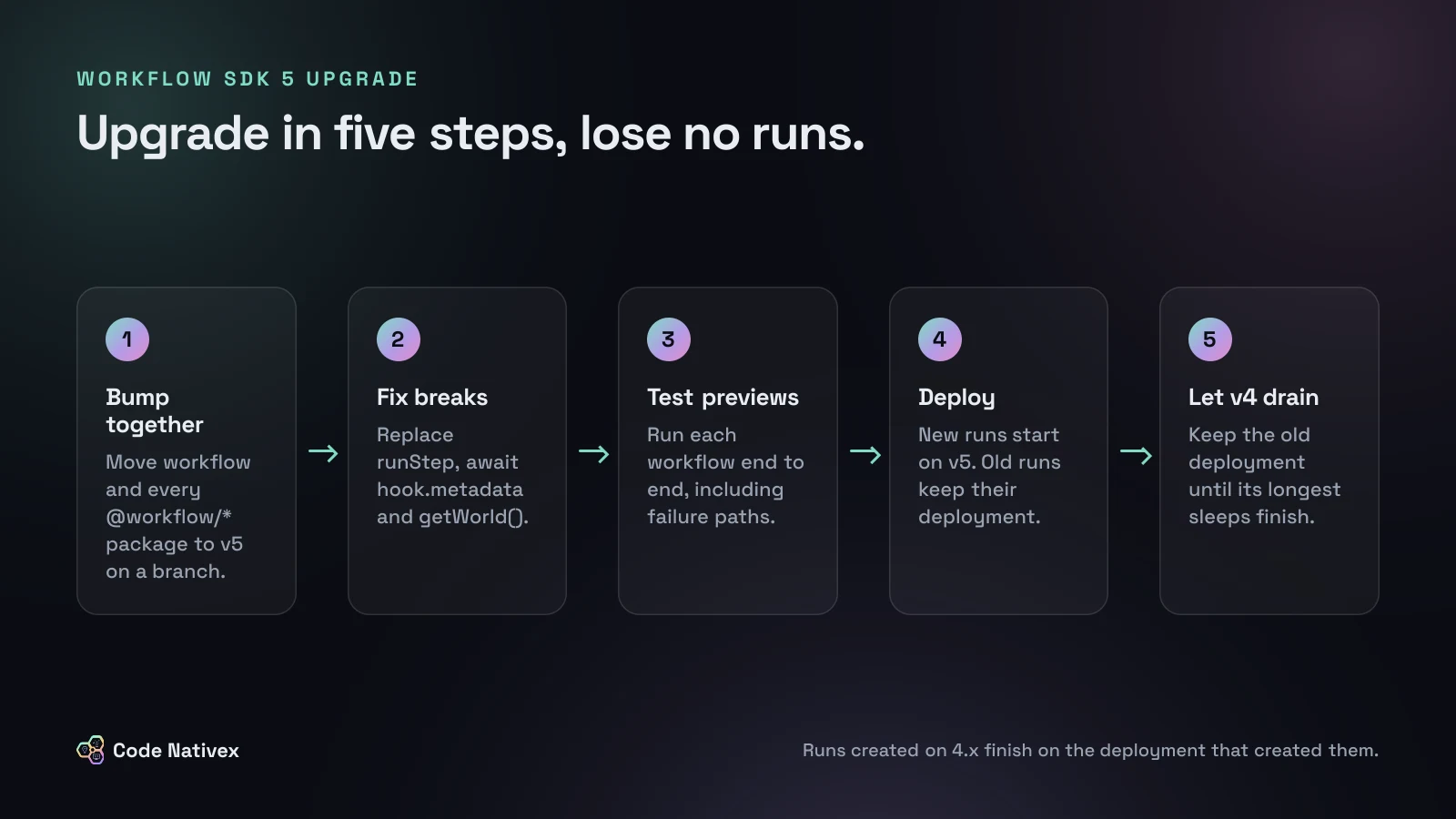
Here is the order we follow:
- 1.Upgrade on a branch. Bump
workflowand every@workflow/*package to version 5 together, as the official guide instructs. Do not mix majors. - 2.Fix the breaking changes. Search the codebase for
runStep,hook.metadata,getWorld(, andexperimental_setAttributes, then run a build to catch duplicate IDs. - 3.Run every workflow in a preview deployment. Trigger each one end to end, including failure paths, and watch it in the trace viewer.
- 4.Deploy to production. New runs use version 5. Old runs drain on the previous deployment.
- 5.Keep the old deployment around until its longest-sleeping runs finish. Do not delete it in a cleanup sweep.
A typical first change after upgrading is cancellation. Version 5 lets you stop a run from outside, for example when a user cancels an export:
import { getRun } from "workflow/api";

export async function POST(req: Request) {
  const { runId } = await req.json();
  const run = getRun(runId);
  await run.cancel();
  return Response.json({ cancelled: true });
}
run.cancel() stops the workflow at its next suspension point and closes its hooks and streams. Check that the user owns the run before you cancel it, just as you would for any other action.
What multi-region means for EU and UK customers
Under version 4, every run's data lived in Vercel's iad1 region in the US. For a SaaS company selling into Europe, that meant workflow inputs, which often include names, emails, and documents, were stored in the US even when the rest of the stack ran in Frankfurt or London.
In version 5, a run is pinned to the region of the function that creates it, or to a region you pass explicitly:
const run = await start(processInvoice, [invoiceId], { region: "fra1" });According to the Vercel World documentation, this controls where the run's data is stored and where its queue messages come from. It does not deploy your code there, so your functions must also run in that region. Two caveats are worth knowing before you promise anything in a data processing agreement: hook tokens are still stored in iad1 for every run, and runs created before the upgrade stay in iad1.
Combined with per-run encryption, this is a real step forward for teams working under GDPR or UK GDPR. It is not a compliance certificate on its own, so review it with whoever owns your data mapping.
Where durable workflows fit in a real product
Most products need durable workflows in a few predictable places: onboarding and billing emails, data imports and exports, and AI features that call a model, wait, and then call a tool. On the America Working platform, for example, we replaced manual welcome emails with an event-driven pipeline where onboarding, billing, retention, and product emails all fire from product events. The hard part was not sending email. It was handling edge cases, such as someone resubscribing after 90 days, reliably every time.
The same pattern shows up in AI features. On Carvise, an AI pre-analysis returns structured findings and every result goes into an expert review queue before anything reaches the driver. That kind of "model proposes, a person approves" flow is a natural fit for a workflow that pauses on a hook until the reviewer acts. We wrote more about that loop in our guide to AI agents for SaaS.
If you are planning work like this, our web app development service covers the full build, from the data model to the background jobs that keep it running.
Should you upgrade now?
For most teams on Vercel, yes, within the next few weeks. The speed gains are free, encryption by default removes a gap you would otherwise have to explain to security reviewers, and the old-runs-drain-naturally design makes the upgrade low risk.
Wait a little longer if you run a custom World, depend on internal SDK imports, or have workflows with very large numbers of steps per run. Those are the cases where the breaking changes and the new event limit will take real time to work through.
The bottom line
Vercel Workflow SDK 5 makes durable workflows faster, encrypted by default, and able to keep data in the region your customers expect. The upgrade is small for most apps: bump every package together, fix a short list of breaking changes, test each workflow in a preview, and let version 4 runs finish on their own.
Planning a product with heavy background work or AI features? Tell us what you are building and we will send a fixed-scope proposal.
Frequently asked questions
- When was Vercel Workflow SDK 5 released?
- Vercel announced Workflow SDK 5 on its blog on November 12, 2026, and its weekly community roundup on November 16 described it as production-ready. Vercel Workflows itself became generally available on April 16, 2026.
- Is Workflow SDK 5 a breaking upgrade?
- Vercel's announcement says there are no major breaking changes, but the official what's new page lists several smaller ones: runStep is removed, hook.metadata becomes a Promise, getWorld() is async, duplicate step IDs fail the build, and the workflow sandbox is stricter.
- What happens to workflow runs that started on version 4?
- They keep running on the deployment that created them and stay in the iad1 region. Upgrading does not migrate them, so you can deploy version 5 while older runs finish on their own.
- Can I keep EU customer data in Europe with Vercel Workflows?
- Version 5 lets you pass a region to start(), which controls where a run's data is stored and where its queue messages come from. Your functions must also be deployed to that region, and hook tokens are still stored in iad1, so check that against your data processing commitments.
- Do I need Vercel to use the Workflow SDK?
- No. The SDK runs on adapters called Worlds. Vercel, Local, and Postgres Worlds all ship on version 5, so you can run durable workflows on your own infrastructure with Postgres if you prefer.
Written by
Tayyeb Ferozi
Senior full stack developer at Code Nativex, delivering full-cycle products from the database and backend to the user interface.
Meet the team