Figma Make to Production: What Figma's October 2026 Launches Change, and What Still Needs Engineers
Figma Make can now spin up a backend with a database, login, and an admin panel. Here is what that changes for founders, what it does not, and how to get a Make prototype ready for real users.
 Zainab AroojSenior UI/UX Designer
If you have built something in Figma Make, the obvious next question is how to get from Figma Make to production: real users, real data, your own domain. Until this month the honest answer was "rebuild it." On October 15, 2026, Figma shipped a batch of launches that close part of that gap. This guide explains what changed, what is still missing, and the checklist we would run before letting customers near a Make app.
What Figma announced on October 15
Figma grouped the launches under one post, Build by design. The pieces that matter for shipping software are:
- Payload in Figma Make. Payload is an open-source CMS and application framework whose team joined Figma last year. Prompting an app in Make can now set up a backend with a database, file storage, user login, and an admin panel, and Figma hosts it.
- Code layers, in open beta on all plans. You can bring code onto the canvas by converting a design, uploading a folder, importing from GitHub, or capturing a live site with the Chrome extension.
- Specs, in open beta on paid plans. A Markdown container for requirements that lives on the canvas, and can be drafted from your codebase through the GitHub connector.
- Code sources, in closed beta. Your design system's components, imported from a GitHub repository or an npm package.
- The Figma agent, now generally available.
The Payload piece is the one that moves the line. Before it, a Make app was a convincing front end. Now it can save a form submission, let a marketer publish an article, and sign a user in, without anyone writing backend code.
What a Payload-backed Make app can do now
According to Figma's Payload in Figma post, the admin panel lets non-developers create articles, edit copy, swap media, reorder categories, review versions, and publish. Content can be uploaded from CSV files. Submitted data is stored with workflows, permissions, and versioning, and API keys live in Make's settings, hidden from visitors.
That covers a real set of products:
- A marketing site where the content team edits pages without a ticket
- A lead or application form that stores submissions and routes them for review
- An internal tool for a small team, such as a request tracker or a resource directory
- A clickable, data-backed demo for investors or a first sales call
Figma's help center describes Payload as "an open-source application framework built with TypeScript and Next.js", and says these backends are currently hosted in the eastern United States. That second detail matters if you sell into the EU or UK and your customers ask where their data lives under GDPR or UK GDPR.
What is still missing before production
A Make app can look finished long before it is safe to run. These are the gaps we see most often when a prototype becomes a product.
The hosting is a beta with no price yet
Figma says Payload hosting is in beta, free for now, and that it will "announce pricing and packaging before it takes effect." Access is also rolling out over the coming weeks. That is fine for a pilot. It is not a foundation for a product whose margins depend on hosting cost.
The data model is whatever the prompt produced
Generated apps tend to store data in the shape the screens needed, not the shape the business needs. Figma's own help article on Make backends notes that the Supabase route "currently uses key-value stores rather than setting up a full SQL database." Payload gives you real collections, but someone still has to decide how customers, accounts, orders, and permissions relate. The difference shows up the first time you need a report:
-- Relational: one query answers "revenue per account this month"
select a.name, sum(o.total_cents) / 100.0 as revenue_usd
from orders o
join accounts a on a.id = o.account_id
where o.created_at >= date_trunc('month', now())
group by a.name
order by revenue_usd desc;
With data stored as loose key-value blobs, that same question becomes application code that loads everything and loops over it.
Security, roles, and multi-tenancy
"Users can sign in" is not the same as "users can only see their own data." Before launch, someone has to check every collection's access rules, test what a logged-out visitor can reach, and confirm that one customer cannot read another's records by changing an ID in the URL.
Accessibility and real-device behavior
Generated layouts often use fixed pixel positions that break on small screens and with zoom. If you sell to EU customers, the European Accessibility Act makes this a legal question, not a polish item.
Payments, email, and the rest of the product
Stripe billing, transactional email, background jobs, analytics, error tracking, and backups are not part of the announcement. A real SaaS needs all of them.
How to take Figma Make to production: the path we recommend
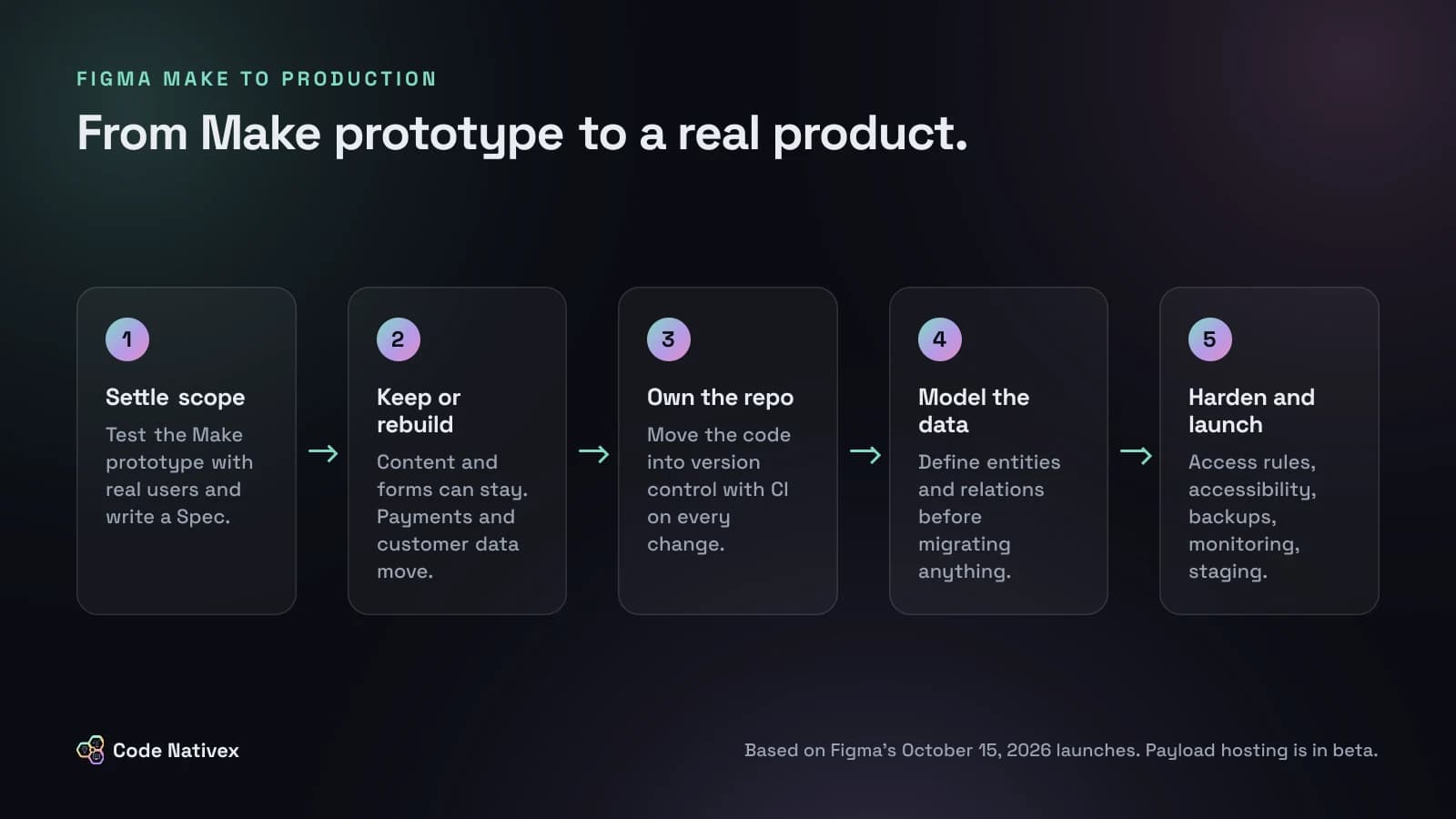
- 1.Use Make to settle scope. Put the prototype in front of five or ten real users. Write what you learn into a Spec on the canvas, so design and engineering read the same requirements.
- 2.Decide what stays and what gets rebuilt. Content sites and internal tools may stay on Payload. Anything with payments, customer data, or complex permissions usually moves to a codebase you own.
- 3.Move the code into your own repository. Download the Make code or start from the open-source Payload framework, put it under version control, and add CI that runs type checks and tests on every change.
- 4.Design the data model on purpose. Write down your entities and how they relate before migrating any data. This is the cheapest point to get it right.
- 5.Harden, then launch. Access rules, an accessibility pass, performance checks, backups, monitoring, and a staging environment that mirrors production.
The useful shift is that steps one and two now happen with a working app instead of static frames. Founders arrive at the build with fewer open questions, which shortens the expensive part.
Figma Make vs custom development: which fits your product
A simple way to decide:
- Stay on Make and Payload if the product is mostly content and forms, the audience is internal or small, and you can live with beta hosting and an unknown future price.
- Move to custom development if you will store customer data, charge money, need roles and multi-tenancy, or must answer security questionnaires from US or UK buyers.
- Do both, in order, which is what most teams should do: prototype in Make, then build the production version on a stack your team controls. We explain the stack we use in our guide to choosing a SaaS tech stack.
How we handle the design-to-code handoff
Our projects start in Figma and ship as Next.js and TypeScript, so this handoff is our daily work. On Bureau of Innovation, a digital gallery for designer furniture, we designed the experience in Figma first, in strict black and white, then built it on Next.js with an AWS S3 image pipeline so large photography stayed sharp without slowing pages down. Everything is content-managed, so the gallery team adds designers, pieces, and shows themselves.
That is the pattern Figma is now pushing: design and content in one place, with a real framework underneath. The part that still takes engineers is the part users never see, which is the data model, the access rules, and the pipeline that keeps it all running. If you want that done for you, our web app development service covers the build from a Figma file to a production app, and you can see more of our work in the portfolio.
Conclusion
Figma's October launches make Figma Make a better place to start a product: a prototype can now store data, sign users in, and let a content team publish. They do not make the production work disappear. Treat Make as the fastest way to agree on what to build, and move to a codebase you own before real customers and real data arrive.
If you have a Make prototype and want a straight answer on what it would take to ship, get a fixed-price quote and we will review it with you.
Frequently asked questions
- Is Figma Make production ready?
- For internal tools, demos, and simple content sites, it can be close. For a product that stores customer data or takes payments, treat it as a fast prototype. The new Payload hosting is in beta, and you still need to review security, accessibility, performance, and the data model yourself.
- What did Figma announce on October 15, 2026?
- Figma announced Payload in Figma Make, code layers in open beta on all plans, Specs in open beta on paid plans, code sources in closed beta, and general availability of the Figma agent.
- Does Figma Make have a real database?
- With Payload, Make sets up a built-in backend with a database, file storage, authentication, and an admin panel, hosted by Figma. Figma's help center notes that the older Supabase route uses key-value stores rather than setting up a full SQL database.
- Can I export Figma Make code and host it myself?
- Make projects can be downloaded as code and continued in your own editor, and Payload is an open-source framework built with TypeScript and Next.js that you can self-host. Expect a review and some refactoring before it runs cleanly in your own pipeline.
- How much does Figma Make hosting cost?
- Figma says the hosting for Payload-backed Make projects is free during the beta, and that it will announce pricing and packaging before charges take effect. No price has been published yet.
Written by
Zainab Arooj
Senior UI/UX designer at Code Nativex, designing intuitive, user-focused product experiences.
Meet the team