How to Build a HIPAA Compliant AI Agent for Your Health Product
OpenAI just put computer-use agents into healthcare workflows. If you are building agents for a health product, here is what HIPAA actually asks of you, and how to design for it.
 Shumail RafiqueSenior Full Stack Developer
On November 16, OpenAI announced computer-use agents for healthcare teams, built to handle work like referrals, discharge planning, and prior authorizations inside existing EHRs and insurer portals. If you run a health tech product, your customers will now ask why your software cannot do the same. Building a HIPAA compliant AI agent is very doable, but the model is the smallest part of it. This guide covers what OpenAI launched, what HIPAA actually requires of an agent, and the architecture, code, and contracts we would put in place before the first patient record reaches a prompt.
What OpenAI launched for healthcare
OpenAI's announcement describes agents that operate existing software the way a person would: clicking through the EHR, reading the chart, and filling in forms. Named partners include CVS Health, Cigna Healthcare, Abridge, and Ambience. The capabilities are available through the OpenAI API, ChatGPT for Healthcare, and ChatGPT for Clinicians.
Two details matter more than the benchmark scores. First, in the Ambience demo, the agent stops when a patient's record is unclear and asks the physician before going further. Second, according to The Decoder's coverage, organizations handling protected health information (PHI) must sign a Business Associate Agreement with OpenAI, use covered services, and apply the required security and retention settings. In other words, the vendor gives you the parts. Compliance is still the job of whoever assembles them.
That is the useful lesson for buyers. Whether you use OpenAI, Anthropic, or a model on your own cloud, the same questions decide whether your agent is safe to ship.
No model is HIPAA compliant on its own
HIPAA has no certification for models, frameworks, or apps. When a vendor says "HIPAA compliant," it usually means "we will sign a BAA for these specific products." That is necessary, and it is nowhere near sufficient.
An agent is a system, not a model. It includes the prompts, the retrieval layer, the tools it calls, the queues it uses, the logs it writes, and the people who review its work. PHI flows through all of them. A compliant model behind a debug log that ships full prompts to an uncovered analytics tool is still a breach waiting to happen.
So the work splits into three parts: contracts that cover every hop, a data flow that sends as little PHI as possible, and technical controls that your code enforces regardless of what the model says.
Map every place PHI travels and get BAAs
Before writing code, draw the path of a single request. For a typical agent it looks like this:
- Your app server, which builds the prompt from patient data
- The model provider's API
- Your vector database, if the agent retrieves from clinical notes
- Background job queues and caches
- Error tracking, tracing, and LLM observability tools
- Any screenshot or session recording store, for computer-use agents
Every vendor on that list that stores or processes PHI needs a BAA, and the BAA must cover the exact product and configuration you use. Enterprise or healthcare plans are often covered where the self-serve tier is not. Observability tools are the most common gap: teams sign a BAA with the model provider, then send full prompts to a tracing service that never signed one.
If a vendor will not sign, change the data flow instead. Strip identifiers before the data reaches that tool, or keep the tool out of the PHI path entirely.
Give the agent the minimum necessary data
HIPAA's minimum necessary principle maps neatly onto agent design. An agent that drafts a prior authorization needs the diagnosis, the requested procedure, the relevant notes, and the payer. It does not need the full chart, the billing history, or other patients' records.
In practice that means:
- Scope each run to one patient and one task. Load the record server side and pass only the fields the task needs.
- Do not let the model choose what to fetch freely. Expose narrow tools such as
getActiveMedications(patientId), not a generic query tool. - Bind tools to the user's own permissions. The agent acts as the clinician who started it, never as a service account that can see everyone. The access control standard requires that only people or software programs that have been granted access rights can reach electronic PHI.
This also makes the agent better. A smaller, focused context produces fewer confident mistakes than a prompt stuffed with an entire chart.
Put approval gates on every action that matters
Reading is low risk. Submitting a prior authorization, sending a patient message, or changing an order is not. OpenAI's own examples keep a person in the loop for exactly these steps, and so should yours, at least until the agent has a track record on real cases.
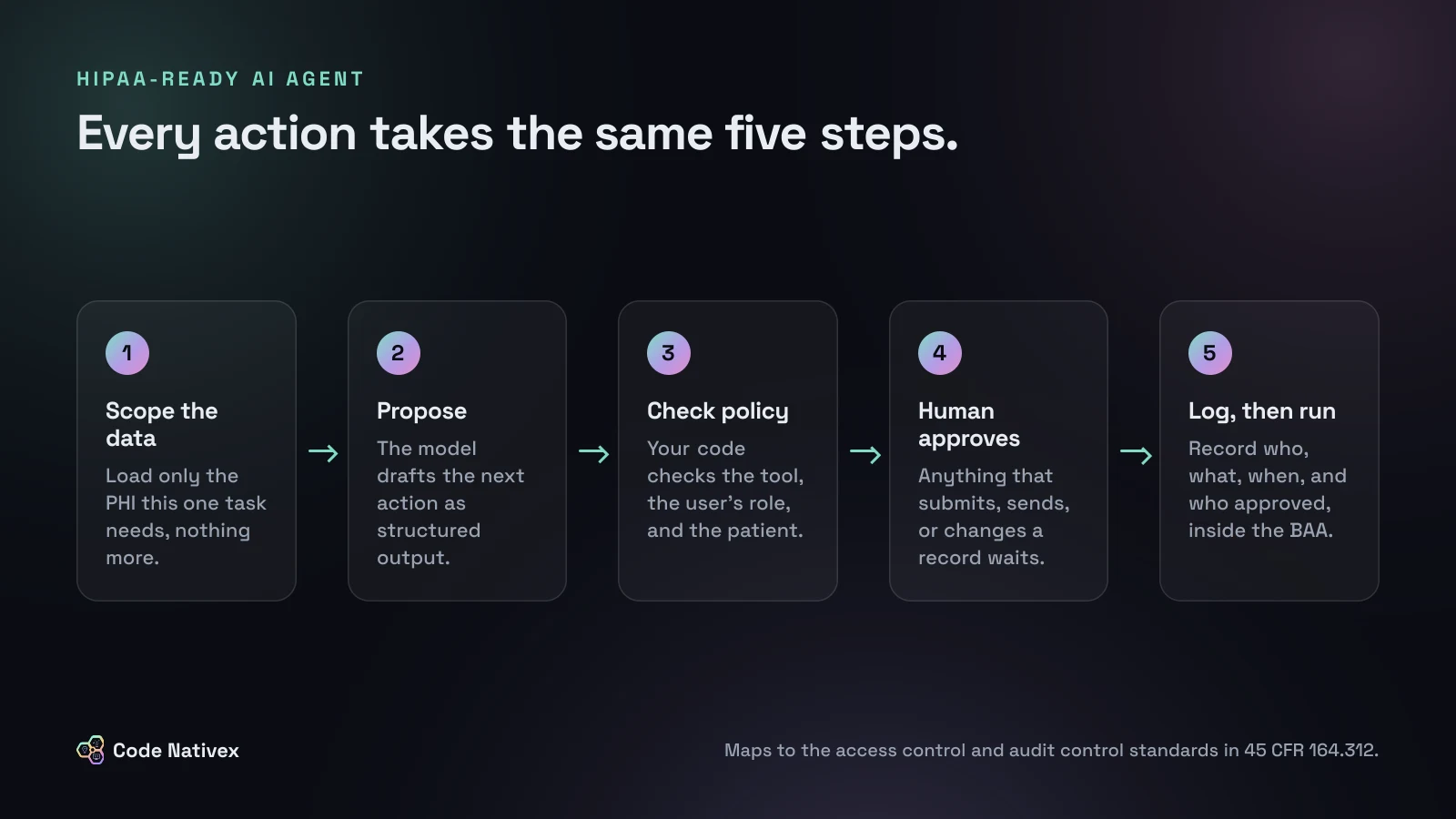
The key design rule is that the model proposes and your code decides. The model returns a structured action. Your code checks it against a policy, routes it to a person if needed, logs the decision, and only then runs it:
const NEEDS_APPROVAL = new Set(["submitPriorAuth", "sendPatientMessage", "updateOrder"]);

export async function runAgentAction(action: AgentAction, ctx: SessionContext) {
  if (!ctx.user.allowedTools.includes(action.tool)) throw new Error("Tool not permitted");
  if (action.patientId !== ctx.patientId) throw new Error("Out-of-scope patient");

  const approval = NEEDS_APPROVAL.has(action.tool)
    ? await requestApproval(action, ctx.user) // waits for a clinician in the review queue
    : { approved: true, approverId: null };

  await auditLog.write({
    agentRunId: ctx.runId, userId: ctx.user.id, patientId: action.patientId,
    tool: action.tool, args: action.args, approved: approval.approved,
    approverId: approval.approverId, at: new Date().toISOString(),
  });

  if (!approval.approved) return { status: "rejected" };
  return tools[action.tool](action.args, ctx);
}
Two failure cases deserve explicit handling. When the record is ambiguous, the agent should stop and ask, as in the Ambience demo, rather than guess. And when something goes wrong at scale, you need a way to stop every run at once, which we cover in our guide to building an AI agent kill switch.
Log everything, and treat the log as PHI
The audit controls standard requires mechanisms that record and examine activity in systems that contain or use electronic PHI. For an agent, the activity that matters is the tool call, not just the database query underneath it. If an auditor asks why a prior authorization was submitted, "the model decided" is not an answer. "Dr. Lee approved action 4 of run 812 at 10:42" is.
A useful agent audit record captures the user the agent acted for, the patient, the tool and its arguments, the result, the timestamp, and the approval decision. Keep these in an append-only store with its own access controls.
Remember that the log is itself PHI. So are prompt traces, retrieved chunks in your vector database, and, for computer-use agents, every screenshot of an EHR screen. Set retention periods for all of them, keep them inside your BAA-covered environment, and know who can read them. This is the area where announcements tend to be thinnest, so ask any vendor where screenshots are processed and how long they are kept.
How we approach agents that handle sensitive data
The pattern above is the one we start every agent build from, health care or not: one narrow job, tools that act with the user's own permissions, an approval gate on anything that writes, sends, or spends, and a log of every step. On Carvise, an AI pre-analysis reads a repair quote in about two minutes, and a certified expert confirms, corrects, or overrides every result before a driver sees it. Fast automation with accountable sign-off is exactly what a clinical workflow needs too.
If you are scoping an agent for a health product, our AI agent development team starts by picking one frequent, checkable task, then defines what the agent can read, what it can change, and where a person approves, before any model is wired in. If the agent needs to be reachable from other AI tools, our guide to an MCP server for SaaS covers the same permission model from the integration side.
A note on scope: this is an engineering guide, not legal advice. Your compliance officer or counsel should review the BAAs, your risk analysis, and your policies.
Conclusion
OpenAI's launch shows where health care software is heading: agents that do the administrative work clinicians and staff dread, with a person signing off on what matters. A HIPAA compliant AI agent comes from the same few decisions every time. Sign BAAs for every hop, send the minimum PHI, let your code decide what runs, gate the risky actions, and log everything inside the covered boundary.
If you want help designing or building an agent like this for your product, tell us about the workflow and we will come back with a fixed-scope proposal.
Frequently asked questions
- Is there a HIPAA certified AI model?
- No. HIPAA has no certification for models or software. A provider can sign a Business Associate Agreement and offer covered services, but whether your agent is compliant depends on how you configure it, what data you send, and the safeguards your own system enforces.
- Can I send PHI to the OpenAI API?
- Only under a signed Business Associate Agreement and using the services and settings that agreement covers. Coverage of OpenAI's healthcare launch notes that organizations handling PHI must sign a BAA, use covered services, and apply the required security and retention settings.
- Does HIPAA require a human to approve AI agent actions?
- Not explicitly. HIPAA requires access controls, audit controls, and authentication, not human review. Human approval is a design choice, but for actions that submit, send, or change patient records it is the most reliable way to keep a mistake from reaching a patient or payer.
- What should a HIPAA audit log for an AI agent include?
- At minimum: the agent and the user it acted for, the patient or record touched, the tool called and its arguments, the result, a timestamp, and the approval decision with the approver's identity. Store it with access controls inside your BAA-covered environment, because it contains PHI.
- Do computer-use agents create new HIPAA risks?
- Yes. An agent that works through screens takes screenshots, and every screenshot of an EHR is PHI. You need to know where those images are processed, who can see them, and how long they are kept, and that the vendor processing them is covered by a BAA.
Written by
Shumail Rafique
Senior full stack developer at Code Nativex, building scalable web applications with modern technologies.
Meet the team