How to Reduce AI Agent Latency: Message Threads, Prompt Caching, and the Fixes That Matter
Anthropic just shipped message threads to make long agent loops faster. Here is where agent latency really comes from, what threads and prompt caching fix, and what only product design can fix.
 Shumail RafiqueSenior Full Stack Developer
If you want to reduce AI agent latency, the model is rarely the only thing to blame. An agent is a loop: it reads a growing conversation, thinks, calls a tool, and goes around again, often dozens of times per task. Every lap adds delay. On November 2, 2026, Anthropic shipped a feature aimed squarely at that loop, called message threads. This guide explains where agent latency actually comes from, what threads and prompt caching each fix, the code to adopt threads safely, and the product decisions that save more time than any API flag.
Where AI agent latency actually comes from
A single agent turn has four parts, and each one has its own fix:
- 1.Sending the request. Without special handling, every turn uploads the whole conversation again: system prompt, tool definitions, and every earlier message. The API validates and tokenizes all of it.
- 2.Reading the prompt. Before the model writes a single word, it has to process every input token. This is what most people mean by time to first token (TTFT), and it grows with context length.
- 3.Generating output. Output tokens come out one at a time. Long answers and long reasoning take longer.
- 4.Running tools. Your code calls a database, a search index, or a third-party API, then sends the result back for the next turn.
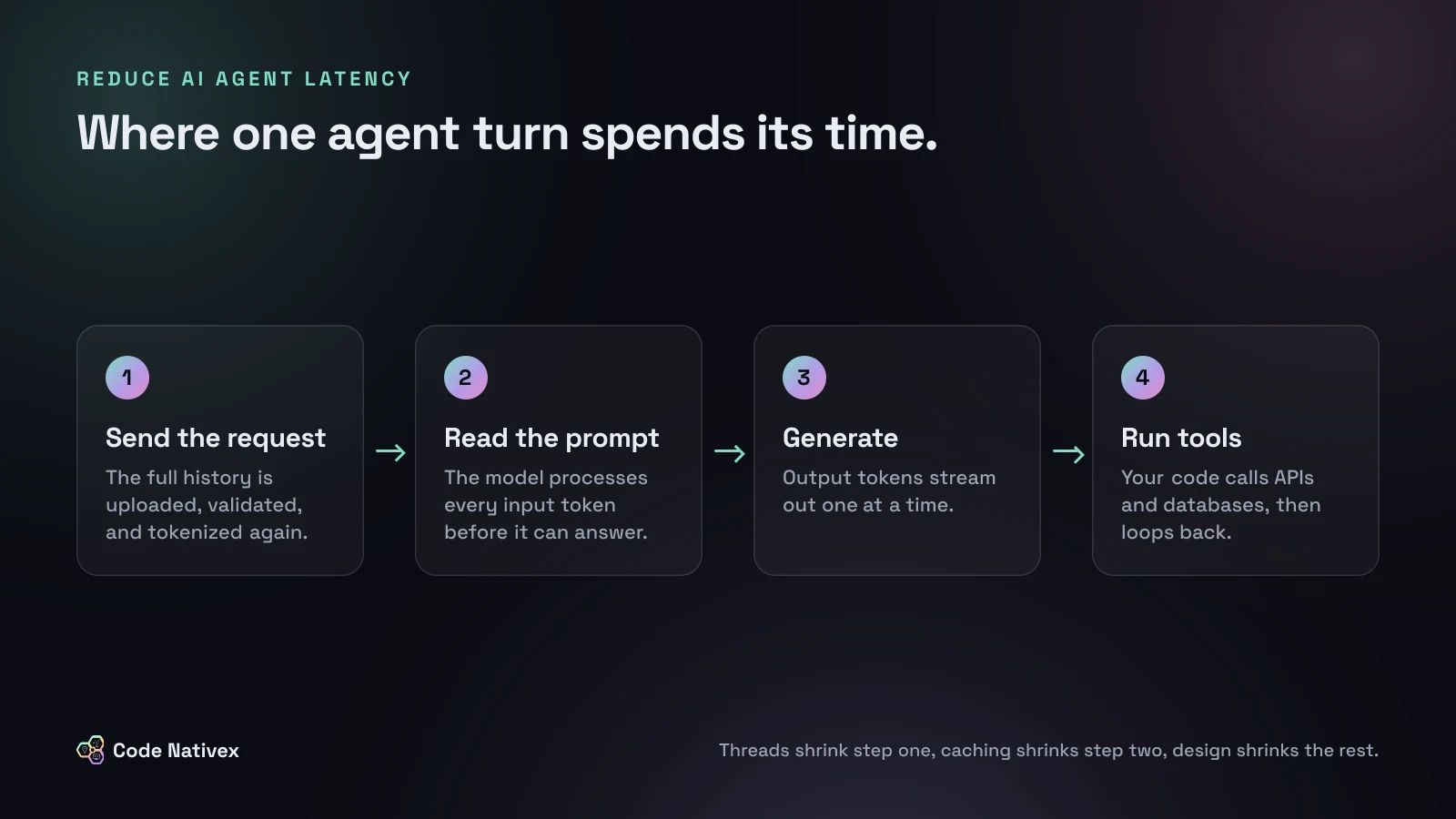
The total wait a user feels is the sum of all four, multiplied by the number of turns. That is why an agent that answers a single question in two seconds can take two minutes on a ten-step task. Before changing anything, log the time spent in each part per turn. Most teams discover that one stage dominates, and it is often not the one they guessed.
What Anthropic's message threads change
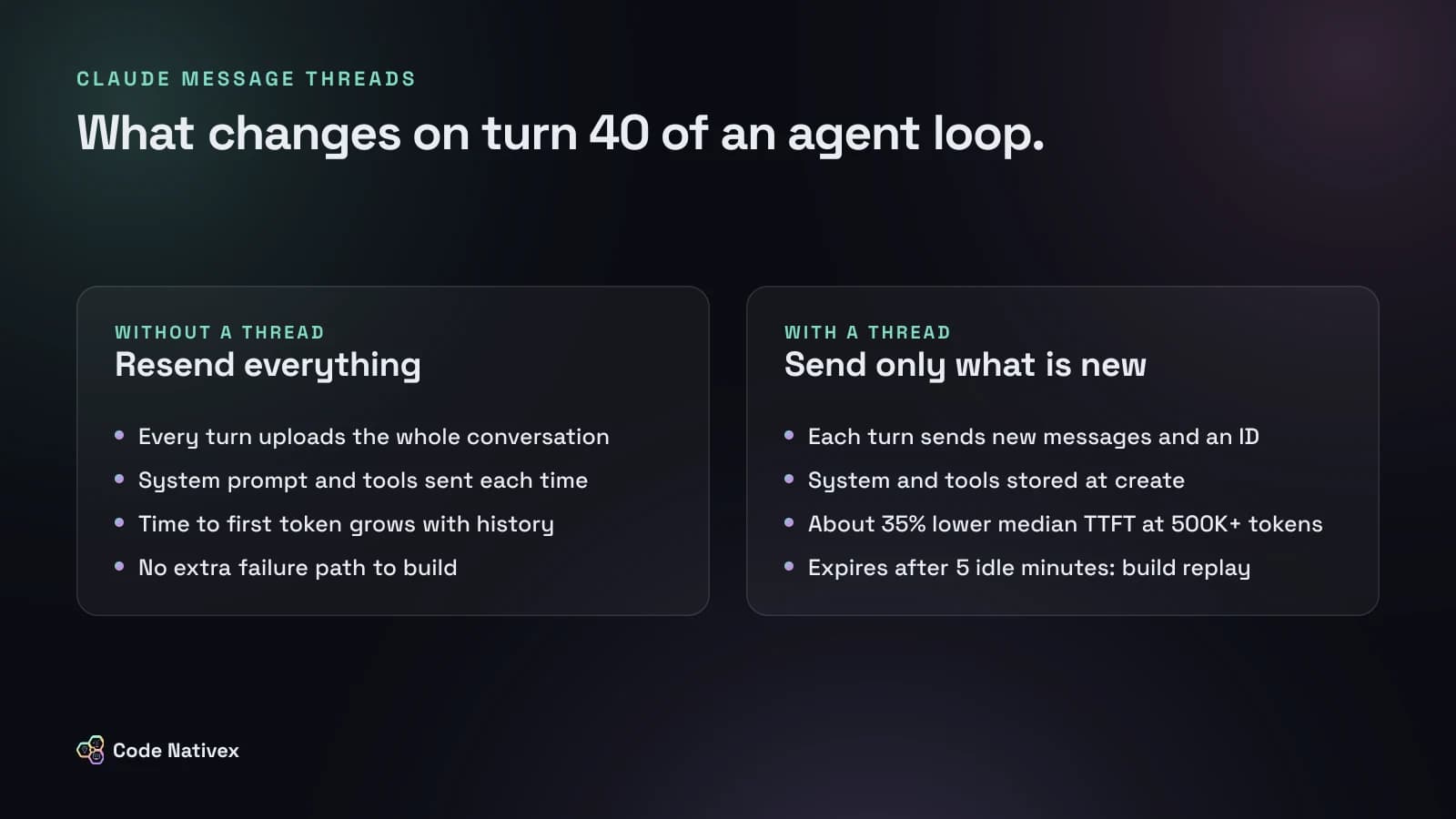
Message threads attack the first stage. According to Anthropic's message threads documentation, your first request sends the full conversation with a thread field set to create. Every later request sends only the new messages plus the ID of the previous response. The API keeps the conversation, system prompt, and tools on its side, so it does not have to receive and process all of it again.
Anthropic's launch announcement reports that requests with 500K to 1M tokens see median TTFT drop by about 35%, measured with threads on by default for most Claude Code users. That is a large gain, but notice the range: it applies to very long conversations. A support chatbot with a few thousand tokens of history will see a much smaller difference.
Three details from the docs matter for planning:
- Threads do not change pricing or rate limits. They make agents faster, not cheaper.
- Threads are best-effort. A thread expires five minutes after its last request, and there is no API to list, read, or delete one.
- Some setups cannot use them. Threads do not work with Message Batches, token counting, or on-demand compaction, and they are unavailable to organizations with HIPAA readiness or Inference hooks enabled. If you build in healthcare, check this before you plan around them.
How to adopt threads without breaking your agent
The most important rule in the documentation is that your application stays the source of truth. Neither a create nor a continue response tells you whether the API stored that turn. You only find out on the next request, when a continue call may return a 404 with the error code thread_not_found. When that happens, you send the full conversation again in a new create request and carry on.
The SDK helper handles this for you. It builds create and continue requests, keeps a full copy of the conversation in memory, and replays once if a thread has expired:
import Anthropic from "@anthropic-ai/sdk";

const client = new Anthropic();

// Sends nothing yet. The first send() creates the thread.
const thread = client.beta.messages.thread({
  model: "claude-sonnet-5-5",
  max_tokens: 1024,
  cache_control: { type: "ephemeral" }, // cache each turn
  system: "You are the billing assistant for our SaaS app.",
});

await thread.send({ role: "user", content: "Why did my invoice go up?" });

// Only this new message goes over the wire.
const reply = await thread.send({ role: "user", content: "Can I get a refund?" });
If you build requests yourself, plan for a few rules. Send system and tools only on the create request. Keep fields such as model, thinking, and tool_choice identical on every turn, or the API rejects the request with thread_fingerprint_mismatch. A thread is append-only, so to summarize or edit earlier turns, start a new thread. Persist the conversation in your own database too, because the SDK copy lives in process memory and disappears when a serverless function ends.
Prompt caching still does the heavy lifting
Threads reduce how much you send. Prompt caching reduces how much the model has to reprocess. The docs are explicit that a thread does not cache your prompt for you, which is why the example above sets cache_control.
Caching only works when the start of your prompt stays identical between requests. A January 2026 study, Don't Break the Cache, tested caching on long agent tasks across OpenAI, Anthropic, and Google models. The authors found it cut API costs by 41 to 80% and recommend caching the system prompt as the most consistent strategy. They also list the habits that quietly break caching:
- Putting a timestamp, session ID, or user name at the top of the system prompt.
- Adding or removing tools between requests, which changes the cached prefix.
- Rewriting or pruning earlier tool results mid-conversation.
The fix is ordering. Put stable content first (instructions, tool definitions, reference documents) and changing content last. If an agent needs today's date, add it to the latest user message, not to line one of the system prompt. We cover the cost side in more depth in our guide on how to reduce LLM API costs.
Cut turns before you cut milliseconds
The fastest turn is the one that never happens. Before tuning the API, look at the loop itself:
- Fewer, better tools. A long tool list makes every planning step slower and invites wrong calls. Give each agent the handful of tools its job needs.
- Parallel tool calls. If the agent needs a customer record and an invoice list, fetch both at once instead of in two turns.
- Smaller models for small steps. Classifying a request or extracting a field does not need your largest model. Route those steps to a faster one.
- Fast tools. A tool that takes four seconds to query an unindexed table costs four seconds every time the agent calls it. Index it, cache it, or precompute it.
- Compact long sessions. When a conversation gets huge, summarize it and start fresh. This shortens prompt reading on every later turn.
Design for the latency you cannot remove
Some work is simply slow. Good product design makes that acceptable. Stream the first words of every reply, and for multi-step tasks stream progress too: "Checking your last three invoices" is far better than a spinner. For anything longer than a few seconds, consider moving the work off the request entirely and notifying the user when it is done. Our guide to background jobs in Next.js covers the options.
We built Carvise, an AI advisory platform that reviews car repair quotes, around this idea. The AI pre-analysis takes about two minutes, and a certified expert validates every result within 24 hours before it reaches the driver. Nothing about that is a chat-style wait, and it does not need to be: drivers get a fast first pass and an accountable final answer.
Finally, latency and safety are linked. A faster loop also runs away faster, so pair speed work with a way to stop an agent mid-task, as described in our post on building an AI agent kill switch.
A practical latency checklist
- 1.Log time per stage, per turn: request, time to first token, generation, and each tool call.
- 2.Track p95, not just averages. Users remember the slow runs.
- 3.Put stable prompt content first and turn on prompt caching.
- 4.If your conversations are long and you use Claude, try message threads, with a replay path built from day one.
- 5.Remove unneeded tools, run independent tool calls in parallel, and route simple steps to a smaller model.
- 6.Stream text and progress, and move long tasks to background jobs.
Conclusion
To reduce AI agent latency, treat the agent as a loop and measure every lap. Message threads are a useful new tool for long Claude conversations, and prompt caching remains essential, but neither will rescue an agent that takes too many turns or calls slow tools. Fix the loop, then the plumbing, then design around what is left.
If you are adding agents to a product and want them fast and reliable, our AI agent development service covers architecture, evaluation, and production rollout. Tell us about your project and we will suggest where to start.
Frequently asked questions
- What is a good latency target for an AI agent?
- It depends on the job. A chat reply should start streaming within a second or two, while a multi-step agent task can take a minute if the user sees progress. Set a budget per step and track p95, not just the average.
- What are Claude message threads?
- A beta feature of Anthropic's Messages API, launched November 2, 2026. After the first request, each turn sends only the new messages plus the previous response ID, so the API does less work per turn and time to first token stays lower as a conversation grows.
- Do message threads reduce API costs?
- No. Anthropic's documentation says threads do not change pricing or rate limits. To lower cost, use prompt caching, smaller models for simple steps, and shorter prompts.
- Does streaming reduce AI agent latency?
- Streaming does not make the model finish sooner, but it shows the first words as soon as they exist, so the wait feels much shorter. For agents, also stream status updates such as which tool is running.
- Can every team use message threads?
- Not yet. Threads are a beta, they are not eligible for zero data retention, and Anthropic's docs say they are unavailable to organizations with HIPAA readiness or Inference hooks enabled. Healthcare products should check this first.
Written by
Shumail Rafique
Senior full stack developer at Code Nativex, building scalable web applications with modern technologies.
Meet the team