OpenAI Agent Builder Shutdown: What Stops on November 30 and How to Migrate
OpenAI shuts down Agent Builder, the Evals platform, and reusable prompt objects on November 30, 2026. Here is what each change breaks, where OpenAI points you instead, and a practical plan for the final week.
 Shumail RafiqueSenior Full Stack Developer
The OpenAI Agent Builder shutdown happens on November 30, 2026, one week from today, and it is not the only thing switching off that day. The Evals platform and the v1/prompts endpoint for reusable prompt objects go with it. If your product runs an agent you designed in Agent Builder, calls the API with a stored prompt ID, or relies on OpenAI-hosted evals, something in your stack stops working at the end of the month. This guide explains exactly what is shutting down, where OpenAI points you instead, and a realistic plan to finish the move this week.
What the OpenAI Agent Builder shutdown includes
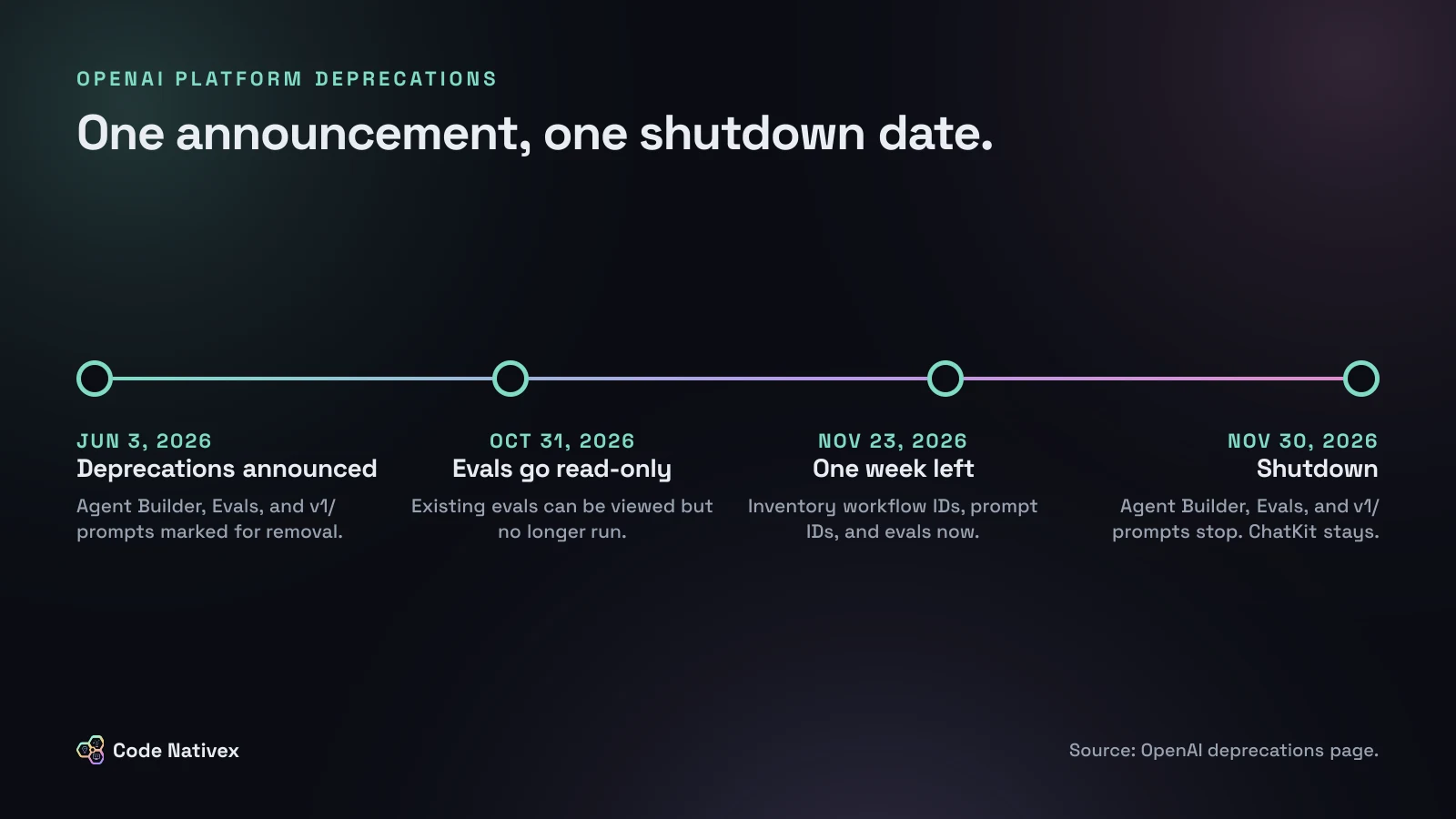
OpenAI announced three related deprecations on June 3, 2026, and all three share the same shutdown date. According to the official OpenAI deprecations page, these are:
- Agent Builder, the visual canvas for designing agent workflows. Replacement: the Agents SDK or ChatGPT Workspace Agents.
- The Evals dashboard, API, and graders for eval workflows. Replacement: Promptfoo. Existing evals became read-only on October 31, 2026.
- `v1/prompts` and reusable prompt objects. Replacement: move the prompt content into your application code.
One thing stays: OpenAI says ChatKit, its embeddable chat interface, remains available. That matters, because many teams deployed Agent Builder workflows through ChatKit by passing a workflow ID. The documentation does not say what happens to a ChatKit embed that points at an Agent Builder workflow once the builder is gone. Until OpenAI says otherwise, assume that path is at risk and plan to put your own backend behind the chat UI.
Who is affected, and how to check in an hour
The risk is not the deprecation itself. It is the dependency you forgot about. Before anyone writes migration code, run a short inventory:
- 1.Search your codebase for workflow IDs. Look for Agent Builder workflow references in ChatKit setup code and environment variables.
- 2.Search for prompt IDs. Stored prompts appear in API calls as a
promptparameter with an ID that starts withpmpt_. Rungrep -rn "pmpt_" .across every repository, including scripts and internal tools. - 3.List your evals. Open the Evals dashboard while it is still readable and note every eval your team uses before a release.
- 4.Check no-code tools. Ask operations and support teams whether they built internal agents in Agent Builder. These often live outside engineering's view.
Rank what you find by who notices when it breaks. A customer-facing support agent comes first. An internal eval that runs once a sprint can wait a few days, as long as you have copied its data.
Option 1: move the agent into code with the Agents SDK
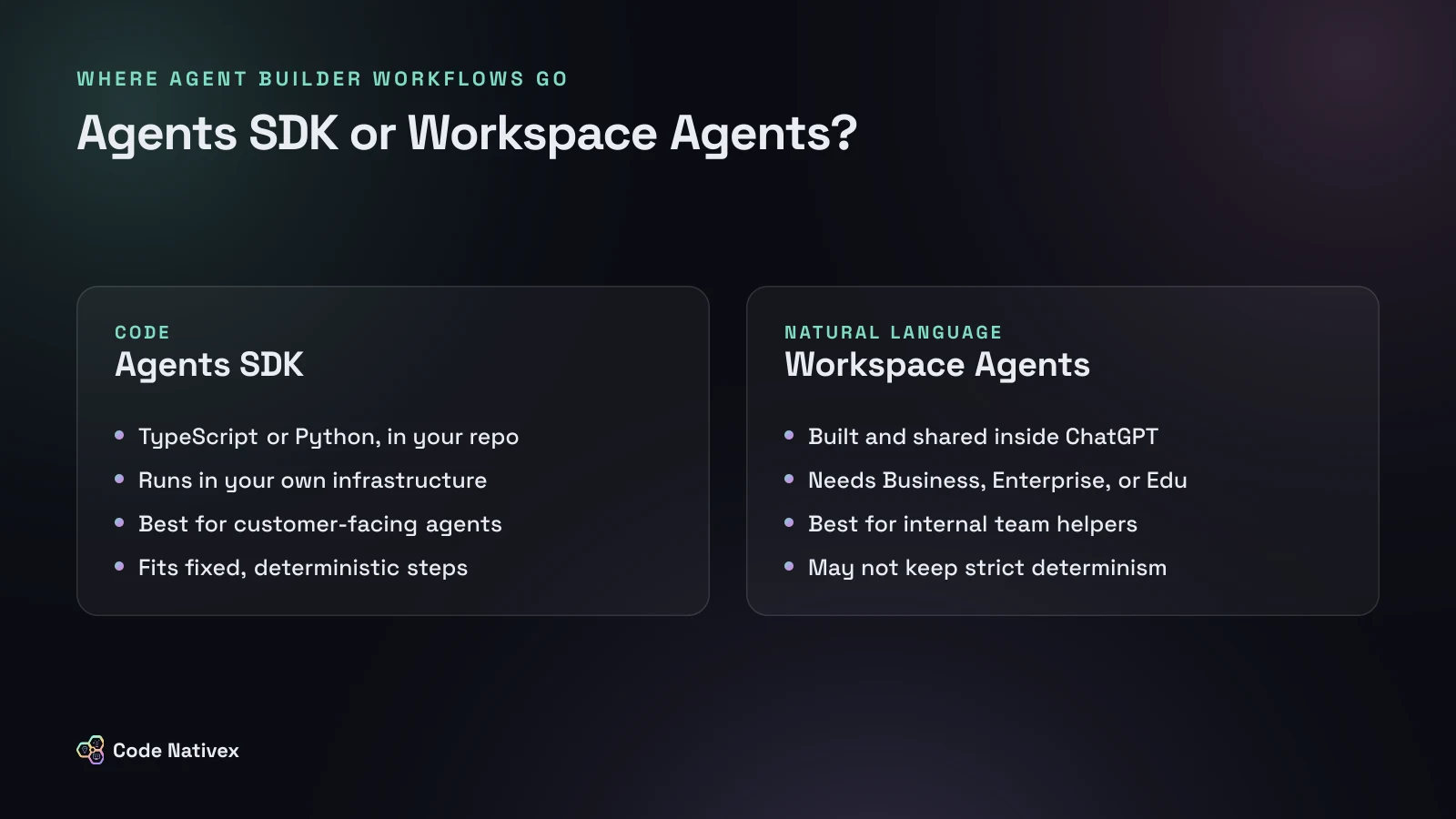
For any agent that sits inside your product, the Agents SDK is the right destination. You own the code, it runs in your infrastructure, and it goes through the same review, testing, and deployment process as the rest of your app.
OpenAI's Agent Builder migration guide gives the export steps: open the workflow, select Code in the top navigation, choose Agents SDK, pick TypeScript or Python, and copy the complete export. Be clear about what you get. OpenAI states that this process "does not convert your workflow graph" and does not guarantee every behavior transfers unchanged.
In practice, treat the export as a first draft. Then check each of these by hand:
- Control flow. Branches, loops, and conditions you drew on the canvas need to exist in code. Compare the canvas to the export node by node.
- Tools and permissions. Every tool the agent can call needs real authentication and the narrowest scope possible. Anything that writes, sends, or spends money deserves an approval step and an AI agent kill switch.
- Knowledge and files. Confirm that any file search or retrieval the workflow used is wired to the right data in your new setup.
- Logging. Record each tool call and model response so you can debug the migrated agent when it behaves differently from the old one.
This is also a chance to fix things the visual builder made hard, such as unit-testing individual steps or routing simple requests to a cheaper model. Our guide to reducing LLM API costs covers the routing patterns that are easier once the agent lives in code.
Option 2: rebuild it as a ChatGPT Workspace Agent
Workspace Agents are built in natural language inside ChatGPT and shared with your team. OpenAI's guide says you need a ChatGPT Business, Enterprise, or Edu workspace with access to workspace agents and permission to create them. The suggested flow is to paste your exported code into the builder with a conversion prompt, review what it flags, configure apps and permissions, test in Preview, and only then create the agent.
This fits internal helpers well: a research assistant for the sales team, or a drafting agent for support. It does not fit agents inside your product that your customers use, because the agent now lives in ChatGPT rather than in your app.
OpenAI also gives a clear warning: workflows "with strong determinism at their core may not migrate faithfully to a workspace agent." If your workflow follows fixed steps, such as validating a form, calling an API, and writing a record in that exact order, choose the Agents SDK instead.
Moving stored prompts into your code
The v1/prompts shutdown is the easiest to miss, because a stored prompt looks like any other API call. If a request passes prompt: { id: "pmpt_...", version: "..." }, it depends on OpenAI storing that prompt for you.
The prompt object migration guide recommends moving the prompt text into source code, turning prompt variables into function arguments, sending messages through the Responses API, and versioning prompts in git with pull request review. A small module of named builder functions keeps prompts in one place:
import OpenAI from "openai";

const client = new OpenAI();

// Static text first: prompt caching depends on exact prefix matches.
const SUPPORT_INSTRUCTIONS = `You are the support assistant for Acme.
Answer only from the provided help articles. If unsure, say so.`;

export function buildSupportInput(customerName: string, question: string) {
  return `Customer: ${customerName}\nQuestion: ${question}`;
}

export async function answerSupportQuestion(name: string, question: string) {
  const response = await client.responses.create({
    model: process.env.OPENAI_SUPPORT_MODEL!,
    instructions: SUPPORT_INSTRUCTIONS,
    input: buildSupportInput(name, question),
  });
  return response.output_text;
}
Copy each prompt's text and version out of the dashboard before the shutdown, then run the old and new versions side by side on a handful of real inputs to confirm the output matches. Keep the model name in configuration rather than hard-coding it. When the next model retires, our guide on LLM model deprecation walks through that migration.
Replacing OpenAI Evals before your test history disappears
Evals became read-only on October 31, so nobody can add new runs, but you can still read what is there. Use this week to export it. For each eval, copy the test inputs, the expected outputs, and the grading criteria.
OpenAI recommends Promptfoo as the replacement for eval workflows, and the OpenAI Evals guide points to Datasets for new iterative work. Whichever you choose, keep the test cases in your repository next to the prompts they test. Then a prompt change and its eval results can be reviewed in the same pull request, and your evals no longer depend on any single vendor's dashboard.
A one-week migration plan
With seven days left, sequence the work by risk:
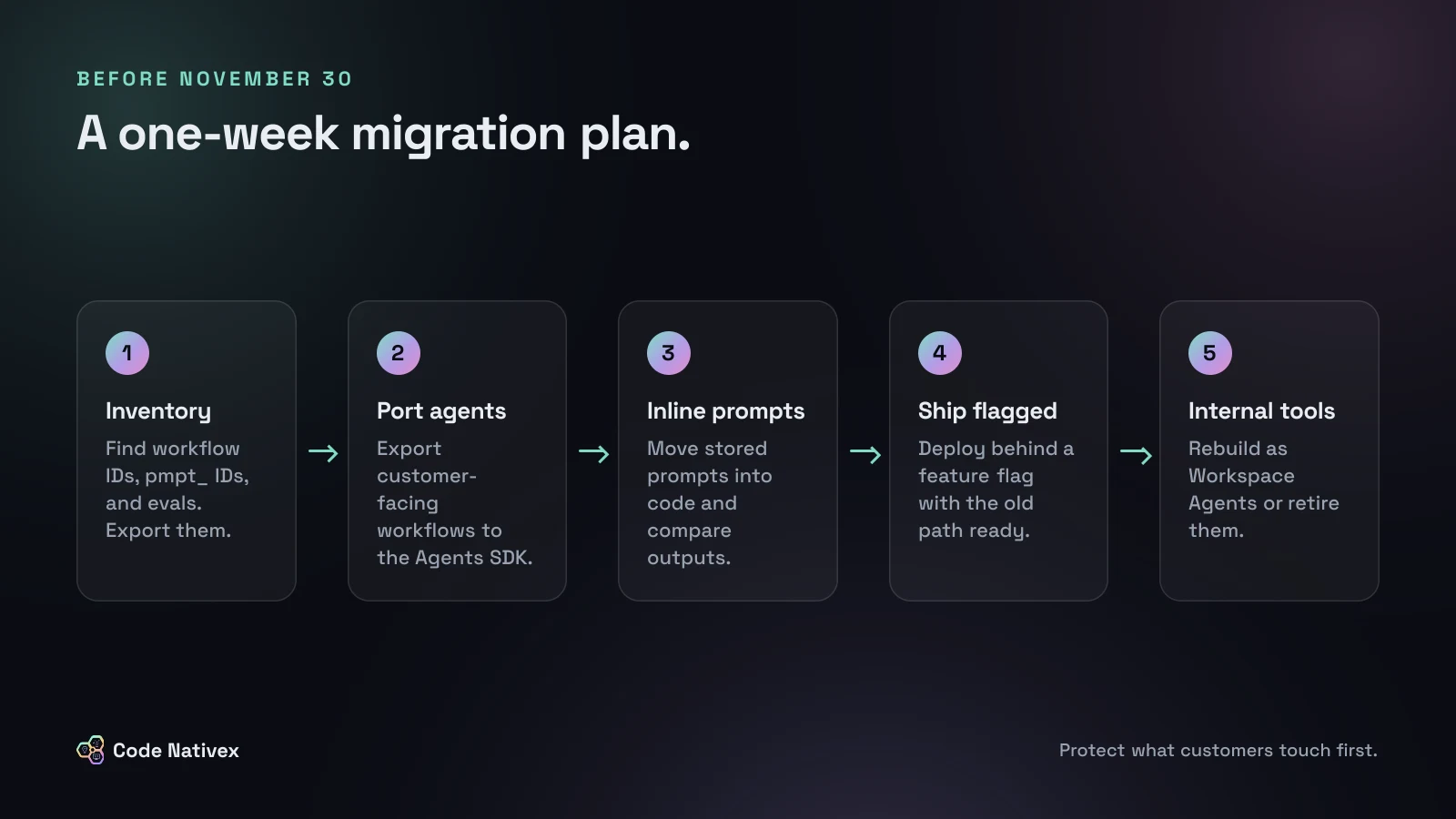
- 1.Monday: run the inventory and export every eval and stored prompt while the dashboards still work.
- 2.Tuesday and Wednesday: export customer-facing Agent Builder workflows to the Agents SDK, then rebuild the missing control flow, tools, and logging.
- 3.Thursday: move stored prompts into code and run side-by-side checks against real inputs.
- 4.Friday: deploy behind a feature flag, compare results, and keep the old path ready until you are confident.
- 5.Weekend before November 30: rebuild internal helpers as Workspace Agents, or retire the ones nobody uses.
If you cannot finish everything, protect the customer-facing paths first and accept that an internal tool may be offline for a few days.
How we approach agent migrations
We build agents to be owned in code from the start, so a vendor change becomes a contained update rather than a rebuild. On Carvise, an automotive advisory platform built on OpenAI, an AI pre-analysis reads a repair quote in about two minutes, and a certified expert confirms, corrects, or overrides every result before a driver sees it. Because that pipeline lives in the product's own code, with its own review queue, its behavior does not depend on a hosted builder.
That is the pattern behind our AI agent development services: a narrow job, tools with clear permissions, a human approval step where mistakes cost money, and documented prompts and evals your team can maintain.
Conclusion
The OpenAI Agent Builder shutdown is a deadline, but it is also a useful prompt to bring your agent stack under your own control. Move customer-facing agents into the Agents SDK, put prompts in your repository, keep evals next to the code they test, and use Workspace Agents only for internal helpers where determinism matters less. If you want a second pair of hands to get an agent migrated and tested before the deadline, tell us about your project and we will help you plan the move.
Frequently asked questions
- When does OpenAI Agent Builder shut down?
- OpenAI's deprecations page lists November 30, 2026 as the shutdown date for Agent Builder. The deprecation was announced on June 3, 2026, and existing users could keep using it during the transition window.
- What is the official replacement for OpenAI Agent Builder?
- OpenAI points to two options: the Agents SDK, for teams that build agents in TypeScript or Python code, and ChatGPT Workspace Agents, for teams that build agents in natural language inside a ChatGPT Business, Enterprise, or Edu workspace.
- Does ChatKit stop working when Agent Builder shuts down?
- OpenAI states that ChatKit remains available. Its documentation does not say what happens to a ChatKit integration that points at an Agent Builder workflow ID after November 30, so treat those integrations as at risk and move them onto a backend you control.
- What happens to calls that use a stored prompt ID?
- The v1/prompts endpoint and reusable prompt objects are scheduled to shut down on November 30, 2026. OpenAI's guidance is to move the prompt content into your application code and send it through the input and instructions fields of the Responses API.
- What replaces the OpenAI Evals platform?
- The deprecations page recommends migrating eval workflows to Promptfoo. Existing evals became read-only on October 31, 2026, so you can still view them to copy test cases and grading criteria until the platform shuts down.
Written by
Shumail Rafique
Senior full stack developer at Code Nativex, building scalable web applications with modern technologies.
Meet the team